The right teleprompter can help you maintain eye contact, deliver smoother talking points, and stay on message without repeatedly looking away from the camera. This roundup compares 10 options for livestreamers using webcams, smartphones, tablets, DSLR cameras, and mirrorless setups.
We focus on screen size, camera compatibility, viewing area, portability, setup, and practical controls so you can choose a teleprompter that fits your studio, desk, or mobile streaming kit.
Best 10 Teleprompters for Livestreaming Picks for 2026
Best Built-In Display

- Built-in 9-inch FHD screen
- Displays scripts, chat, or apps
- Works with PC, Mac, and Stream Deck
Best For: Desktop livestreaming and video calls
Best All-in-One Phone and Tablet Option

- Works with phones, tablets, and DSLRs
- Includes nine adapter-ring sizes
- Bluetooth remote and free app included
Best For: Flexible mobile and camera livestreaming
Best External Monitor Flexibility
- Built-in LCD monitor for prompts
- Works with Windows and macOS
- Supports phone mirroring and camera/webcam use
Best For: Multi-device streaming workstations
Best Wide-Angle Camera Support

- Supports wide lenses from 24mm
- Works with phones and tablets up to 10 inches
- High-transmission coated beam-splitter glass
Best For: Wide-angle livestreams and vertical video
Best No-Assembly Pick

- No-assembly aluminum design
- 12-inch display readable up to 10 feet
- Remote, app control, and carry case included
Best For: Tablet-based livestreaming and quick portable setups
Best Modular Camera Rig

- Supports tablets up to 11 inches
- Works with 49mm–95mm lens diameters
- Requires a separate 15mm LWS baseplate
Best For: DSLR, mirrorless, and camcorder livestream rigs
Best Accessory-Friendly Option

- 75% light-transmitting HD beam-splitter glass
- Remote and iOS/Android app control
- Cold shoes and 1/4-inch threads for accessories
Best For: Camera livestream setups with compatible lenses and add-ons
Best for Mobile Walk-and-Talk Creators
LENSGO TC12P 14.5-Inch Teleprompter
- Large 14.5-inch HD glass
- Supports smartphones and tablets
- Bluetooth remote with app control
Best For: Mobile livestreams, vlogs, Zoom, and TikTok
Best for Portable Multi-Device Setups
GVM 12-Inch Collapsible Teleprompter
- Foldable aluminum-alloy construction
- Supports phones, tablets, and cameras
- Includes app, remote, and carry case
Best For: Flexible livestream and camera setups
Best for Camera-Based Live Production
GVM TQ-M 10.5-Inch Teleprompter
- Supports phones, tablets, and cameras
- Solid aluminum construction
- Wide-angle beam splitter with app control
Best For: Camera-based livestreams, interviews, and presentations
Best Built-In Display – Elgato Prompter
The Elgato Prompter is a polished choice for livestreaming setups that need scripts or chat visible directly beside the camera. Its built-in 9-inch FHD display works like an additional monitor, so you can move windows onto it without relying on a phone or tablet.
Best For: Streamers, remote presenters, and creators who want a desktop-controlled teleprompter for livestreaming, chat monitoring, and video calls.
Pros:
- Built-in display eliminates the need for a separate phone or tablet screen.
- Can show scripts, Twitch chat, or other computer windows.
- Supports a broad range of cameras and lens types, with customizable text and chat settings through Camera Hub.
- Works with PC or Mac computers and integrates with Stream Deck.
Cons:
- Mac users need free DisplayLink software, while Android users need DisplayLink Presenter.
- Its desktop-computer approach may be less convenient for mobile-only workflows.
Choose this model if seamless computer integration and a dedicated screen matter more than a lightweight, phone-based setup. It is especially well suited to creators who regularly switch between scripts, chat, and video calls.
Best All-in-One Phone and Tablet Option – Desview T5
The Desview T5 is a flexible teleprompter for livestreaming with smartphones, tablets under 11 inches, or DSLR cameras. Its included adapter rings, free app, and Bluetooth remote make it practical for creators who alternate between mobile and camera-based recording.
Best For: Livestreamers and video creators who want one prompter for phones, tablets, and DSLR cameras.
Pros:
- Supports smartphones, tablets under 11 inches, and DSLR cameras.
- Includes 49–82mm adapter rings for broad camera compatibility.
- Free iOS and Android app supports text editing, file imports, formatting, timers, and screen orientation controls.
- Bluetooth remote enables hands-free page turning and speed adjustment.
Cons:
- Requires a separate phone or tablet for displaying scripts.
- Its listed tablet support is limited to devices under 11 inches.
The T5 is a strong pick for mixed-device setups. It offers useful adjustment controls and glare-reducing foam, while the included remote keeps script control accessible during a broadcast.
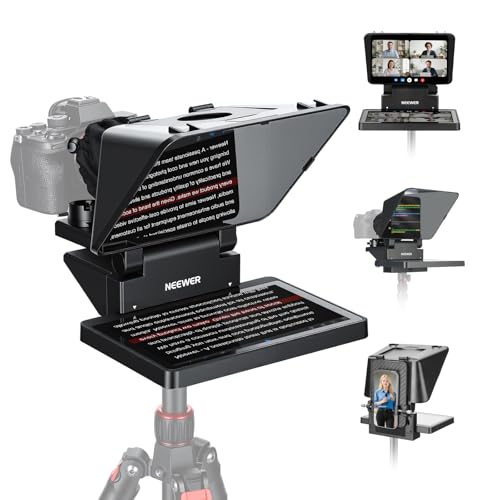
Best External Monitor Flexibility – NEEWER X11 Teleprompter
The NEEWER X11 combines a camera teleprompter with a built-in LCD monitor, giving livestreamers several ways to display scripts. It can mirror a compatible phone or work as a second display for Windows and macOS computers, though some connection methods require drivers or specific ports.
Best For: Streamers who want a monitor-equipped teleprompter that can connect to computers, phones, cameras, or webcams.
Pros:
- Built-in monitor removes the need for a separate tablet or phone for prompts.
- Supports computer use as a second display on Windows and macOS.
- 75% light-transmission coated glass is designed to keep text readable up to 2.5 meters.
- Adjustable Arca-type holder and multiple mounting points support flexible positioning.
Cons:
- Some computer connections require drivers, and phone mirroring requires compatible DP-protocol support.
- Voice synchronization is not supported.
- The listed setup supports lenses up to 72mm and focal lengths from 35 to 200mm.
The X11 is appealing when connection flexibility is a priority. Before buying, verify your computer ports, phone compatibility, and lens specifications so the monitor and mounting features fit your existing livestreaming system.
Best Wide-Angle Camera Support – Desview T3 Teleprompter
The Desview T3 is a camera-and-smartphone teleprompter designed for creators who use wide lenses and compact tablets. Its coated beam-splitter glass, included adapter rings, and Bluetooth remote make it a capable choice for livestreaming, interviews, and vertical video.
Best For: Creators using DSLR or mirrorless cameras, smartphones, and wide-angle lenses for livestreams and short-form video.
Pros:
- Supports smartphones and tablets up to 10 inches, plus cameras with compatible filter threads.
- Supports horizontal shooting from 24mm and vertical shooting from 35mm without the prompter frame appearing in the shot.
- 26-layer coated glass provides up to 97% light transmittance and ghost-free text readability.
- Includes a Bluetooth remote and free app for scrolling, playback, and speed control.
Cons:
- It is not designed for 12.9-inch iPads.
- Point-and-shoot cameras without lens filter threads are not supported.
- Requires a separate phone or tablet to display the script.
Consider the T3 if avoiding vignetting is important to your livestreaming setup. Its lens guidelines are clear, but confirming your camera’s filter-thread size and focal length is essential before purchase.
Best No-Assembly Pick – NEEWER BASICS X12B
For livestreamers who want a straightforward setup, the NEEWER BASICS X12B is a practical choice among teleprompters for livestreaming. Its no-assembly design, 12-inch display, remote control, and app support make it convenient for presentations, online courses, and tutorial recording. Note that it is not designed for phone shooting and does not function as a monitor.
Best For: Tablet-based livestreaming and creators who prioritize quick setup and portability.
Pros:
- No-assembly design with a liftable platform and adjustable glass.
- 12-inch HD display with text readable from up to 10 feet.
- Includes remote and supports NEEWER app controls for playback, speed, pages, and font size.
- Folds flat and includes a carry case for storage and transport.
Cons:
- Not for phone shooting.
- AAA battery for the included remote is not included.
- Does not provide direct on-screen self-viewing during recording.
The X12B stands out for its simple, portable workflow. It is a strong fit when your livestream setup uses a compatible tablet and you want to avoid assembly, but phone-first creators should consider another option.
Best Modular Camera Rig – SMALLRIG Teleprompter 3646
The SMALLRIG 3646 is built for DSLR, mirrorless, and camcorder workflows, making it a specialized option among teleprompters for livestreaming. It supports tablets up to 11 inches, offers broad lens compatibility, and includes app-based text extraction, but it requires a separately available 15mm LWS baseplate.
Best For: Camera-based livestreamers who already use, or plan to build, a 15mm rail-supported rig.
Pros:
- Works with tablets up to 11 inches and supports DSLR, mirrorless, and camcorder setups.
- Compatible with lenses from 49mm to 95mm in diameter.
- SmallGoGo app can extract text from PDFs, pictures, Word documents, and TXT files.
- Includes a top flag and a 4 x 5.65-inch filter adapter.
Cons:
- Not compatible with smartphones.
- Requires a separately available 15mm LWS baseplate.
- No vignetting is specified only when the focal length is at least 22mm.
This model makes the most sense for a more structured camera rig rather than a casual tabletop setup. Its modular accessories and document-friendly app are useful, provided you account for the required rail support and tablet-only design.
Best Accessory-Friendly Option – NEEWER X12 14-Inch
The NEEWER X12 combines a larger high-definition display with flexible mounting options, making it a capable choice among teleprompters for livestreaming. It supports tablets and smartphones for displaying scripts, includes app and remote control, and provides cold shoes and 1/4-inch threads for accessories. However, it is not intended for phone shooting and has specific lens limitations.
Best For: Livestreamers using a camera with a compatible lens who need room for lights, microphones, or other accessories.
Pros:
- High-definition display with 75% light-transmitting beam-splitter glass.
- Supports app and remote control for pausing, speed adjustments, and page turning.
- Dual cold shoes and 1/4-inch threads accommodate microphones, LED lights, and other accessories.
- Collapsible design, phone holder, and carrying case support transport.
Cons:
- Not compatible with wide-angle lenses; camera focal length must exceed 28mm.
- Not for phone shooting, despite supporting smartphones for script display.
- Not compatible with iPad Pro 12-inch.
The X12 is a sensible choice when you want an accessory-ready teleprompter with a generous display and portable construction. Confirm your camera lens and tablet dimensions before buying, especially if your livestream uses a wide-angle setup.
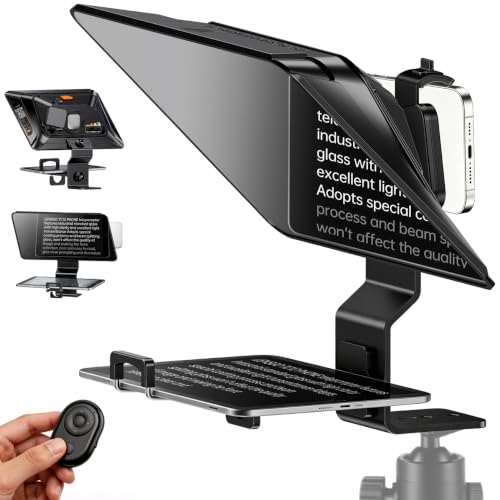
Best for Mobile Walk-and-Talk Creators – LENSGO TC12P 14.5-Inch Teleprompter
For creators comparing teleprompters for livestreaming and mobile video, the LENSGO TC12P emphasizes portability and a large viewing area. Its 14.5-inch beam-splitter glass supports smartphones and tablets, while the included Bluetooth remote helps you control scripts without touching the recording device.
Best For: Smartphone-based livestreams, walk-and-talk videos, TikTok, Zoom, and vlogging.
Pros:
- Supports phones and tablets up to 7.3 inches in landscape orientation.
- Large 14.5-inch HD glass can make scripts easier to read during longer recordings.
- Includes a Bluetooth remote and app features for scrolling, speed control, and mirror mode.
- Quickly switches between horizontal and vertical shooting setups.
Cons:
- Designed primarily for smartphone and tablet shooting rather than DSLR or mirrorless camera setups.
- Not water resistant, so it is better suited to controlled or protected shooting environments.
The TC12P is a practical choice when portability and a wide reading surface matter more than studio-style camera compatibility. Its adjustable front panel, foam light seals, and remote control support a relatively streamlined mobile workflow.
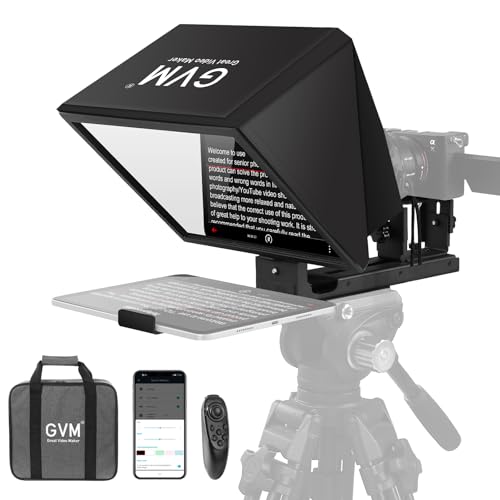
Best for Portable Multi-Device Setups – GVM 12-Inch Collapsible Teleprompter
The GVM 12-inch kit is a flexible option for teleprompters for livestreaming when you use different cameras or recording devices. Its collapsible aluminum-alloy design supports phones, tablets, and cameras, and the included case makes transport and storage more convenient.
Best For: Livestreamers and video creators who need a foldable teleprompter compatible with tablets, smartphones, and camera rigs.
Pros:
- Installation-free, collapsible design mounts to a tripod without assembly.
- 12-inch anti-reflective optical glass provides a stated reading range of up to 15 feet.
- Works with smartphones and tablets up to 8.6 inches, plus cameras with 1/4-inch or 3/8-inch mounting screws.
- Includes wireless remote control, app support, and a carry case.
Cons:
- At 5.68 pounds in the listed package details, it may be less convenient for lightweight travel setups.
- The 12-inch display is smaller than the LENSGO TC12P’s 14.5-inch glass.
Choose this model if you want one teleprompter for phones, tablets, and camera-based livestreaming. The foldable construction and included case improve portability, while the broad mounting compatibility supports a more adaptable production setup.
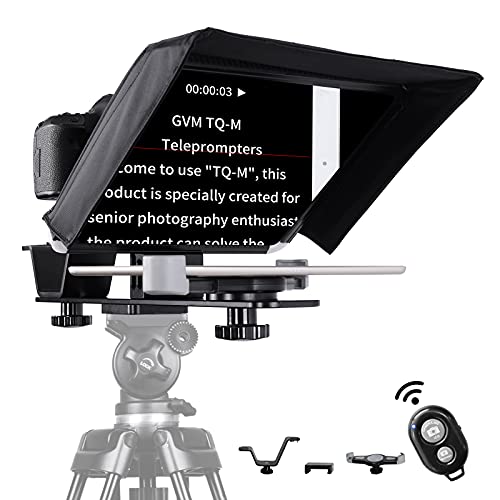
Best for Camera-Based Live Production – GVM TQ-M 10.5-Inch Teleprompter
The GVM TQ-M is aimed at creators who want camera compatibility without giving up app-based script control. For teleprompters for livestreaming, its colorless beam splitter, wide-angle design, and support for phones, tablets, DSLRs, camcorders, and other compatible cameras make it a versatile studio or interview option.
Best For: YouTube live broadcasts, interviews, online classes, presentations, and small- to mid-sized camera setups.
Pros:
- Supports tablets up to 10.5 inches along with smartphones and multiple camera types.
- Solid aluminum construction is designed for a sturdy setup.
- Colorless beam splitter and wide-angle design are intended to provide clear text without ghosting.
- App and Bluetooth remote offer font-size, playback-speed, background-color, and start/stop controls.
Cons:
- The 10.5-inch screen is smaller than the display on the other two listed models.
- Its camera-oriented design may be more equipment than needed for phone-only creators.
The TQ-M stands out for camera-based workflows that need direct eye contact with the lens while reading. Its sturdy build, broad camera support, and detailed app controls make it a strong fit for interviews, presentations, and livestream production.
How We Picked the Best Teleprompters for Livestreaming
We evaluated these teleprompters based on the features that matter most during live broadcasts: camera and lens compatibility, readable text area, reflective-glass quality, mounting flexibility, setup time, portability, and included accessories. We also considered whether each model uses a built-in monitor, smartphone, or tablet as its display, since that choice affects cost, brightness, and convenience.
Models with remote controls or app support can make it easier to adjust speed and scroll direction while presenting. Wide-angle designs, adapter rings, and larger tablet compartments are especially useful when your camera uses a short focal length or when you need to frame more than one person.
Quick Comparison
| Best For | Look For | Main Advantage |
|---|---|---|
| Desk-based livestreaming | Built-in screen or compact tablet support | Fast setup and consistent presentation |
| DSLR or mirrorless cameras | Multiple adapter rings and sturdy mounting | Better lens compatibility |
| Large text and group framing | 11- to 14-inch display area | Improved readability and wider viewing |
| Mobile or travel streaming | Collapsible body and lightweight construction | Easier transport and storage |
| Budget setups | Smartphone or tablet-based design | Uses hardware you may already own |
Key Buying Factors for Teleprompters for Livestreaming
Camera and Lens Compatibility
Check the included adapter rings, lens opening, and mounting method before buying. Some models are designed for smartphones or tablets, while others are better suited to DSLR and mirrorless cameras. Wide-angle lenses need enough clearance to avoid seeing the teleprompter frame in the image.
Display Size and Readability
A larger screen lets you use bigger text and place more distance between the camera and presenter, but it usually adds weight. Built-in monitors offer an all-in-one solution, while tablet and phone models can be more flexible and economical.
Glass Quality and Viewing Angle
Beam-splitter glass should reflect bright, readable text while keeping the camera image clear. A larger glass panel provides a more forgiving viewing area, particularly when you move during a livestream or present with another person.
Controls, Power, and Setup
Remote controls and compatible scrolling apps are valuable when you need to change speed without touching the camera. Also check how the display is powered and whether the unit folds flat, assembles without tools, or includes a carrying solution.
Who Should Buy Which Teleprompters for Livestreaming?
Choose a built-in-screen model if you want the simplest dedicated setup and do not want to rely on a separate tablet. A compact smartphone or small-tablet teleprompter is a practical choice for creators who stream from a desk or travel frequently.
For DSLR and mirrorless users, prioritize sturdy aluminum construction, broad adapter-ring support, and enough clearance for your lens. Larger 11- to 14-inch models suit presenters who want bigger text, a wider viewing area, or more flexibility when the camera is positioned farther away. If you already own an iPad or Android tablet, a tablet-based kit can deliver strong value while leaving room to choose your preferred scrolling app.