Choosing among video switchers with SDI can be difficult when you need dependable multicamera control, clean switching, and a workflow that fits both your crew and venue. SDI models range from compact hybrid mixers to advanced production switchers with ISO recording, streaming, and audio features.
This roundup compares 10 notable options across different production needs, including portable streaming, studio work, event production, and mixed SDI/HDMI setups. Use the guide below to match inputs, outputs, recording tools, and control features to your workflow.
Best 10 Video Switchers with Sdi Picks for 2026
Most Versatile

- Four SDI and four HDMI inputs
- NDI HX, USB-C, and playback support
- Streams to up to three platforms
Best For: Flexible multi-camera live productions
Best for Large Events

- 10 standards-converted SDI inputs
- Up to seven layers with DVE and keyers
- 28-channel digital audio mixer
Best For: Concerts, sports, and major live events
Best Touchscreen Workflow

- 10.1-inch touchscreen preview
- Four HDMI plus one SDI input
- USB 3.0 streaming and recording
Best For: Compact events and easy live streaming
Best Compact SDI Option
ATEM SDI Live Production Switcher
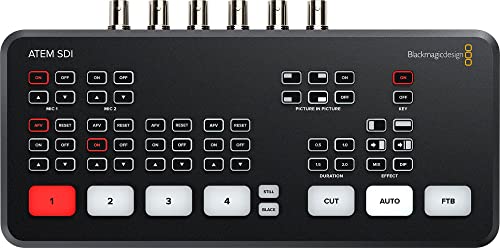
- Four 3G-SDI inputs with 10-bit HD
- Real-time format conversion
- USB-C webcam output and six-input audio
Best For: Compact professional SDI camera setups
Best Hybrid Production Pick

- Four 3G-SDI and four HDMI inputs
- Built-in effects, audio mixing, and PTZ control
- UVC, RTMP, and MP4 recording support
Best For: Mixed HDMI/SDI live events and streaming
Best SDI-Only Workflow
Blackmagic ATEM SDI Extreme ISO

- Eight 3G-SDI inputs and four SDI outputs
- Records nine H.264 streams simultaneously
- Strong keying, multiview, and Ethernet streaming tools
Best For: SDI multicamera streaming and ISO recording
Best Connected 4K Input Option

- Four SDI and four HDMI inputs
- 4K60 input with 1080p60 output
- NDI|HX3, PTZ, dual streaming, and recording support
Best For: Networked events with PTZ and mixed video sources
Best Compact SDI Streamer

- Four 3G-SDI inputs with format conversion
- Direct Ethernet or USB-C internet streaming
- ISO recording and six-input Fairlight audio mixer
Best For: Compact HD productions using SDI cameras
Best Hybrid SDI Switcher

- Four HDMI and four 3G-SDI inputs
- Eight ISO feeds plus program recording
- XLR audio, graphics, and triple streaming
Best For: Hybrid camera productions needing extensive recording
Best Feature-Rich SDI Mixer

- Four SDI and four 4K60 HDMI inputs
- Built-in PTZ control and touchscreen interface
- Streams to up to four platforms
Best For: Mixed-source productions with PTZ cameras
Most Versatile – GoStream Duet SDI/HDMI Mixer
Osee GoStream Duet Multiple Camera SDI and HDMI Live Stream Video Mixer Switcher
Check Price On AmazonFor buyers comparing video switchers with SDI, the Osee GoStream Duet stands out for its broad input selection and flexible streaming options. It accepts four SDI inputs, four HDMI inputs, USB-C, NDI HX sources, and SD/SSD playback, while supporting both landscape and portrait workflows.
Best For: Multi-camera creators and live event operators who need flexible inputs, layered effects, and simultaneous streaming.
Pros:
- Combines four SDI and four HDMI inputs with USB-C and NDI HX support.
- Offers chroma key, luma key, pattern key, PIP, DSK, and multiple transitions.
- Can stream to up to three platforms and work with OBS or vMix.
Cons:
- NDI HX requires the latest firmware to unlock the included license.
- Its extensive feature set may require setup time for less experienced users.
The GoStream Duet is a strong all-around option when connectivity and production flexibility matter more than a simple plug-and-play layout. Built-in, computer, and Bitfocus Companion control provide several ways to manage a production.
Best for Large Events – ATEM 1 M/E Constellation HD
Blackmagic Design ATEM 1 M/E Constellation HD Live Production Switcher (SWATEMSCN2/1ME1/HD)
Check Price On AmazonThe Blackmagic Design ATEM 1 M/E Constellation HD is built for demanding productions that need numerous SDI sources and extensive live compositing. Its ten standards-converted 3G/HD/SD-SDI inputs, multiple outputs, DVE, keyers, and audio mixer make it one of the more production-focused video switchers with SDI in this group.
Best For: Concerts, festivals, live sports, houses of worship, and other large multi-camera events.
Pros:
- Provides 10 SDI inputs and supports up to seven layers.
- Includes a 28-channel digital audio mixer, DVE, keyers, media players, and multiview monitoring.
- Offers six 3G-SDI outputs, a 16-way multiview SDI output, and front-panel control with LCD.
Cons:
- Its large feature set may be more than small or simple productions need.
- The supplied notes emphasize SDI production connectivity rather than HDMI camera inputs.
This switcher is best suited to crews that need substantial input capacity and layered compositions. Talkback, reference SDI, and front-panel controls further support complex live-event workflows.
Best Touchscreen Workflow – FEELWORLD L4 SDI Switcher
The FEELWORLD L4 combines a 10.1-inch touchscreen with a practical five-input layout: four HDMI inputs and one SDI input. For shoppers seeking video switchers with SDI that also simplify monitoring, its real-time preview, USB 3.0 streaming, and on-screen controls are useful for compact productions.
Best For: Weddings, worship services, education, corporate events, and small multi-camera streams.
Pros:
- Displays source previews, preset output, and program output on a 10.1-inch touchscreen.
- Supports USB 3.0 streaming and 1080p at 60 fps USB recording.
- Includes chroma key, logo overlay, 13 transitions, and T-Bar operation.
Cons:
- It has only one SDI input alongside four HDMI inputs.
- Logo uploads are limited to one image at a time and a 256×128-pixel size.
The L4 is an approachable choice for operators who value direct visual feedback and integrated control. Its combination of touchscreen preview and USB streaming keeps a modest live setup relatively straightforward.
Best Compact SDI Option – ATEM SDI Live Production Switcher
The Blackmagic Design ATEM SDI Live Production Switcher is a compact choice for buyers who want dedicated SDI connectivity without moving to a larger event switcher. Its four 3G-SDI inputs support 10-bit HD, with built-in format conversion, Ethernet control, USB-C webcam output, and integrated audio processing.
Best For: Small professional productions using several SDI cameras and software-based streaming.
Pros:
- Provides four 3G-SDI inputs with 10-bit HD support.
- Built-in frame-rate and format converters support real-time input processing.
- Includes USB-C webcam output and a six-input audio mixer with Fairlight tools.
Cons:
- It offers fewer SDI inputs than the larger ATEM Constellation model.
- The supplied notes focus on SDI connectivity and do not list HDMI inputs.
For a streamlined SDI-based setup, this ATEM balances professional video handling with accessible computer connectivity. Ethernet control and USB-C webcam output are especially useful when the switcher needs to integrate with a laptop workflow.
Best Hybrid Production Pick – FEELWORLD L3 PRO
For creators comparing video switchers with sdi, the FEELWORLD L3 PRO stands out as a flexible hybrid switcher with four 3G-SDI inputs, four HDMI inputs, and UVC/media connectivity. Its built-in effects, recording, streaming, audio mixing, and PTZ control make it suited to productions that need more than basic source switching.
Best For: Churches, educators, event producers, streamers, and small AV teams mixing HDMI and SDI cameras.
Pros:
- Combines four SDI, four HDMI, and UVC/media inputs.
- Includes chroma key, luma key, PIP, logo overlay, and up to 16 transitions.
- Supports UVC, RTMP streaming, MP4 recording, seven-channel audio mixing, and PTZ control.
Cons:
- Its output is aimed at HD workflows rather than a stated 4K production workflow.
- The broad feature set may require more setup than a basic switcher.
The L3 PRO is a strong all-in-one choice when a production requires SDI and HDMI compatibility plus graphics, audio, PTZ, streaming, and recording in one unit. It is especially practical for recurring live events where preset scenes and macro keys can simplify operation.
Best SDI-Only Workflow – Blackmagic ATEM SDI Extreme ISO
Blackmagic Design ATEM SDI Extreme ISO Live Stream Switcher (SWATEMMXEPCEXTISO)
Check Price On AmazonThe Blackmagic Design ATEM SDI Extreme ISO is a focused option for buyers seeking video switchers with sdi for multicamera streaming and broadcast-style production. It provides eight 3G-SDI inputs, four 3G-SDI outputs, embedded audio handling, Ethernet streaming, and ISO recording of nine H.264 streams.
Best For: SDI camera crews, educators, businesses, esports producers, and live internet broadcasts.
Pros:
- Offers eight 3G-SDI inputs with 10-bit HD switching and input resynchronization.
- Records nine separate H.264 video streams in real time for extensive post-production flexibility.
- Includes multiview support, four upstream keyers, two downstream keyers, Ethernet streaming, and USB-C recording.
Cons:
- It does not list HDMI video inputs, so it is less flexible for mixed-connector setups.
- The workflow is HD/3G-SDI rather than a stated 4K switching solution.
Choose the ATEM SDI Extreme ISO when your cameras and infrastructure are already SDI-based and you value detailed recording for editing or replay. Its ISO capture and generous keying support make it particularly capable for productions that need both live output and multiple clean sources afterward.
Best Connected 4K Input Option – Tenveo PC500
The Tenveo PC500 is a feature-rich choice among video switchers with sdi, combining four SDI inputs with four HDMI inputs, a 5.5-inch display, PTZ control, network protocols, and recording. It accepts 4K60 input on supported HDMI connections while delivering up to 1080p60 output, making it useful for complex live-production systems.
Best For: Professional events, churches, studios, conferences, classrooms, and productions using PTZ or NDI|HX3 cameras.
Pros:
- Provides four SDI and four HDMI inputs, including two HDMI inputs supporting 4K60.
- Supports UVC, SRT, RTMP, RTSP, and NDI|HX3 streaming, with simultaneous streaming to two platforms.
- Includes a built-in monitor, dual recording options, PTZ presets, web-browser control, and USB recording.
Cons:
- Although it accepts 4K60 input, listed output is limited to 1080p60.
- Its extensive network, PTZ, and recording features may be more than simple productions require.
The PC500 is a compelling fit for operators who need SDI and HDMI sources alongside networked production tools. Its PTZ automation, browser control, multi-protocol streaming, and recording features make it better suited to larger or recurring productions than to basic one-camera switching.
Best Compact SDI Streamer – Blackmagic ATEM SDI Pro ISO
For buyers seeking video switchers with SDI, the Blackmagic Design ATEM SDI Pro ISO offers a focused four-camera HD workflow with 3G-SDI inputs, built-in format conversion, direct streaming, and ISO recording. Its integrated controls and desktop software make it practical for streamlined live productions.
Best For: HD multi-camera streaming with SDI cameras, ISO recording, and hands-on control.
Pros:
- Four 3G-SDI inputs include frame-rate and format converters.
- Supports Ethernet streaming and shared mobile internet through USB-C.
- Records ISO feeds and includes a six-input Fairlight audio mixer.
- Offers both a built-in control panel and Mac/Windows software control.
Cons:
- Its SDI inputs are designed for HD workflows rather than 4K switching.
- Provides four camera inputs, which may be limiting for larger productions.
This is a sensible choice when dependable SDI connectivity, low-latency HD processing, and integrated streaming matter more than extensive input expansion.
Best Hybrid SDI Switcher – Osee GoStream Duet 8 ISO
The Osee GoStream Duet 8 ISO is a versatile option among video switchers with SDI, combining four 3G-SDI inputs with four HDMI 2.0 inputs. It is built for productions that need extensive recording, professional XLR audio, network sources, layered graphics, and simultaneous streaming.
Best For: Hybrid HDMI/SDI productions, event teams, churches, podcasts, and users who want ISO recording.
Pros:
- Combines four HDMI inputs and four 3G-SDI inputs in one switcher.
- Records eight ISO feeds plus the program output in H.264 or H.265.
- Includes XLR and 3.5mm audio connections with phantom power and processing tools.
- Supports NDI|HX, SRT, RTMP, UVC webcams, triple RTMP streaming, and layered graphics.
Cons:
- Its output workflow is listed as 4K input and 1080p output.
- The broad feature set may require more setup than a basic switcher.
Choose this model when your production mixes camera types and needs a more complete broadcast workflow, especially ISO protection, XLR audio, and multiple streaming destinations.
Best Feature-Rich SDI Mixer – RGBlink mini-ISO
For flexible video switchers with SDI, the RGBlink mini-ISO combines four SDI inputs with four 4K60 HDMI inputs, NDI|HX, UVC, PTZ control, audio mixing, and direct streaming. Its compact touchscreen-based design suits creators and small production teams working across several source types.
Best For: Churches, education, events, and creators using mixed HDMI, SDI, network, and PTZ sources.
Pros:
- Mixes four 4K60 HDMI inputs with four SDI inputs and additional network sources.
- Controls up to five compatible PTZ cameras through IP VISCA.
- Includes a 3.5-inch touchscreen, multi-view monitoring, chroma key, PIP, and layered effects.
- Streams to up to four platforms through RTMP(S) or outputs via USB UVC.
Cons:
- Audio delay is not supported on this model.
- NDI|HX2 requires a license, according to the supplied notes.
- Firmware updates and use of the original or adequately powered adapter are emphasized for reliable operation.
This model stands out when source flexibility and integrated PTZ operation are priorities. It offers substantial control in a compact unit, but buyers should plan for firmware setup and review the NDI licensing requirement.
How We Picked the Best Video Switchers with Sdi
We focused on practical production capabilities rather than brand recognition alone. The comparison considers SDI input and output counts, HDMI compatibility, supported resolutions and frame rates, switching responsiveness, multiview monitoring, streaming connectivity, recording options, audio control, and overall workflow flexibility.
We also included products at different levels of complexity. A compact switcher may be the better choice for a solo creator or mobile crew, while a larger unit with ISO recording, multiple program outputs, and expanded audio controls can justify its size and cost in a studio or event environment.
Quick Comparison
| What to Compare | Best For |
|---|---|
| Compact SDI/HDMI switching | Portable streaming and small productions |
| Multiple SDI and HDMI inputs | Mixed-camera multicamera setups |
| ISO recording | Editors who need individual camera files |
| Built-in multiview display | Operators working without an external monitor |
| Advanced live production control | Events, studios, and larger crews |
Key Buying Factors for Video Switchers with Sdi
Input and Output Format
Count the cameras you will connect now, then allow room for expansion. Confirm whether the switcher accepts 3G-SDI, HD-SDI, 6G-SDI, or 12G-SDI, and check the exact resolution and frame-rate combinations supported. If your setup mixes mirrorless cameras, camcorders, and professional SDI cameras, HDMI and SDI compatibility can prevent the need for converters.
Streaming, Recording, and ISO Features
Some switchers send a program feed directly to streaming platforms, while others rely on a computer or external encoder. Look for USB webcam output, network streaming, onboard recording, and ISO recording if you plan to edit each camera angle later. ISO capability usually increases storage requirements, so verify media type, capacity, and recording formats.
Monitoring and Audio
A built-in multiview or preview screen makes field operation easier, but an external monitor may provide a larger and more detailed view. Also check embedded and analog audio support, microphone inputs, XLR connectivity, mixing controls, delay options, and headphone monitoring. Audio limitations can matter more than an extra video input during live events.
Control, Power, and Portability
Touchscreens, physical buttons, software control, macros, and transition controls affect how quickly an operator can work. For mobile productions, consider dimensions, power requirements, cooling, and cable access. A feature-rich switcher is not automatically the best choice if it complicates setup or exceeds your crew’s experience.
Who Should Buy Which Video Switchers with Sdi?
Choose a compact hybrid model if you are a solo streamer, educator, worship producer, or small event team that needs straightforward SDI and HDMI switching. Look for a switcher with a built-in display if you frequently work on location and want to reduce monitor equipment.
Choose an ISO-capable model if your productions need post-event editing, alternate cuts, or reliable backups of individual camera feeds. For studios, conferences, and larger live events, prioritize more inputs, robust SDI connectivity, advanced audio, and dedicated control options over portability.
Before buying, confirm camera output formats, cable lengths, streaming requirements, and power availability. The best video switcher is the one that supports your complete signal path without requiring last-minute adapters or workflow compromises.