Corporate livestreams demand more than a good camera. The right encoder converts HDMI or SDI footage into a stable network stream while fitting your production workflow, streaming platform, and venue infrastructure.
We selected 10 options spanning compact HDMI units, SDI-capable production encoders, and flexible network video devices. Use the guide below to match features such as 4K support, H.265 compression, recording, redundancy, and protocol compatibility to your event needs.
Best 10 Streaming Encoders for Corporate Events Picks for 2026
Premium Production Pick

- HDMI and SDI inputs with source mixing
- 4K H.264/HEVC encoding and six destinations
- Simultaneous recording, overlays, and flexible control
Best For: Multi-camera corporate productions and hybrid conferences
Simple SDI Streaming Interface

- 12G-SDI direct streaming interface
- HDMI and SDI monitoring outputs
- 1080p output with USB webcam connectivity
Best For: HD SDI presentations, webinars, and corporate events
Flexible Budget Encoder

- 4K HDMI input with H.264/H.265 encoding
- Up to four protocol-based output streams
- Built-in captions, logos, and timestamp controls
Best For: HDMI events needing multi-platform and branded streaming
4K Broadcast Interface

- 4K H.264/H.265 streaming support
- 12G-SDI, HDMI, USB, and Ethernet connections
- Front LCD with SDI and HDMI monitoring
Best For: 4K corporate productions using SDI and HDMI sources
Flexible 4K Multistreamer

- 4K encoding up to 30fps
- Four simultaneous protocol outputs
- Branding tools and lifetime support
Best For: Corporate events needing flexible multistream distribution
SDI Production Pick
Blackmagic Streaming Encoder HD

- 12G-SDI input and loop output
- H.264 and H.265 support
- 1080p streaming at 60fps
Best For: Corporate events using professional SDI production gear
Enterprise HDMI Streamer

- 4K HDMI encoding at 30fps
- Four simultaneous network streams
- Audio, overlay, and bitrate controls
Best For: HDMI events requiring configurable multi-platform delivery
Premium 4K Production
Blackmagic Streaming Encoder 4K

- 4K60 H.264/H.265 encoding over SRT or RTMP
- 12G-SDI input with standards conversion
- Ethernet plus automatic mobile failover
Best For: Professional SDI-based corporate event productions
Flexible HDMI Networking
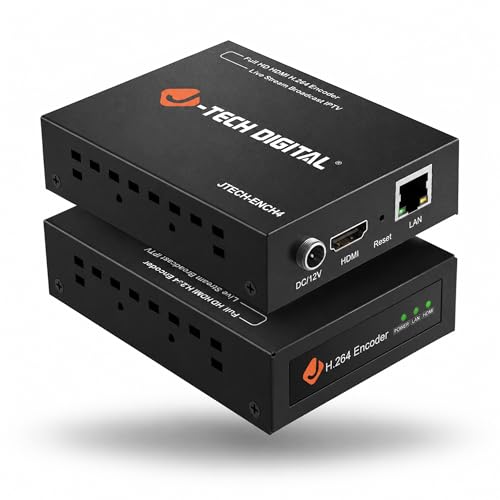
- 4K60 HDMI input with 1080p60 output
- H.264/H.265 encoding with three substreams
- Web GUI controls and broad protocol support
Best For: Single-source HDMI events and corporate webinars
Multi-Stream Value
URayCoder Compact H.265 Encoder

- Dual streams can use different protocols
- Supports RTMPS, SRT, HLS, WebRTC, and more
- Adds logos, text, time, and stream adjustments
Best For: Multi-destination 1080p HDMI event distribution
Premium Production Pick – Magewell Ultra Encode AIO
For corporate events that need polished, flexible streaming, the Magewell Ultra Encode AIO combines HDMI and SDI connectivity with 4K encoding, multi-destination output, and built-in production tools. It is a strong choice when one device must handle varied sources, overlays, recording, and professional network workflows.
Best For: Corporate production teams streaming multi-camera events, presentations, and hybrid conferences.
Pros:
- Accepts HDMI and SDI, with picture-in-picture and side-by-side mixing.
- Supports 4K encoding with H.264 or HEVC compression.
- Streams to up to six destinations using protocols including RTMP, RTMPS, SRT, and NDI|HX3.
- Can stream and record simultaneously, with overlays and scheduled captures.
Cons:
- More functionality than needed for simple single-camera events.
- Its rack-mountable, professional form factor may be less convenient for casual setups.
The Ultra Encode AIO is the most capable all-around option here for teams that value production flexibility and redundancy. PoE, Wi-Fi, 4G modem support, web control, and API access further suit managed corporate deployments.
Simple SDI Streaming Interface – Blackmagic Web Presenter HD
The Blackmagic Design Web Presenter HD is a compact choice among streaming encoders for corporate events when the workflow centers on an SDI source and straightforward 1080p streaming. Its monitoring connections, LCD display, and USB webcam output help simplify event control.
Best For: Presentations, webinars, and live corporate events using HD SDI equipment.
Pros:
- Provides a direct streaming interface with 12G-SDI input and output.
- Includes HDMI and SDI monitoring outputs for event oversight.
- USB webcam output can support computer-based streaming workflows.
- Compact design and front display suit portable or space-conscious setups.
Cons:
- Its listed video resolution is 1080p rather than 4K.
- The supplied notes do not list HDMI video input, so HDMI-source workflows may require additional equipment.
This model is best when reliability and simplicity matter more than advanced switching or 4K delivery. It fits teams that already use SDI cameras and want monitoring built into a compact interface.
Flexible Budget Encoder – URayCoder 4K HDMI IP Encoder
The URayCoder 4K HDMI to IP encoder offers a broad protocol list and configurable streaming controls for corporate teams working from an HDMI source. Its support for multiple outputs, captions, logos, and timestamps makes it practical for branded event streams without adding a separate graphics device.
Best For: HDMI-based corporate events needing multi-platform distribution and branded overlays.
Pros:
- Accepts 4K HDMI input and supports H.264 and H.265 encoding.
- Can output up to four streams using different protocols.
- Supports RTMP(S), SRT, HLS, WebRTC, UDP, ONVIF, and other formats.
- Offers logos, scrolling captions, timestamps, cropping, and audio options.
Cons:
- 4K operation is listed at a maximum of 30 frames per second.
- Connectivity is centered on HDMI, so SDI sources need conversion.
- Its feature set may require more setup than a basic streaming interface.
For organizations distributing an event to several services, this encoder provides considerable protocol and customization flexibility. It is particularly appealing when HDMI is the standard source connection and branded presentation elements are important.
4K Broadcast Interface – Blackmagic Web Presenter 4K
The Blackmagic Design Web Presenter 4K is a professional option for streaming encoders for corporate events when 4K capability, SDI connectivity, and hands-on monitoring are priorities. It combines 12G-SDI, HDMI, USB, Ethernet, and a front-panel LCD in a compact interface.
Best For: Corporate productions using 4K or SDI equipment with a need for integrated monitoring.
Pros:
- Supports 4K streaming with H.264 and H.265/HEVC codecs.
- Offers 12G-SDI input and output plus HDMI connectivity.
- Includes SDI and HDMI monitoring ports, loop output, and a bright LCD.
- Ethernet and USB connections support network and computer workflows.
Cons:
- Its compact interface does not provide the advanced source mixing listed for the Magewell.
- The supplied notes specifically identify YouTube and Facebook support, so platform requirements should be checked.
- It is heavier than an ultra-portable basic interface at 953 grams.
The Web Presenter 4K is a good fit for teams that want a focused, broadcast-oriented interface rather than a full production switcher. Its combination of 4K support and extensive monitoring connections can simplify oversight during important corporate broadcasts.
Flexible 4K Multistreamer – URayCoder UHE265-1L-4K
For teams comparing streaming encoders for corporate events, the URayCoder UHE265-1L-4K is a flexible option for converting HDMI sources into network streams. It supports 4K input and output at up to 30fps, multiple protocols, and up to four simultaneous streams for broad distribution.
Best For: Corporate events that need 4K HDMI encoding, mult platform delivery, and branded stream overlays.
Pros:
- Supports 4K at 30fps and up to 120fps at 2K or lower resolutions.
- Can output four streams using different protocols, including RTMP(S), SRT, HLS, RTSP, and UDP.
- Offers logos, captions, timestamps, cropping, rotation, and adjustable video settings.
- Includes lifetime warranty and technical support.
Cons:
- Its extensive settings may be more than a simple single-platform event requires.
- 4K output is limited to 30fps.
This encoder stands out when an events team wants distribution flexibility and on-stream branding in one compact device. Its HDMI-to-Ethernet workflow and browser-style management are practical for recurring productions, while the lifetime support may appeal to organizations planning long-term use.
SDI Production Pick – Blackmagic Streaming Encoder HD
For corporate events built around professional SDI equipment, the Blackmagic Design Streaming Encoder HD provides a focused hardware-encoding solution. It accepts 12G-SDI input with loop output and supports H.264 and H.265 streaming at up to 1080p60.
Best For: Corporate productions using SDI cameras, switchers, or other professional video infrastructure.
Pros:
- Provides 12G-SDI input and loop output for professional video workflows.
- Supports H.264 and H.265 codecs.
- Handles 1080p at up to 60fps.
- Includes a two-year manufacturer guarantee.
Cons:
- Maximum listed resolution is 1080p rather than 4K.
- Its SDI connectivity is less suitable for HDMI-only event setups.
This is a sensible choice when reliability and compatibility with an SDI production chain matter more than 4K resolution. It is less versatile for basic HDMI installations, but its 12G-SDI input and loop-through design fit established corporate broadcast systems.
Enterprise HDMI Streamer – URayCoder 4K IP Video Encoder
For organizations seeking streaming encoders for corporate events, this URayCoder hardware encoder combines 4K HDMI handling with broad IP delivery options. It supports common platforms and protocols, while providing controls for stream branding, audio, bitrate, and output formatting.
Best For: HDMI-based corporate events that need multi-platform streaming and configurable network outputs.
Pros:
- Supports up to 3840×2160 input and output at 30fps.
- Works with RTSP, RTMPS, HLS, UDP, SRT, HTTP, FLV, WebRTC, and other protocols.
- Can send four video streams with different protocols simultaneously.
- Supports HDMI and line-in audio, plus logos, captions, and timestamps.
Cons:
- 4K operation is limited to 30fps.
- The broad feature set may require setup time for less experienced operators.
- It is designed around HDMI sources rather than SDI inputs.
This model is a strong fit for event teams managing varied delivery requirements from HDMI equipment. Its multi-output capability can reduce the need for additional streaming hardware, while the overlay and audio controls help standardize branded corporate broadcasts.
Premium 4K Production – Blackmagic Streaming Encoder 4K
For corporate events that need polished, high-resolution delivery, the Blackmagic Streaming Encoder 4K is a powerful choice among streaming encoders for corporate events. It accepts 12G-SDI sources up to DCI 4K60, encodes in H.264 or H.265, and streams through SRT or RTMP without requiring a separate encoding computer.
Best For: Corporate productions using SDI cameras, 4K sources, confidence monitors, and backup connectivity.
Pros:
- Supports H.264 and H.265 streaming up to 2160p60.
- 12G-SDI input includes automatic standards conversion for HD and Ultra HD sources.
- Ethernet and USB-tethered 4G/5G connectivity can switch automatically if the primary connection fails.
- Includes closed-caption embedding, timecode, REST API control, tally, talkback, and webcam output.
Cons:
- Its SDI-focused design may be more equipment than a simple HDMI event setup requires.
- Advanced production features may add complexity for occasional users.
This is the most production-oriented option in the group. Choose it when reliability, 4K capability, remote control, and professional SDI workflows matter more than keeping the setup minimal.
Flexible HDMI Networking – J-Tech Digital HDMI Encoder
The J-Tech Digital HDMI Encoder is a practical pick for teams that want to convert a 4K HDMI source into network video. It outputs 1080p at up to 60Hz, supports multiple streaming protocols, and provides browser-based controls suited to branded corporate event streams.
Best For: Corporate presentations, webinars, and meeting-room events built around a single HDMI source.
Pros:
- Accepts 4K HDMI input at up to 60Hz while delivering 1080p60 output.
- Supports H.264 and H.265 encoding with one main stream and three substreams.
- Works with RTMP, RTMPS, HLS, RTSP, UDP, SRT, FLV, and additional protocols.
- Web controls allow bitrate, frame rate, IP, OSD, crop, rotation, and image adjustments.
Cons:
- It has an HDMI input rather than the SDI connectivity used in larger broadcast systems.
- The listed package does not include a power plug.
For HDMI-based corporate events, this encoder balances broad protocol support with useful remote configuration. It is especially appealing when you need overlays or multiple stream versions without moving to a more elaborate SDI workflow.
Multi-Stream Value – URayCoder Compact H.265 Encoder
The URayCoder Compact Multi-channel Encoder is designed for HDMI-based distribution where one source may need to reach multiple destinations. It can produce two streams from each HDMI input, use different protocols for those streams, and provide branding and stream-control options useful for corporate events.
Best For: Corporate teams sending event video to multiple platforms, servers, or internal viewing systems.
Pros:
- Supports H.264 and H.265 encoding for 1080p HDMI streaming.
- Can output dual streams simultaneously, with different protocols for each stream.
- Supports RTMP, RTMPS, RTSP, SRT, HLS, UDP, RTP, MP4, WebRTC, and other formats.
- Offers text, logo, and time overlays plus resolution, frame-rate, bitrate, crop, and audio controls.
Cons:
- It is limited to 1080p HD rather than 4K delivery.
- Its multi-stream feature set may be unnecessary for a single-destination broadcast.
This encoder stands out when distribution flexibility is the priority. It gives event teams practical ways to create separate outputs for public streaming, internal networks, or recording systems while retaining branding controls.
How We Picked the Best Streaming Encoders for Corporate Events
We focused on features that affect real-world event production rather than headline specifications alone. The selection includes HDMI and SDI encoders, models with 1080p or 4K workflows, and devices supporting common delivery methods such as RTMP, RTMPS, SRT, RTSP, HLS, and UDP.
We also considered setup flexibility, codec support, audio handling, network connectivity, portability, and suitability for single-camera presentations, executive town halls, conferences, training sessions, and multi-source productions. Platform compatibility and dependable operation matter more than maximum resolution when an event cannot be repeated.
Quick Comparison
| Priority | Look For | Best Fit |
|---|---|---|
| Simple platform streaming | RTMPS, HDMI input, guided setup | Presentations and town halls |
| Professional switching | HDMI/SDI inputs, mixing, monitoring | Conferences and live productions |
| Bandwidth efficiency | H.265/HEVC and adjustable bitrate | Remote venues and limited uplinks |
| Contribution reliability | SRT, redundant network options | High-value broadcasts |
| IP distribution | RTSP, HLS, UDP, or WebRTC support | Internal networks and IPTV |
Key Buying Factors for Streaming Encoders for Corporate Events
Inputs and Source Resolution
Match the encoder to your cameras, switcher, and presentation system. HDMI is common for compact setups, while SDI is better suited to longer cable runs and professional production environments. A 4K input can provide useful headroom, but confirm the output resolution and whether the device can downscale cleanly to 1080p.
Codec, Bitrate, and Protocols
H.264 offers broad compatibility, while H.265 can reduce bandwidth at comparable quality when your platform supports it. RTMPS is typically important for major cloud platforms; SRT is valuable for resilient contribution over unpredictable networks. Do not assume every listed protocol supports every codec or resolution, so verify the manufacturer’s specifications before purchase.
Reliability and Monitoring
Look for stable wired Ethernet, clear status information, local preview or monitoring, and straightforward recovery after a network interruption. For critical events, consider a backup encoder, separate internet connection, or recording function rather than relying on one device and one uplink.
Audio and Workflow Integration
Check embedded-audio support, audio delay controls, and compatibility with your mixer or camera output. Features such as recording, NDI, dual-input mixing, or mobile connectivity can reduce the number of separate devices required, but they may also increase setup complexity.
Who Should Buy Which Streaming Encoders for Corporate Events?
Choose a compact HDMI encoder for a single-camera presentation or occasional webinar. Select an SDI-capable model when your corporate production uses professional cameras, long cable runs, or a switcher. H.265-focused units make sense for venues with constrained upload bandwidth, provided the destination accepts HEVC. For major conferences and executive broadcasts, prioritize SRT, monitoring, recording, and a tested backup plan over theoretical 4K performance.