A good microphone stand should do more than hold your mic. The right model keeps cables controlled, clears valuable desk space, and stays stable while you record, stream, or take calls.
We selected 10 microphone stands with cable management across desk-mounted boom arms, low-profile designs, portable stands, and studio-focused options. Use the guide below to match reach, mounting style, compatibility, and cable organization to your setup.
Best 10 Microphone Stands with Cable Management Picks for 2026
Best Portable Boom Stand
Amazon Basics Adjustable Boom Stand
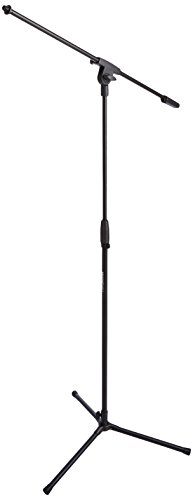
- Folds flat for transport
- Reaches up to 85.75 inches
- Includes a clip-on cable holder
Best For: Portable vocal, speaking, and instrument setups
Best Low-Profile Desk Arm
FIFINE BM88W Low Profile Boom Arm

- Low-profile desktop design
- 360-degree horizontal adjustment
- Built-in cable management
Best For: Podcasting and streaming on compact desks
Best Quiet Professional Arm
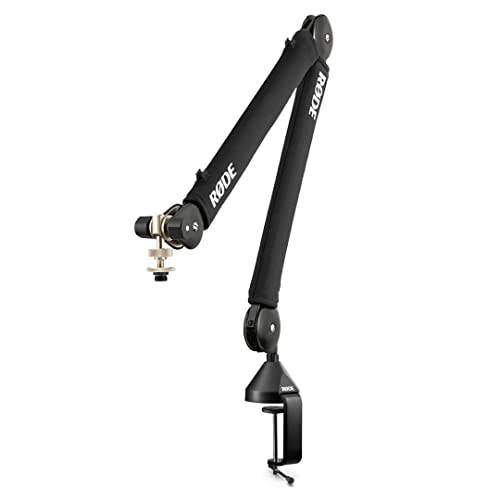
- Internal spring damping for quiet movement
- 360-degree rotation
- Integrated cable management
Best For: Podcasting and streaming with a professional desk setup
Best Heavy-Duty Cable Arm
InnoGear PSA28-RD Heavy-Duty Boom Arm

- Supports up to 4.4 pounds
- Internal springs and steel construction
- Wide positioning range
Best For: Heavy microphones such as Blue Yeti and Shure SM7B
Best Cable-Hiding Boom Arm
SA-30 Rotatable Microphone Boom Arm

- Internal cable routing keeps the setup tidy
- Includes a 6-inch riser for overhead placement
- 360° arm with multiple thread adapters
Best For: Flexible desktop recording and streaming setups
Best Low-Profile Cable Management
AK-58i Low Profile Mic Boom Arm

- Cable channel runs beneath the low-profile arm
- Supports microphones or mounts up to 2 kg
- 360° rotation with 180° vertical adjustment
Best For: Discreet gaming, streaming, and podcast desks
Best Space-Saving Arm for Lightweight Mics
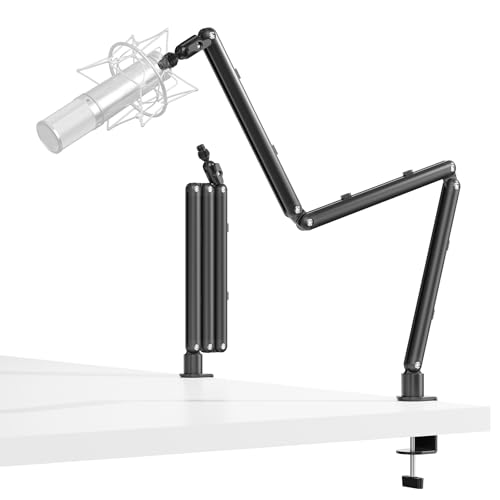
- Dedicated channel organizes and protects the cable
- 30-inch foldable reach suits larger desks
- Supports microphones up to 3 lb
Best For: Minimalist streaming and podcast setups with lightweight mics
Best Low-Profile Pick
InnoGear LP98 Magnetic Cable Mic Arm

- 3.35-inch low-profile arm saves desk space
- Magnetic cable channel hides and organizes wires
- 3.3-pound capacity with wide adjustment range
Best For: Minimalist desks and tidy streaming setups
Best All-Metal Option
FULAIM X37 Hidden-Cable Boom Arm

- Aluminum-alloy construction supports up to 800 grams
- Hidden organizer includes four cable ties
- Multiple adjustments and fold-away positioning
Best For: Streaming and recording setups needing sturdy flexibility
Best for Built-In Cable Routing

- Routes cables inside the arm for a clean look
- Low-profile design fits beneath or around monitors
- Supports microphones up to 4.2 pounds
Best For: Compact desks needing discreet internal cable management
Best Portable Boom Stand – Amazon Basics Adjustable Boom Stand
For performers who need microphone stands with cable management that travel easily, this Amazon Basics model combines a foldable tripod base with a height-adjustable boom. Its steel construction, molded counterweight, and clip-on cable holder support flexible setup for singing, speaking, or playing an instrument. The microphone clip is sold separately.
Best For: Portable vocal, speaking, and instrument setups that need a full-height boom stand.
Pros:
- Adjusts to seated or standing use and reaches up to 85.75 inches.
- Folds flat and weighs 3.3 pounds for easier transport.
- Clip-on cable holder keeps cords out of the way.
- Supports microphones weighing up to 2 pounds.
Cons:
- Microphone clip is not included.
- Its 21-inch tripod base requires more floor space than a desk arm.
- Maximum microphone weight is limited to 2 pounds.
This is a practical choice when portability and broad height adjustment matter more than a compact desktop footprint. Check the microphone weight and plan to purchase a compatible clip if needed.
Best Low-Profile Desk Arm – FIFINE BM88W Low Profile Boom Arm
The FIFINE BM88W is a low-profile option for shoppers seeking microphone stands with cable management in a recording, streaming, or home-office setup. Its metal arm extends up to 29 inches, rotates horizontally through 360 degrees, and includes built-in cable management to keep the desktop organized.
Best For: Podcasting, streaming, and recording at desks where a low-profile arm helps preserve workspace.
Pros:
- Low-profile design extends from below the screen.
- Adjusts 220 degrees vertically and 360 degrees horizontally.
- Built-in cable management helps reduce cord clutter.
- Includes adapters for 1/4-inch, 3/8-inch, and 5/8-inch connections.
Cons:
- Desk clamp fits surfaces from 0.8 to 2.4 inches thick.
- The microphone is not included.
- The section near the C-clamp cannot adjust vertically.
With its broad positioning range and tidy cable channels, the BM88W suits compact desktop studios. Confirm your desk thickness and microphone connection before ordering.
Best Quiet Professional Arm – RØDE PSA1+ Studio Boom Arm
The RØDE PSA1+ is designed for creators who want microphone stands with cable management and quiet movement during recording. Its internal spring damping is intended to reduce creaks and handling noise, while 360-degree rotation and integrated cable management support flexible, clean-looking desk setups.
Best For: Podcasting and streaming setups that prioritize quiet repositioning and a professional desk appearance.
Pros:
- Internal spring damping helps minimize creaks and handling noise.
- 360-degree rotation provides flexible microphone positioning.
- Integrated cable management hides XLR runs.
- Supports microphones and shock mounts from 0.25 to 1.2 kilograms.
Cons:
- Maximum supported microphone weight is 1.2 kilograms.
- Clamp capacity is limited to desks up to 70 millimeters thick.
- Its maximum height is listed as 0.9 meters.
The PSA1+ is a strong fit for voice-focused work where silent movement and tidy cable routing are important. Verify both desk thickness and total microphone-plus-shock-mount weight for a secure match.
Best Heavy-Duty Cable Arm – InnoGear PSA28-RD Heavy-Duty Boom Arm
The InnoGear PSA28-RD is a heavy-duty choice among microphone stands with cable management, supporting up to 4.4 pounds for larger microphones such as the Blue Yeti and Shure SM7B. Its internal springs, steel construction, and simplified cable channels are aimed at stable, organized recording and streaming setups.
Best For: Heavy microphones and desktop recording setups that need strong load support and organized cabling.
Pros:
- Supports microphones weighing up to 4.4 pounds.
- Internal springs provide a cleaner look than exposed springs.
- Adjusts through 135 degrees horizontally and 180 degrees vertically.
- Reaches up to 32.3 inches horizontally and 30.9 inches vertically.
Cons:
- Uses a 5/8-inch connector, so adapter needs may vary by microphone.
- Shock mount is not included.
- Its 2-kilogram arm is heavier than lighter portable stands.
This arm stands out when microphone weight and positioning range are priorities. It is particularly suitable for heavier compatible microphones, but check connector requirements and plan separately for a shock mount if your setup needs one.
Best Cable-Hiding Boom Arm – SA-30 Rotatable Microphone Boom Arm
The SENSIC SA-30 is a flexible option for anyone comparing microphone stands with cable management for a desktop recording setup. Its internal cable routing, 360° rotation, foldable arm, and included 6-inch riser make it adaptable for streaming, podcasting, and overhead microphone placement.
Best For: Streamers, podcasters, and creators who want a versatile clamp-mounted arm with concealed cables and extra clearance behind a monitor.
Pros:
- Hides microphone cables inside the stand for a neater workspace.
- Includes a 15 cm riser for overhead positioning behind a monitor.
- Supports up to 1,000 g and includes 1/4-inch, 3/8-inch, and 5/8-inch adapters.
- Offers 360° rotation, a foldable design, and a table clamp plus grommet mount.
Cons:
- Its 1,000 g capacity may not suit heavier microphone combinations.
- The riser and multiple adapters may be unnecessary for simpler setups.
The SA-30 stands out when cable concealment and positioning flexibility matter most. The included riser expands placement options, while the clamp-based design keeps the desk footprint relatively small.
Best Low-Profile Cable Management – AK-58i Low Profile Mic Boom Arm
The Aokeo AK-58i is a practical choice among microphone stands with cable management for users who want the arm to stay visually unobtrusive. Its low-profile design routes the cable along the underside, while 360° arm rotation and 180° vertical movement support precise positioning.
Best For: Gamers, streamers, and podcasters who need a stable, discreet arm that fits tables less than 7 cm thick.
Pros:
- Low-profile shape reduces visual distraction across the desk and screen area.
- Bottom channel hides and secures the microphone cable.
- Supports up to 2 kg and includes 3/8-inch-to-1/4-inch and 3/8-inch-to-5/8-inch adapters.
- Both arms rotate 360°, while the microphone arm also moves vertically through 180°.
Cons:
- Designed for tables under 7 cm thick, which limits mounting compatibility.
- The package does not include a microphone.
Choose the AK-58i if a clean sightline and low center of gravity are priorities. Its 2 kg capacity gives it broad microphone and shock-mount compatibility, provided your desk meets the thickness requirement.
Best Space-Saving Arm for Lightweight Mics – 30-Inch Adjustable Boom Arm
This 30-inch adjustable arm is a space-saving option for shoppers seeking microphone stands with cable management for streaming, gaming, or podcasting. Its dedicated cable channel, foldable construction, and low- or high-profile positioning help keep the desk organized without blocking the monitor.
Best For: Users with larger desks who want a long-reach arm for lightweight microphones and a clean, minimalist setup.
Pros:
- Integrated cable channel helps prevent tangling and accidental disconnection.
- 30-inch reach can tuck behind a monitor or extend over a larger desk.
- All-metal construction supports microphones up to 3 lb.
- 360° hinge, foldable design, and included hex wrench allow flexible positioning.
Cons:
- Not compatible with Blue Yeti ORB, Yeti X, Shure MV7i, or Beta58A models.
- Its 3 lb capacity is intended for lightweight microphones rather than very heavy setups.
- Uses 3/8-inch and 5/8-inch threads, so additional compatibility checks may be needed.
The MA5915 is appealing when reach and desk space are equally important. Confirm microphone compatibility before buying, especially if you use one of the listed excluded models.
Best Low-Profile Pick – InnoGear LP98 Magnetic Cable Mic Arm
If you want microphone stands with cable management that stay out of the way, the InnoGear LP98 combines a 3.35-inch low-profile arm with an integrated magnetic cable channel. Its alloy-steel construction, broad adjustment range, and 3.3-pound capacity suit compact streaming, recording, and office setups.
Best For: Minimalist desks and users who want hidden, tangle-free cable routing.
Pros:
- Low-profile design helps preserve valuable desk space.
- Snap-on magnetic channel keeps the microphone cable hidden and organized.
- 360-degree base rotation plus extensive tilt and swivel adjustment.
- Supports microphones weighing up to 3.3 pounds.
Cons:
- The C-clamp fits flat-edged desks up to 2.36 inches thick.
- A shock mount is not included.
The LP98 is a strong choice when appearance and desk clearance matter most. Its magnetic cable system is especially convenient for clean, frequently adjusted workstations, while the included adapters broaden compatibility.
Best All-Metal Option – FULAIM X37 Hidden-Cable Boom Arm
The FULAIM X37 is one of the more versatile microphone stands with cable management for creators who want an all-metal desktop arm. It supports microphones up to 800 grams, offers multiple positioning adjustments, and includes a dedicated cable organizer plus cable ties.
Best For: Streamers and recording users who prioritize an aluminum build and flexible positioning.
Pros:
- Aluminum-alloy construction provides a solid, professional-grade feel.
- Hidden cable organizer and four included cable ties help reduce desk clutter.
- 360-degree base rotation, 180-degree arm movement, and 270-degree adapter adjustment.
- Can fold or be pushed aside when not in use.
Cons:
- Its maximum supported microphone weight is 800 grams, lower than some heavier-duty arms.
- The two usage modes may require choosing the mounting arrangement that best fits your desk.
Choose the X37 if you want a sturdy aluminum arm that can move out of the way between sessions. The included clamp, adapters, and cable ties make it a practical ready-to-use option for common microphones such as the Blue Yeti, HyperX QuadCast, and Shure SM7B.
Best for Built-In Cable Routing – Sensic SA-30 LP Boom Arm
The Sensic SA-30 LP keeps cable management inside the microphone arm itself, making it a useful choice for clean, low-profile setups. Its metal construction, 360-degree horizontal rotation, and compact mounting design work well under or around a monitor.
Best For: Users who want internal cable routing and a compact arm for streaming or recording.
Pros:
- Internal cable management creates a clean, minimal appearance.
- Low-profile arm can mount beneath a monitor or in tight desk areas.
- Rotates 360 degrees horizontally and 95 degrees vertically.
- Supports microphones weighing up to 4.2 pounds.
Cons:
- The listed maximum height is only 1.9 centimeters, reflecting its low-profile design.
- Its modular construction includes steel, aluminum, and plastic components.
The SA-30 LP stands out for users who dislike exposed cable clips or ties. It offers a particularly tidy installation and a comparatively high stated weight capacity, though its low-profile geometry is best suited to setups where maximum vertical reach is not required.
How We Picked These Microphone Stands with Cable Management
We focused on the factors that most affect daily use: stability, adjustment range, cable-routing design, mounting hardware, microphone compatibility, and desk footprint. The lineup includes traditional tripod-based stands as well as clamp-mounted boom arms, so different recording spaces and workflows are represented.
We also considered whether each stand suits heavier broadcast microphones, compact USB models, or common microphones such as the Blue Yeti, HyperX QuadCast, Elgato Wave, and RØDE models. Since cable management can mean anything from clips to a fully hidden channel, we treated accessibility and routing convenience as important practical differences.
Quick Comparison
| Best For | What to Look For |
|---|---|
| Portable recording | Foldable base, adjustable height, and easy setup |
| Streaming and podcast desks | Strong clamp, smooth arm movement, and cable routing |
| Low-profile setups | Short horizontal reach that keeps the arm below the monitor |
| Studio microphones | Higher weight capacity, spring damping, and rigid joints |
| Small or crowded desks | Compact clamp and minimal vertical clearance |
Key Buying Factors for Microphone Stands with Cable Management
Mounting Style and Stability
A desk clamp is usually the best choice for permanent streaming or podcast stations, but confirm your desk thickness and available edge space first. A tripod stand is more flexible and portable, while a weighted or reinforced base can reduce movement during use.
Reach, Height, and Adjustment
Check the arm’s horizontal reach and vertical range against your seating position, monitor placement, and preferred microphone angle. Low-profile arms work well beneath screens, while taller boom stands offer more flexibility for standing or multi-person recording.
Weight Capacity and Thread Compatibility
USB microphones may need less support than a dynamic broadcast microphone paired with a shock mount. Verify the stand’s load rating and included adapters, especially when using 1/4-inch, 3/8-inch, or 5/8-inch hardware.
Cable Routing and Workspace Fit
Clips are simple to access and easy to reposition; enclosed channels and hidden routing create a cleaner appearance but may take longer to install. Measure your desk and consider whether the arm will interfere with drawers, monitor stands, speakers, or camera equipment.
Who Should Buy Which Microphone Stands with Cable Management?
Choose a portable tripod model if you move between rooms, travel, or need a stand that does not depend on a desk edge. A low-profile desk arm is a better fit for streamers who want the microphone close without blocking a monitor. For heavier microphones and frequent angle changes, prioritize a reinforced boom arm with smooth joints, damping, and a dependable clamp.
Buyers with a compact workstation should prioritize a short arm and small mounting footprint. If appearance matters as much as function, look for hidden cable management. For broad microphone compatibility, select a model with multiple thread adapters and enough adjustment range for your shock mount or microphone holder.