The best headphones for calls make conversations easier to hear while helping your voice come through clearly in busy offices, shared spaces, and on the go.
This roundup compares 10 practical options, from simple USB headsets and wired earbuds to Bluetooth models with noise cancellation, mute controls, and included dongles.
Best 10 Headphones for Calls Picks for 2026
Best for Long Workdays
PrancyBt KH120M Wireless Headset

- Up to 35 hours of operation
- Noise cancellation and call mute
- Bluetooth plus Windows USB dongle
Best For: Remote work, call centers, and extended meetings
Best Compact Earbuds
Soundcore P20i True Wireless Earbuds
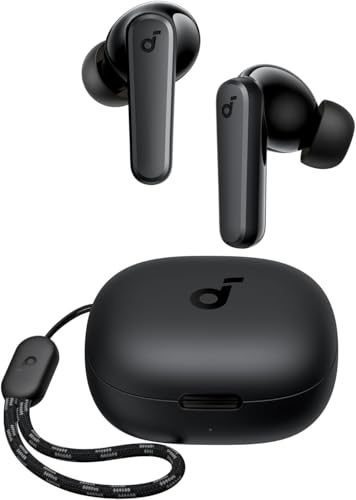
- AI-enhanced call microphones
- Up to 30 hours with case
- Compact Bluetooth 5.3 design
Best For: Mobile calls and portable everyday listening
Best Simple Wired Option

- Plug-and-play USB-A connection
- Rotating noise-canceling microphone
- Mute and volume controls on cable
Best For: Computer calls, meetings, and Chromebook users
Best for Dual-Device Use

- Multipoint laptop and phone pairing
- Up to 40 hours of talk time
- ENC, mute button, and USB dongle
Best For: Hybrid workers switching between computers and smartphones
Best for Easy Setup

- Integrated microphone for calls, FaceTime, and Siri
- Inline controls for volume, playback, and calls
- USB-C wired design needs no charging
Best For: Everyday calls on USB-C devices
Work Call Specialist

- ANC and ENC support clearer calls in noisy spaces
- USB-A dongle and Bluetooth 5.4 connectivity
- Flip-to-mute boom and up to 35 hours of talk time
Best For: Frequent computer meetings and work calls
Long-Battery Noise Canceller

- Hybrid ANC rated to reduce up to 90% of external noise
- Dual connections switch between two Bluetooth devices
- Up to 40 hours with ANC or 60 hours in normal mode
Best For: Travel, commuting, and office calls
Best Everyday Earbuds

- ENC call noise cancellation with built-in microphones
- Up to 36 hours with the charging case
- IP7-rated design and Bluetooth 5.4
Best For: Everyday calls, commuting, and workouts
Best Professional Call Headset
Yealink BH71 Pro Bluetooth Headset

- Four beamforming microphones for background-noise reduction
- Up to 10 hours of talk time
- USB-C/A dongle and two-device connectivity
Best For: Office meetings and business calls
Best Long-Battery Headphones
Sony WH-CH520 Wireless Headphones
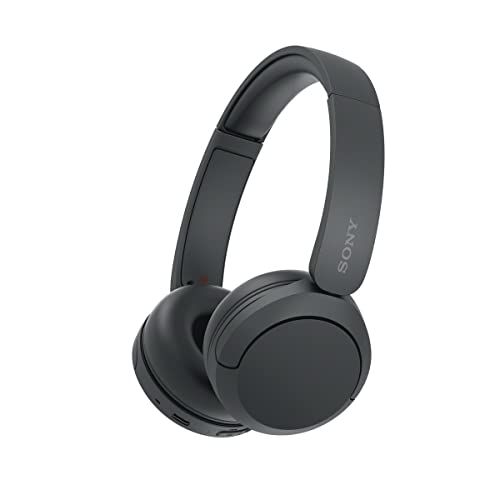
- Up to 50 hours of battery life
- Built-in microphone for hands-free calls
- Multipoint connection for two devices
Best For: Casual calls, travel, and everyday listening
Best for Long Workdays – PrancyBt KH120M Wireless Headset
If you need headphones for calls that can handle meetings, work shifts, and travel, the PrancyBt KH120M combines a boom microphone, environmental noise cancellation, Bluetooth, and a Windows-compatible USB dongle. Its mute button works during active calls or meetings, while the adjustable fit is designed for extended wear.
Best For: Remote workers, call-center users, and professionals who want long battery life and flexible wireless connectivity.
Pros:
- Up to 35 hours of continuous operation.
- Environmental noise cancellation and one-click call mute.
- Bluetooth and USB dongle connectivity with up to a 33-foot range.
- Adjustable headband, soft ear pads, and rotatable earcups.
Cons:
- The USB dongle works only with Windows systems.
- Not compatible with desk phones or landlines.
- The headset should be powered off before charging.
The KH120M is a practical choice when stamina and work-focused features matter more than a compact design. Confirm that your computer and calling setup support its Bluetooth or Windows USB-dongle connection.
Best Compact Earbuds – Soundcore P20i True Wireless Earbuds
The Soundcore P20i are headphones for calls in a small true-wireless format. Two built-in microphones and an AI algorithm help pick up your voice, while the compact case provides up to 30 hours of total playtime for calls, music, and everyday use.
Best For: Mobile users who prefer lightweight earbuds for phone calls, commuting, and casual listening.
Pros:
- Two microphones and AI-enhanced voice pickup.
- Up to 30 hours with the charging case.
- A 10-minute charge provides up to 2 hours of playtime.
- Bluetooth 5.3, app controls, and customizable EQ presets.
Cons:
- Passive rather than active noise cancellation.
- Earbud battery life is listed as 10 hours per charge, with total case playtime up to 30 hours.
- The in-ear design may not suit users who prefer over-ear headsets.
The P20i makes sense if portability is your priority and you want call support without a bulky office headset. Its strongest advantages are the compact charging case, quick charging, and app-based customization.
Best Simple Wired Option – Logitech H390 USB Headset
For dependable headphones for calls without pairing or battery management, the Logitech H390 uses a plug-and-play USB-A connection. Its rotating noise-canceling microphone, in-line mute and volume controls, and 6.23-foot cable make it suited to straightforward computer calling.
Best For: Computer users who want an easy wired headset for calls, meetings, Chromebook use, and everyday audio.
Pros:
- Plug-and-play USB-A connection with no software installation.
- Rotating noise-canceling microphone with mute control.
- In-line volume and call-mute controls.
- Padded, adjustable design and a 6.23-foot cable.
Cons:
- Wired design limits mobility compared with Bluetooth headsets.
- Requires a USB-A computer connection.
- It does not provide wireless noise control.
The H390 is a sensible pick for users who value simplicity and consistent computer connectivity. It avoids charging and pairing concerns, though the cable is less convenient for moving around during calls.
Best for Dual-Device Use – KH53 Wireless Work Headset
The KH53 is a strong option among headphones for calls when you need to move between a computer and phone. Bluetooth 5.3, a Windows USB-A dongle, multipoint pairing, environmental noise cancellation, and a one-touch mute button support flexible work and meeting setups.
Best For: Hybrid workers and professionals who switch between laptop meetings and smartphone calls.
Pros:
- Multipoint pairing connects to a laptop and smartphone simultaneously.
- Up to 40 hours of talk time.
- Environmental noise cancellation and one-touch call mute.
- Includes a USB dongle and charging stand.
Cons:
- The USB dongle is incompatible with desk phones and landlines.
- The mute function activates only during calls.
- The headset is designed primarily for Bluetooth and computer use rather than a simple wired setup.
Choose the KH53 if switching devices and maintaining long talk time are central to your workflow. Its dual-device support and included charging stand make it especially convenient for hybrid work, provided your devices match the listed connection options.
Best for Easy Setup – Apple EarPods USB-C
If you want straightforward headphones for calls without charging or pairing, these wired Apple EarPods are a practical choice. Their USB-C connection, integrated microphone, and cord controls make it easy to answer calls, adjust volume, and control playback on compatible devices.
Best For: USB-C phones, tablets, and computers users who prefer lightweight wired earbuds for everyday calls.
Pros:
- Built-in microphone is designed to capture your voice clearly during calls, FaceTime, and Siri use.
- USB-C plug works with devices that have a USB-C port.
- Inline remote handles volume, playback, and answering or ending calls.
- Lightweight design weighs 1.12 ounces.
Cons:
- Wired design limits movement compared with wireless headphones.
- Compatibility depends on having a USB-C port.
These EarPods are best when simplicity matters more than wireless freedom or active noise cancellation. They offer essential call controls and a built-in microphone in a compact, no-charge-needed design.
Work Call Specialist – M112 ANC Wireless Headset
For busy offices and home workspaces, this wireless headset combines ANC for your listening environment with ENC for clearer outgoing speech. Its USB-A dongle, Bluetooth 5.4, dual-device connectivity, and flip-to-mute boom make it well suited to frequent computer calls.
Best For: Remote workers, support professionals, and anyone handling back-to-back Zoom, Teams, or computer calls.
Pros:
- Hybrid ANC and microphone ENC help reduce surrounding noise and improve voice clarity.
- Qualcomm USB-A dongle provides a plug-and-play PC or Mac connection.
- Flip-to-mute microphone offers a quick physical mute option.
- Up to 35 hours of talk time after a two-hour charge.
Cons:
- The dongle is not compatible with landlines, desk phones, or VoIP phones.
- USB-A connectivity may require an adapter on some newer computers.
- As an over-ear headset, it is less compact than wired earbuds.
This is the most purpose-built option here for professional calls. The dedicated dongle, dual connectivity, adjustable boom, and long talk-time rating prioritize reliable workplace communication over portability.
Long-Battery Noise Canceller – Soundcore Q20i Headphones
The Soundcore Q20i is a versatile over-ear option for people who want headphones for calls alongside travel, music, and commuting. Hybrid ANC helps reduce external noise, while dual connections let you stay linked to two devices and switch to the one receiving a call.
Best For: Travelers and office users who want call support, long battery life, and customizable listening modes in one headset.
Pros:
- Hybrid ANC uses four microphones and is rated to reduce up to 90% of external noise.
- Dual-device Bluetooth connections support quick switching between a laptop and phone.
- Provides up to 40 hours with ANC on or 60 hours in normal mode.
- Soundcore app offers EQ customization, ANC modes, and Transparency mode.
Cons:
- The listed wireless connection uses Bluetooth 5.0 rather than a newer Bluetooth version.
- Its over-ear design is bulkier than wired earbuds.
- Noise reduction and sound customization require using the available controls or app features.
The Q20i balances calls with broader everyday headphone use. Its dual connections and substantial battery make it convenient for switching between work and phone audio, while ANC and Transparency modes add flexibility in changing surroundings.
Best Everyday Earbuds – A90 Pro Wireless Earbuds
If you want compact headphones for calls that can also handle music and workouts, the A90 Pro wireless earbuds offer Bluetooth 5.4, built-in ENC call noise cancellation, and touch controls. Their charging case extends total playback to up to 36 hours, while the IP7-rated design suits active use.
Best For: Everyday calling, commuting, workouts, and users who prefer true wireless earbuds.
Pros:
- ENC noise cancellation and built-in microphones are designed for clearer calls in noisy environments.
- Bluetooth 5.4 provides a stated range of up to 15 meters and supports automatic pairing.
- Up to 36 hours of total battery life with the charging case and USB-C fast charging.
- IP7 waterproofing, multiple ear-tip sizes, and touch controls support active use.
Cons:
- Six to eight hours of listening per charge is less than the total case-supported runtime.
- In-ear earbuds may not suit people who prefer an open or over-ear fit.
The A90 Pro is a versatile option among headphones for calls, especially if you want a small, workout-friendly design with useful battery indicators. Its main trade-off is that call performance and fit will depend on the in-ear seal.
Best Professional Call Headset – Yealink BH71 Pro Bluetooth Headset
For business users comparing headphones for calls, the Yealink BH71 Pro focuses on voice clarity, device flexibility, and a secure single-ear fit. Its four beamforming microphones are designed to reduce background noise, while the included USB-C/A dongle connects it to compatible computers and conference platforms.
Best For: Office meetings, mobile professionals, Teams and Zoom users, and extended business calling.
Pros:
- Four beamforming noise-canceling microphones are claimed to cancel 90% of background noise.
- Supports Bluetooth connections and the included BT51 dongle, with two-device connectivity.
- Up to 10 hours of talk time and a magnetic charging cable for convenient recharging.
- Rotatable ear hook and mic arm can be worn on either ear and adjusted for fit.
Cons:
- It is a mono headset, so it does not provide stereo listening.
- Compatibility with desk phones is limited to listed models; it is not compatible with most desktop phone systems.
- The headset is not water resistant.
The BH71 Pro is the most call-focused choice here, with a practical mono design, mute control, and broad computer and mobile connectivity. Check your desk-phone model before buying if you plan to use it beyond PCs and smartphones.
Best Long-Battery Headphones – Sony WH-CH520 Wireless Headphones
The Sony WH-CH520 is a lightweight on-ear option for people who want headphones for calls alongside everyday listening. It includes a built-in microphone for hands-free calling, multipoint connection for two devices, and up to 50 hours of battery life with quick charging.
Best For: Casual calls, remote work, travel, and users who want one pair for music and phone conversations.
Pros:
- Up to 50 hours of battery life supports multi-day use.
- Built-in microphone enables hands-free calling without removing your phone.
- Multipoint connection allows switching between two devices.
- Lightweight on-ear construction includes an adjustable headband, cushions, and swivel earcups.
Cons:
- The product lists no active noise control, so it may be less suitable for noisy calls.
- It is not water resistant.
- The on-ear design may provide less isolation than in-ear or over-ear headphones.
The WH-CH520 is a straightforward choice if battery life and comfort matter more than dedicated call-noise cancellation. Its app-based EQ and multipoint support add flexibility for users moving between a phone and computer.
How We Picked the Best Headphones for Calls
We focused on features that directly affect call quality and everyday convenience: microphone performance, background-noise handling, connection reliability, comfort, controls, battery life, and device compatibility. The selection includes USB, 3.5mm-style wired alternatives, Bluetooth, and models with wireless USB dongles so you can match the headset to your computer, phone, or meeting platform.
We also considered different work styles. A dedicated boom microphone can be useful in a noisy office, while compact earbuds are easier to carry. Active noise cancellation may improve what you hear, but microphone noise reduction and a stable fit are equally important for the people listening to you.
Quick Comparison
| Best For | Look For | Typical Advantage |
|---|---|---|
| Desk-based work | USB headset or dongle | Simple computer setup and consistent connection |
| Phone calls on the go | Bluetooth earbuds or headset | Compact design and wireless freedom |
| Noisy environments | ANC headphones plus microphone noise reduction | Clearer listening and fewer distractions |
| Long meetings | Comfortable over-ear or lightweight headset | Less ear fatigue over extended use |
| Budget buyers | Wired USB or basic Bluetooth model | Useful call features at a lower cost |
Key Buying Factors for Headphones for Calls
Microphone and Noise Control
Prioritize a microphone that stays close to your mouth, especially if you work around coworkers, traffic, or household noise. Boom microphones often provide more predictable voice pickup than distant built-in microphones. Noise suppression can reduce steady background sounds, but no headset removes every interruption.
Connection and Compatibility
Check whether your computer has USB-A, USB-C, Bluetooth, or another required connection. A wireless dongle can be more dependable for work computers and may reduce pairing hassles. For phones and tablets, verify Bluetooth support or the correct wired connector.
Comfort, Battery, and Controls
For frequent meetings, soft ear cushions, modest clamping force, and an adjustable headband matter as much as audio quality. Wireless models should provide enough battery for your workday, while mute buttons or flip-to-mute controls can be valuable during back-to-back calls. Wired models avoid charging entirely.
Audio Quality and Noise Cancellation
Clear midrange audio helps speech remain intelligible. ANC is useful when you need to concentrate or hear callers in a loud setting, but it is not essential for quiet rooms. If you listen to music between calls, compare bass response and overall sound balance as well.
Who Should Buy Which Headphones for Calls?
Choose a USB headset if you mainly use a desktop or laptop and want straightforward plug-and-play calling. A Bluetooth headset with a boom microphone is better for people who move between devices or need stronger voice pickup. Earbuds suit commuters and mobile users who value portability, while over-ear ANC headphones are a stronger fit for travelers, open offices, and anyone who wants more isolation.
If reliability and low maintenance are your priorities, start with a wired model. If freedom of movement matters more, choose wireless headphones with dependable controls, sufficient battery life, and the right adapter or dongle for your devices.