The best camera slider for beginners makes controlled camera movement easier without requiring a complicated cinema rig. The models in this roundup range from compact manual rails to app-controlled motorized systems.
We compare setup, portability, payload, motion control, and shooting features so you can choose a slider that fits your camera, workspace, and filmmaking goals.
Best 10 Camera Slider for Beginners Picks for 2026
Best Pocket Dolly
NEEWER SD001 Manual Camera Dolly

- Straight or circular movement
- Quiet rubber wheels
- Compact camera and phone support
Best For: Portable tabletop tracking and panning shots
Best Long Motorized Slider
GVM 48-Inch Automatic Camera Slider
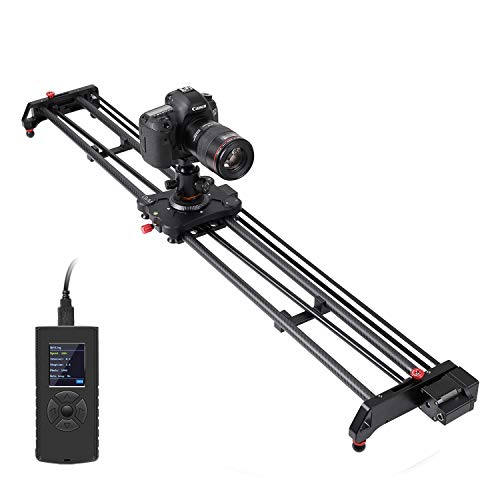
- 48-inch carbon-fiber rail
- Automatic round-trip motion
- Battery and accessories included
Best For: Long, repeatable tracking and time-lapse shots
Best Manual Rail Slider
Zecti 16-Inch Carbon Fiber Slider

- Adjustable legs and bubble level
- Multiple mounting positions
- Lightweight 16-inch rail
Best For: Learning manual slider movement on varied surfaces
Best App-Controlled Slider
NEEWER ER1 31.5-Inch Motorized Slider

- App and optional remote control
- Silent motor with included battery
- Video and time-lapse modes
Best For: Creators practicing automated product and time-lapse shots
Best Budget Pick
Andoer 12-Inch Aluminum Camera Slider

- Manual slider with smooth four-bearing movement
- Supports up to 11 pounds
- Multiple rail lengths and mounting threads
Best For: Beginners using DSLR cameras or camcorders
Best Motorized Pick

- Motorized 15.8-inch slider with five shooting modes
- Works with DJI Pocket, action cameras, and phones
- Up to seven hours of battery life
Best For: Automated tracking shots and time-lapses
Best Versatile Pick
NEEWER 16-Inch Carbon Fiber Slider

- Lightweight 16-inch slider with adjustable legs
- Includes phone and action-camera mounts
- Supports horizontal, tilted, and vertical setups
Best For: Multi-camera users shooting indoors or outdoors
Compact Motorized Pick
NEEWER 3-Wheels Wireless Video Camera Dolly

- Wireless remote with three speeds and direction control
- Adjustable wheels create straight or circular routes
- Up to six hours of battery service time
Best For: Portable creative moves with cameras, phones, or action cameras
Beginner Rail Pick
GVM 27-Inch Motorized Camera Slider

- Supports video, time-lapse, and round-trip shooting
- Adjustable feet help level the rail
- Works horizontally, vertically, or at 45 degrees
Best For: Learning motorized rail work with DSLR, video, or cellphone setups
Advanced Control Pick
GVM 48-Inch Carbon Fiber Motorized Slider

- Six shooting modes with app-based motion control
- 120 cm carbon-fiber rail supports long tracking moves
- Includes shutter-release cables and a carry bag
Best For: Growing creators who want programmable, repeatable camera movement
Best Pocket Dolly – NEEWER SD001 Manual Camera Dolly
If you want a compact camera slider for beginners, the NEEWER SD001 offers a simple manual way to create straight-line or circular movement. Its small footprint and phone support make it approachable for tabletop videos, product clips, and casual mobile shooting.
Best For: Beginners who want portable camera or smartphone tracking and panning shots.
Pros:
- Supports straight or circular movement by adjusting the wheels.
- Soft rubber wheels are designed for smooth, quiet movement on floors, tables, and sliders.
- Includes a 360-degree rotating, 90-degree tilting ball head and a rotatable phone clamp.
- Compact aluminum-alloy design weighs about 220g and supports up to 6.6 pounds.
Cons:
- Not suitable for telephoto lenses.
- Action-camera adapter is sold separately.
- Manual movement requires the operator to maintain a consistent pace.
The SD001 is less like a traditional rail slider and more like a portable tabletop dolly. For beginners prioritizing easy setup, phone compatibility, and creative circular motion over long travel, it is a practical starting point.
Best Long Motorized Slider – GVM 48-Inch Automatic Camera Slider
The GVM 48-inch slider is a more advanced camera slider for beginners who want automated movement for time-lapse, tracking, or panoramic video. Its long carbon-fiber rail provides substantial travel, while the included battery and carrying bag make the kit ready for mobile production.
Best For: Beginners moving into automated long-travel shots and repeatable camera motion.
Pros:
- Offers automatic round trips, adjustable start and end points, looping, and time-lapse settings.
- Supports manual and motorized operation with adjustable speed, interval, stop time, and motor torque.
- 48-inch carbon-fiber rail includes multiple 1/4-inch and 3/8-inch mounting ports.
- Includes a battery, charger, shutter cables, remote connection, and carrying bag.
Cons:
- At 11.8 pounds and 48 inches long, it is less portable than compact sliders.
- Setup and motor controls may be more involved for absolute beginners.
- It is not water resistant.
This GVM model makes sense when automated, repeatable movement matters more than minimal size. Its long rail and broad control range can support ambitious shots, but plan for more storage and setup time.
Best Manual Rail Slider – Zecti 16-Inch Carbon Fiber Slider
The Zecti 16-inch model is a straightforward camera slider for beginners who want traditional manual rail movement. Adjustable legs, a bubble level, and several mounting threads help it adapt to tabletop, tripod, horizontal, vertical, and angled setups.
Best For: Beginners learning manual sliding techniques with cameras, camcorders, or smartphones.
Pros:
- Four precision bearings and dual interior carbon-fiber rails are designed for stable movement.
- Removable adjustable legs and non-skid feet support uneven-surface setup.
- Can be positioned horizontally, vertically, or at an angle, including on a tripod.
- Portable 16-inch design weighs about 600g and includes a carrying bag.
Cons:
- The supplied note warns that overtightened screws can cause noise or rough movement.
- Phone holder is not included.
- Its 4.4-pound maximum load is more limited than some larger sliders.
The Zecti provides useful physical feedback for learning controlled manual camera moves without adding a motor. Beginners should check the screw tension during setup, especially if the carriage feels noisy or resistant.
Best App-Controlled Slider – NEEWER ER1 31.5-Inch Motorized Slider
The NEEWER ER1 is a capable camera slider for beginners who want automated movement without stepping up to a full 48-inch system. App control, manual operation, video mode, and time-lapse settings give new creators several ways to practice repeatable motion.
Best For: Content creators who want quiet motorized movement, app control, and time-lapse capability.
Pros:
- Supports app control and optional 2.4G remote control, plus manual, video, and time-lapse modes.
- Silent stepper motor and included 4400mAh battery are designed for extended shooting.
- Supports horizontal loads up to 11 pounds and 45-degree tilted loads up to 5.5 pounds.
- Offers horizontal, tracking, 120-degree panoramic, and 45-degree tilt shooting options.
Cons:
- The 2.4G remote control is not included.
- A 5V 2A Type-C portable charger is not included.
- Minor shake may occur during macro photography.
For beginners who want to grow into automated production, the ER1 balances a manageable 31.5-inch length with useful control options. It is especially attractive for product videos and time-lapse work, provided macro-level stability is not the main priority.
Best Budget Pick – Andoer 12-Inch Aluminum Camera Slider
If you are choosing a camera slider for beginners, the Andoer offers a straightforward manual setup with a compact aluminum rail and smooth bearing-based movement. It supports up to 11 pounds and includes mounting threads for expanding your basic rig.
Best For: Beginners who want an affordable manual slider for DSLR or camcorder shots.
Pros:
- Available in 30, 40, and 50cm track lengths
- Supports 2–5kg, with an 11-pound maximum recommendation
- Four precision bearings provide smooth, quiet movement
- Includes 1/4-inch and 3/8-inch mounting options for accessories
Cons:
- Manual operation requires you to control the slide yourself
- The supplied 30cm version has a relatively short travel distance
- It is not water resistant
The Andoer is a sensible entry point if you primarily need controlled manual movement and broad mounting compatibility. Choose the longer rail option if you want more travel for wider compositions.
Best Motorized Pick – iFootage Shark Slider PICO
For beginners who want repeatable camera motion without manually pushing a carriage, the iFootage Shark Slider PICO combines a 15.8-inch motorized slider with app and onboard controls. Its compatibility with DJI Pocket cameras, action cameras, and smartphones makes it especially flexible.
Best For: Beginners creating time-lapses, panoramas, stop motion, and repeatable tracking shots.
Pros:
- Supports DJI Pocket 3/4, Action 5/6, and smartphones
- Offers video, time-lapse, stop-motion, panorama, and multi-target modes
- Quick-Mark system supports up to eight programmable points
- 5000mAh battery provides up to seven hours of operation
Cons:
- It is more complex than a basic manual slider
- Its listed payload is 2.4 pounds, limiting heavier camera setups
- The motorized design costs more than a simple rail slider
The PICO is the most feature-rich option here for automated movement and compact camera systems. Its light 1.9-pound build and long battery life also suit mobile shooting, provided your setup stays within its payload limit.
Best Versatile Pick – NEEWER 16-Inch Carbon Fiber Slider
The NEEWER CS1M is a practical camera slider for beginners who want one compact setup for cameras, phones, and action cameras. Its adjustable legs, bubble level, ball head, and included mounts make it easier to position on different surfaces and shooting angles.
Best For: Beginners who use multiple camera types and need horizontal, tilted, or vertical positioning.
Pros:
- Carbon fiber and aluminum construction weighs about 1.3 pounds
- Adjustable legs help balance the slider on uneven ground
- Supports horizontal, 45-degree tilt, and vertical mounting
- Includes a ball head, phone clamp, and action-camera mount
Cons:
- Maximum capacity drops to 2.2 pounds for 45-degree or vertical use
- The 16-inch track offers less travel than longer professional sliders
- It is not water resistant
The CS1M stands out for beginners who want flexibility without carrying a bulky rig. Its 4.4-pound horizontal capacity is useful for lighter camera setups, while the included phone and action-camera accessories broaden its use.
Compact Motorized Pick – NEEWER 3-Wheels Wireless Video Camera Dolly
If you want a camera slider for beginners that is compact and easy to experiment with, the NEEWER DL100 offers motorized movement without a long rail. Its wireless remote lets you adjust speed, direction, and pauses while the adjustable wheels support straight or circular routes.
Best For: Beginners using cameras, phones, or action cameras for compact tracking shots and creative circular moves.
Pros:
- Wireless remote control with three adjustable speeds, direction changes, and pause control.
- Adjustable wheel angle supports straight-line and circular movement.
- Built-in 1800mAh battery offers up to six hours of service time.
- Supports devices up to 6.6 pounds and includes a convertible 1/4-inch to 3/8-inch screw.
Cons:
- It is a dolly-style system rather than a conventional long camera rail.
- Accessories such as a smartphone holder and action-camera adapters are not included.
- It is not water resistant.
The DL100 is a practical entry point for portable motorized movement. Its small footprint and simple remote make it approachable, though creators wanting long, highly controlled linear moves should consider a full-length slider.
Beginner Rail Pick – GVM 27-Inch Motorized Camera Slider
The GVM 27-inch slider is a solid camera slider for beginners who want a traditional rail with motorized controls. It supports video, time-lapse, and automatic round-trip shooting, while adjustable feet help level the aluminum-alloy rail on a surface or tripod.
Best For: Beginners who want a versatile 27-inch rail for DSLR, video-camera, or cellphone shooting.
Pros:
- Supports video, time-lapse, and automatic round-trip shooting modes.
- Adjustable non-slip feet help with leveling and stability.
- Can be used horizontally, vertically, or at 45 degrees.
- Multiple 1/4-inch and 3/8-inch screw holes support tripod mounting and varied setups.
Cons:
- At 26.8 inches long and 2.36 kg, it is less compact than a small dolly.
- The listed maximum load is 2.5 kg, limiting heavier camera configurations.
- It is not water resistant.
With several shooting modes and flexible mounting options, this GVM is a capable learning platform for basic motion-control work. Its longer rail and heavier build are better suited to planned setups than quick handheld-style portability.
Advanced Control Pick – GVM 48-Inch Carbon Fiber Motorized Slider
The GVM 48-inch model is a camera slider for beginners who expect to grow into more controlled motion work. Its carbon-fiber rail supports tracking, panoramic, time-lapse, and video modes, while the iOS/Android app allows detailed start, end, speed, interval, stop-time, and looping adjustments.
Best For: Beginners and developing creators who need long travel, app control, and repeatable motion sequences.
Pros:
- Offers six shooting modes, including tracking, panoramic, time-lapse, and video capture.
- App control supports adjustable start and end points, speed, intervals, stop times, and auto loop.
- Multiple 1/4-inch and 3/8-inch ports enable tripod mounting and vertical, horizontal, or 45-degree shooting.
- Includes six shutter-release cables, an extension cable, and a carry bag.
Cons:
- The 120 cm rail and 4 kg weight make it less portable than shorter sliders.
- Its extensive app and motion settings may take longer for beginners to learn.
- Battery average life is listed as two hours.
This is the most feature-rich option of the three, with long travel and granular app-based programming. It makes sense for beginners who want room to advance, but its size, weight, and control complexity are better suited to deliberate production setups.
How We Picked the Best Camera Slider for Beginners
We evaluated these sliders against the practical concerns that matter most when learning camera movement: setup simplicity, stability, portability, compatibility, motion control, and value. Manual sliders can be lighter and easier to understand, while motorized models offer repeatable moves, time-lapse control, and automated tracking.
We also considered the included accessories. Ball heads, phone clamps, action-camera mounts, adjustable feet, and app controls can make a slider more useful, but they may add bulk or complexity. Always confirm the stated load capacity before mounting a camera, lens, cage, or fluid head.
Quick Comparison
| Type | Best For | Main Advantage | Watch For |
|---|---|---|---|
| Compact manual slider | Phones, action cameras, and lightweight DSLRs | Simple setup and portability | Manual movement is less repeatable |
| Long manual slider | Basic tracking shots | More travel without motor controls | Needs careful leveling and support |
| Short motorized slider | Tabletop videos and product shots | Repeatable motion in a small footprint | Limited travel distance |
| Long motorized slider | Time-lapse and cinematic moves | Greater travel and programmable movement | Higher cost, weight, and setup time |
Key Buying Factors for a Camera Slider for Beginners
Manual or Motorized Movement
A manual slider is usually the easiest place to start. It gives you direct control and fewer batteries or settings to manage. Choose motorized operation if you need consistent speed, automatic round trips, panoramic movement, or repeatable time-lapse sequences.
Length and Portability
Short rails are convenient for desks, small studios, and close-up product work. Longer 31.5-inch, 48-inch, or similarly sized sliders create wider camera moves but require more storage, support, and leveling. A compact model is often the better choice if you regularly travel.
Payload and Stability
Check the load rating with your complete setup, not just the camera body. A heavy lens, cage, microphone, or monitor can significantly increase the weight. Look for sturdy rails, stable feet, smooth bearings, and mounting options that keep the camera balanced.
Control and Compatibility
For motorized models, check whether control is handled through onboard buttons, a remote, or a mobile app. Confirm phone and camera compatibility, available power options, and whether the slider supports the movement modes you plan to use.
Who Should Buy Which Camera Slider for Beginners?
Choose a compact manual slider if you are learning the basics, use a phone or lightweight camera, or want the simplest travel setup. Choose a short motorized model for tabletop demonstrations, social content, and repeatable product shots. Choose a longer motorized slider if time-lapse, panoramic movement, or polished cinematic tracking shots are priorities.
Before buying, measure your available workspace and tripod support, then match the slider’s payload to your fully assembled camera rig. For most first-time users, reliable stability and straightforward controls are more valuable than maximum length or advanced automation.