Remote interviews are easier to manage when you can maintain eye contact, follow important talking points, and avoid distracting pauses. The right teleprompter keeps your script close to the camera without making your delivery sound overly rehearsed.
These 10 options cover compact smartphone models, portable tablet designs, and larger camera-mounted systems. Use the guide below to match screen size, compatibility, portability, and control features to your interview setup.
Best 10 Teleprompters for Remote Interviews Picks for 2026
Best Built-In Display

- Integrated 9-inch FHD screen
- Displays scripts, chat, or apps
- Computer-controlled setup for Zoom and Teams
Best For: Remote interviews at a desk
Best Large Tablet Support
Desview T12S 12.9-inch Teleprompter
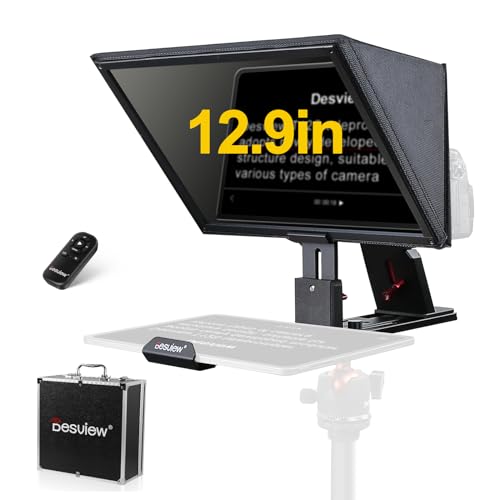
- Supports tablets up to 12.9 inches
- Zero-ghosting beam splitter glass
- Includes Bluetooth remote and aluminum case
Best For: Studio interviews and traveling production teams
Best Portable Phone Setup
LENSGO TCQI 10P Phone Teleprompter

- Weighs 0.8 pounds with tripod
- Magnetic phone attachment and remote
- Supports horizontal and vertical shooting
Best For: Mobile interviews and phone-based Zoom recording
Best Accessory-Friendly Design
NEEWER X12 14-Inch Teleprompter

- Aluminum body with accessory mounts
- Includes remote, app, and carrying case
- Supports compatible tablets and cameras
Best For: Camera rigs with tablet scripts and mounted accessories
Most Versatile
Desview T5 Multi-Device Teleprompter

- Works with smartphones, tablets under 11 inches, and DSLRs
- Includes adapter rings, app, and Bluetooth remote
- Adjustable design with coated glass and glare-reducing foam
Best For: Creators switching between phones, tablets, and DSLR cameras
Best Portable Pick
LENSGO TC7S Foldable Phone Teleprompter

- Folds in one second and weighs 450 grams
- Uses 9.7-inch high-definition beam-splitter glass
- Includes app support and Bluetooth remote control
Best For: Traveling and phone-based interview setups
Best Large-Text Option
LENSGO TC12P Wide-Angle Teleprompter
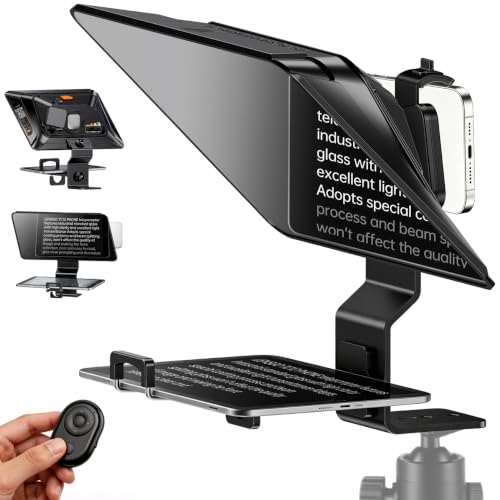
- Provides a large 14.5-inch HD prompting surface
- Supports phones and tablets up to 7.3 inches
- Includes remote control and glare-reducing coated glass
Best For: Longer smartphone interviews where larger text is helpful
Flexible Phone-and-Tablet Pick

- Works with phones, tablets, and cameras
- App and remote control script playback
- Folds quickly for portable interview setups
Best For: Creators using varied recording devices
Wide-Angle Interview Choice

- Supports tablets up to 10 inches
- Includes nine camera lens adapter rings
- Designed for wide-angle and vertical video
Best For: Multi-format interview and livestream setups
Sturdy Studio Kit
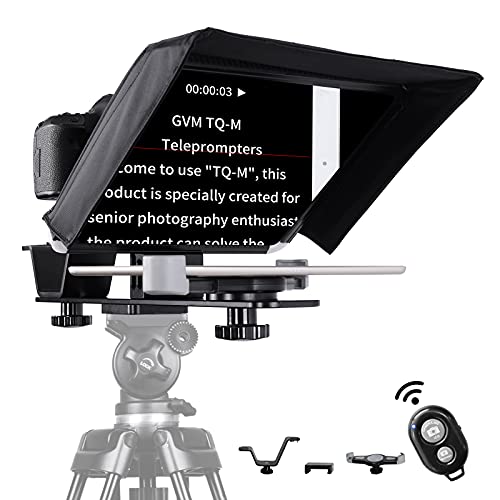
- Solid aluminum construction
- Supports tablets up to 10.5 inches
- App and Bluetooth remote controls included
Best For: Tripod-based home studios and fixed interview setups
Best Built-In Display – Elgato Prompter
For remote interviews, the Elgato Prompter is a streamlined choice when you want scripts, chat, or other windows visible without adding a tablet or phone. Its built-in 9-inch FHD display connects to a computer and is designed to help you maintain eye contact on Zoom or Teams.
Best For: Remote interviewers and streamers who want a computer-controlled teleprompter with an integrated screen.
Pros:
- Built-in display eliminates the need for a separate tablet or smartphone screen.
- Can show scripts, Twitch chat, or other computer windows.
- Supports a broad range of cameras and lenses, with Camera Hub customization.
- Works with PC or Mac and supports Stream Deck.
Cons:
- Mac users need free DisplayLink software, and Android users need DisplayLink Presenter.
- Requires a computer rather than a third-party mobile app.
- Its 1.52-pound design and desktop setup may be less convenient for highly portable use.
The built-in screen makes this a particularly convenient option for computer-based interviews. It is best suited to a permanent or semi-permanent desk setup where direct eye contact and flexible on-screen content matter most.
Best Large Tablet Support – Desview T12S 12.9-inch Teleprompter
The Desview T12S is a robust tablet-based option for teleprompters for remote interviews, supporting cameras alongside tablets up to 12.9 inches. Its beam splitter glass, Bluetooth remote, and mobile app provide a flexible workflow for reading and controlling scripts.
Best For: Creators and interview hosts who want a large tablet display, sturdy metal construction, and travel protection.
Pros:
- Accommodates iPads and tablets up to 12.9 inches.
- Compatible with DSLR, mirrorless cameras, and camcorders.
- Beam splitter glass is designed for clear, zero-ghosting text reflection.
- Includes a Bluetooth remote, app control, and an aluminum carry case.
Cons:
- At 3 kg, it is substantially heavier than compact phone-based options.
- Requires a separate compatible tablet for displaying scripts.
- The product is not water resistant.
With its larger reading area and durable aviation-grade aluminum body, the T12S makes sense for studio work, podcasts, and location shoots where portability still matters but low weight is not the top priority.
Best Portable Phone Setup – LENSGO TCQI 10P Phone Teleprompter
The LENSGO TCQI 10P is a lightweight option for teleprompters for remote interviews when your phone is the primary camera. Its magnetic base, mini tripod, app, and remote make it quick to set up for Zoom meetings, walk-and-talk videos, and mobile recording.
Best For: Mobile creators and business professionals who need a compact phone teleprompter for indoor or outdoor use.
Pros:
- Portable 0.8-pound setup includes a mini tripod and magnetic phone base.
- Supports horizontal and vertical shooting with compatible smartphones.
- High-transmittance coated glass is designed to reduce glare and preserve color.
- App and Bluetooth remote control scrolling speed, pauses, and text appearance.
Cons:
- Designed for smartphones rather than interchangeable-lens cameras.
- Android phones require the included magnetic ring for attachment.
- The 10-inch display accommodates phones under 3.82 inches wide.
This is the most convenient pick for phone-first interview setups and creators who move between locations. Its compact design favors speed and portability over the larger reading area and camera flexibility of full-size tablet prompters.
Best Accessory-Friendly Design – NEEWER X12 14-Inch Teleprompter
The NEEWER X12 is a tablet-based choice for teleprompters for remote interviews, combining an aluminum body with a collapsible design and accessory mounting points. It supports tablets and smartphones within its stated size limits and includes an app-controlled remote for script navigation.
Best For: Camera-based interview setups using an iPad or compatible tablet with microphones, lights, or other mounted accessories.
Pros:
- Fits tablets or smartphones up to 9.84 by 8.68 inches.
- Includes an RT-110 remote and NEEWER app for speed, pausing, and page control.
- Aluminum construction includes dual cold shoes and 1/4-inch threads for accessories.
- Collapsible design, carrying case, and tripod compatibility support transport.
Cons:
- Not compatible with wide-angle lenses; camera focal length needs to exceed 28mm.
- Not intended for phone shooting through the teleprompter.
- Not compatible with the iPad Pro 12-inch.
The X12 is a practical fit when your interview rig includes a conventional camera and several accessories. Check lens focal length and tablet dimensions carefully before buying, as those compatibility limits are central to the setup.
Most Versatile – Desview T5 Multi-Device Teleprompter
For shoppers comparing teleprompters for remote interviews, the Desview T5 stands out for supporting smartphones, tablets under 11 inches, and DSLR cameras. Its included adapter rings, adjustable setup, and wireless controls make it suitable for both casual and more polished video work.
Best For: Creators who want one teleprompter for phones, tablets, and DSLR cameras.
Pros:
- Supports smartphones, tablets, and DSLR cameras with multiple adapter rings.
- Free iOS/Android app supports TXT and DOCX scripts, formatting controls, and countdowns.
- Bluetooth remote controls playback, speed, and page turns without touching the device.
- Coated glass, foam padding, and light-seal foam help reduce glare and stray light.
Cons:
- Its broader camera compatibility may be more than phone-only users need.
- The listed tablet compatibility is limited to devices under 11 inches.
The T5 is a flexible choice when remote interviews may involve different cameras or shooting orientations. Its adjustable design and self-check feature add convenience, while the included warranty and lifetime maintenance support provide extra reassurance.
Best Portable Pick – LENSGO TC7S Foldable Phone Teleprompter
The LENSGO TC7S is a compact option for teleprompters for remote interviews, especially when portability matters. It folds in one second, weighs 450 grams, and works with smartphones and smaller tablets for interviews, online teaching, live streams, and travel recording.
Best For: Mobile creators who need a lightweight teleprompter for travel, online classes, and phone-based interviews.
Pros:
- One-second folding design is convenient for transport and quick storage.
- 9.7-inch beam-splitter glass provides a clear prompting surface.
- Bluetooth remote and TCQI app support scrolling, speed adjustments, and script controls.
- Supports vertical or horizontal phone placement and left- or right-sided shooting.
Cons:
- Designed primarily for smartphones and tablets below 8 inches.
- The TCQI app’s documented text import format is TXT.
The TC7S makes sense for interviewers who prioritize a small footprint over a larger reading area. Its foldable construction and remote control simplify mobile setups, although users with larger tablets or camera-based rigs may need a different model.
Best Large-Text Option – LENSGO TC12P Wide-Angle Teleprompter
For remote interviews where comfortable reading is a priority, the LENSGO TC12P offers a large 14.5-inch HD glass surface. It is designed for smartphone shooting, supports landscape or portrait recording, and includes a remote for hands-free script control during Zoom calls, videos, or live sessions.
Best For: Smartphone users who want a larger script display for longer interviews and walk-and-talk recordings.
Pros:
- Large 14.5-inch glass provides more room for readable script text.
- Supports smartphones and tablets up to 7.3 inches in landscape orientation.
- Quick assembly and disassembly allow horizontal or vertical shooting.
- Coated glass, foam padding, and light-seal foam help limit glare.
Cons:
- It is intended for smartphone shooting rather than DSLR cameras.
- Its larger screen may be less convenient for highly compact travel kits.
- The product is not water resistant.
The TC12P is a strong fit when maintaining eye contact over longer answers matters more than minimizing equipment size. Its wide viewing area and adjustable front panel can make scripted remote interviews easier to follow, while the Bluetooth remote keeps controls within reach.
Flexible Phone-and-Tablet Pick – LENSGO TC7
For creators comparing teleprompters for remote interviews, the LENSGO TC7 is a flexible option for phone, tablet, and camera setups. Its beam-splitter glass is designed for clear text, while the TCQI app and included remote let you control script playback from iOS or Android.
Best For: Remote interviewers who alternate between smartphone, tablet, and DSLR recording.
Pros:
- Supports smartphones, tablets under 9.7 inches, and cameras.
- TCQI app offers script entry, speed, pause, font, and background controls.
- Folds in one second and includes multiple cold shoes for accessories.
- Supports wide-angle shooting with lenses as wide as 17mm.
Cons:
- The app may require updates and has specific TXT-upload steps.
- Image-based scripts cannot be resized, according to the supplied notes.
- It is not water resistant.
The TC7 stands out when portability and device flexibility matter most. Its fast-folding design is useful for mobile interview kits, though users should plan their script workflow around the TCQI app.
Wide-Angle Interview Choice – Desview T3
The Desview T3 is a practical choice among teleprompters for remote interviews, especially when you need phone or tablet compatibility without dark corners in the frame. Its coated beam-splitter glass, Bluetooth remote, and included lens rings support a straightforward camera or smartphone workflow.
Best For: Interview creators using DSLR or mirrorless cameras, smartphones, and wide-angle lenses.
Pros:
- Supports phones and tablets up to 10 inches and 170mm wide.
- Includes nine adapter rings for common 49mm-to-82mm lens sizes.
- Supports horizontal shooting at 24mm or longer and vertical shooting at 35mm or longer.
- 97% light-transmission beam-splitter glass is designed for clear, ghost-free text.
Cons:
- It does not support 12.9-inch iPads, according to the supplied notes.
- Point-and-shoot cameras without lens filter threads are not supported.
- At 2.2 pounds, it may be less convenient for lightweight travel kits.
The T3 is a strong fit for speakers who want framing flexibility and a broad range of camera-lens compatibility. Check your tablet dimensions and lens focal length before buying to ensure the prompter stays outside the shot.
Sturdy Studio Kit – GVM TQ-M
For a more substantial setup, the GVM TQ-M is one of the teleprompters for remote interviews built around solid aluminum construction. It supports tablets up to 10.5 inches, includes phone and tablet clips, and pairs Bluetooth app controls with a colorless beam splitter for readable scripts.
Best For: Home studios and interviewers using small-to-mid-sized cameras on a tripod.
Pros:
- Solid aluminum construction is designed for a sturdy setup.
- Supports tablets up to 10.5 inches plus smartphones.
- GVM app controls font size, playback speed, background color, and start/stop.
- Compatible with 1/4-inch-20 and 3/8-inch-16 tripod-mount threads.
Cons:
- The supplied details list camera compatibility but do not specify lens adapter sizes.
- Its sturdier construction may be less travel-friendly than a compact folding model.
- It is not water resistant.
The TQ-M makes the most sense when stability and tripod integration take priority over the smallest possible footprint. Its included clips, remote, and mounting hardware create a useful starting kit for a dedicated interview space.
How We Picked the Best Teleprompters for Remote Interviews
We focused on the practical requirements of interview recording and live video calls: camera and device compatibility, readable viewing area, beam-splitter glass quality, setup time, portability, and remote or app control. Models were also compared by the type of creator they suit, from smartphone users and online educators to DSLR and mirrorless camera owners.
A good teleprompter should position text close enough to the lens to preserve natural eye contact. It should also support your preferred script device without creating excessive weight, glare, or framing problems.
Quick Comparison
| Best For | Look For | Typical Advantage |
|---|---|---|
| Phone-based interviews | Compact body, magnetic or adjustable mount | Fast setup and easy portability |
| Tablet scripts | Large glass and broad device support | More comfortable reading and longer scripts |
| Camera rigs | Adapter rings and sturdy construction | Better stability with DSLR or mirrorless cameras |
| Frequent travel | Folding design, case, and remote | Convenient transport and quick deployment |
Key Buying Factors for Teleprompters for Remote Interviews
Screen and Glass Size
Larger glass generally makes text easier to read, especially when the camera sits farther away. A compact phone teleprompter can work well at a desk, while a 12- to 14-inch design gives you more flexibility for tablet scripts and wider camera framing.
Device and Camera Compatibility
Check whether the unit supports your phone, iPad, tablet, webcam, DSLR, or mirrorless camera. Adapter rings and adjustable mounts matter because the wrong opening can cause vignetting or prevent the lens from sitting at the correct distance.
Reading Control and Software
Bluetooth remotes and compatible apps let you pause, adjust speed, and move through a script without reaching toward the screen. Confirm iOS and Android support, app requirements, and whether the remote works with your preferred script application.
Build Quality and Portability
Aluminum construction can improve rigidity, but it may add weight. Folding designs and included carry cases are valuable for mobile interviews. Also consider assembly time if you regularly switch between solo recording and live calls.
Lighting and Reflections
Beam-splitter glass should provide a clear reflection while allowing the camera to capture a clean image. Position lights to avoid reflections, and test the setup with your actual camera before an important interview.
Who Should Buy Which Teleprompters for Remote Interviews?
Choose a compact smartphone model if you conduct interviews from a desk, travel frequently, or use a phone as your primary camera. These units are usually easiest to carry and set up.
Choose a tablet-capable teleprompter if you read longer scripts, need larger text, or want more control over line spacing and scrolling speed. This is often the best balance for creators and remote presenters.
Choose a larger aluminum camera teleprompter if you use a DSLR or mirrorless camera and prioritize stability, wider framing, and a professional studio setup. Verify lens clearance and adapter compatibility first.
For occasional interviews, prioritize simplicity and portability. For frequent production, invest in stronger construction, better glass, and a remote workflow that lets you keep your attention on the guest or audience.