The best teleprompters for laptops make it easier to maintain eye contact, follow a script, and record polished presentations without memorizing every line. The right model depends on your laptop or camera setup, screen size, portability needs, and preferred control method.
This roundup compares compact tablet-style designs, dedicated-monitor prompters, and larger studio options so you can choose a setup that fits your workspace and shooting style.
Best 10 Teleprompters for Laptops Picks for 2026
Best Laptop-Compatible Monitor Prompter

- Built-in monitor works with Windows and macOS
- 11-inch beamsplitter with up to 2.5 m reading range
- Supports phone mirroring and camera setups
Best For: Laptop-based livestreaming and video conferencing
Best Large-Format Tablet Prompter

- 14-inch beamsplitter supports reading up to 3 m
- Includes Bluetooth remote and app control
- Folds flat and requires no assembly
Best For: Presentations, courses, and longer camera-to-subject distances
Best Built-In Display for Laptop Prompters

- Built-in screen works like an additional monitor
- Move scripts or chat windows onto the display
- Designed for PC, Mac, and Stream Deck workflows
Best For: Streamers and video-call users seeking desktop control
Best Tablet-Only Camera Prompter

- Fits tablets up to 11 inches
- Supports lenses from 49mm to 95mm in diameter
- SmallGoGo app edits multiple document formats
Best For: 15mm-rail camera rigs using an iPad or tablet
Large-Screen Professional Pick

- 17-inch beamsplitter reflects scripts up to 13 feet
- Includes remote and app-based script controls
- Assembly-free frame with a 44-pound maximum load
Best For: Studio recording, speeches, courses, and large-camera setups
Best Computer-Controlled Setup
Elgato Prompter Swivel Mount Bundle

- Built-in display accepts windows dragged from a computer
- Camera Hub manages scripts, chat, contrast, and more
- Swivel arm rotates 360 degrees horizontally
Best For: Laptop-based streaming, video calls, and desktop-controlled prompting
Best 2-in-1 Monitor Option
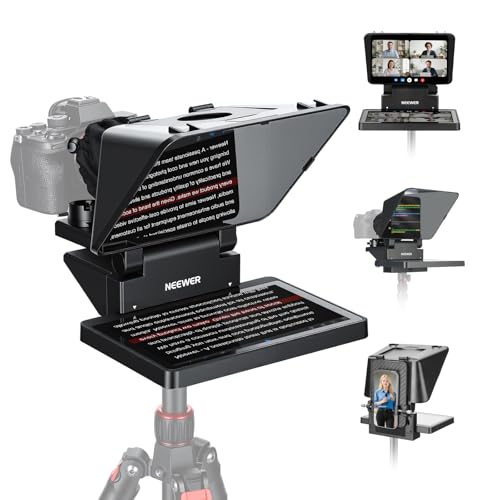
- Built-in 9-inch LCD works without a separate prompt device
- Functions as a second Windows or macOS display
- Supports computer, phone, webcam, and camera setups
Best For: Beginner streamers and flexible home video-conferencing setups
Best Compact Camera Pick

- Supports phones and tablets up to 10 inches
- Includes nine lens adapter rings
- Bluetooth remote and app control
Best For: Compact camera, phone, and tablet recording
Best Built-In Monitor Pick
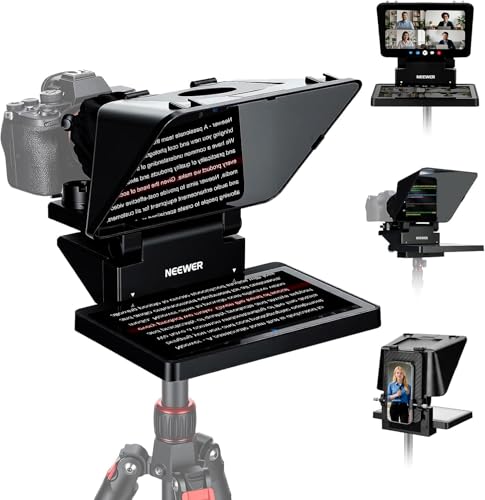
- Built-in monitor works with Windows and macOS
- Supports phone mirroring and webcam setups
- Adjustable mount with Arca quick-release plate
Best For: Laptop streaming and video conferencing
Best Full-Size Pick
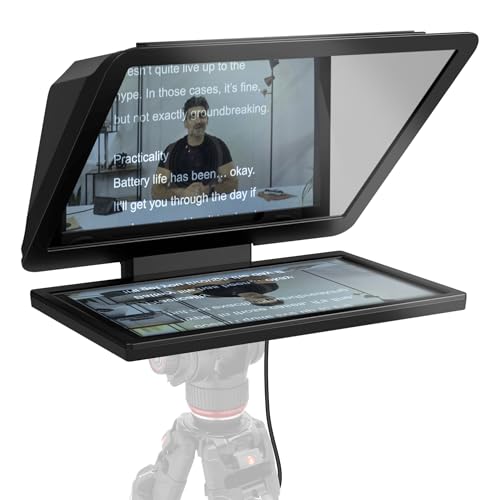
- Large detachable 15.6-inch Full HD display
- Works with DSLR, mirrorless, and studio cameras
- Can double as a spare monitor
Best For: Studio recording and longer-distance reading
Best Laptop-Compatible Monitor Prompter – NEEWER X11
The NEEWER X11 is a practical choice among teleprompters for laptops because its built-in HD monitor can mirror a phone or tablet and also function as a second screen for Windows or macOS. It suits creators who want an integrated setup, though computer connections may require a driver depending on the cable used.
Best For: Laptop-based livestreaming, video conferencing, and creators who want a built-in monitor rather than a separate tablet.
Pros:
- Built-in 9-inch HD monitor supports Windows and macOS as a second screen.
- 11-inch beamsplitter offers a reading distance of up to 2.5 m.
- Includes phone clamp, screen-mirroring cable, and Arca-style quick-release plate.
- Supports lenses with thread sizes up to 72mm and focal lengths from 35–200mm.
Cons:
- Voice sync is not supported.
- HDMI connection requires driver installation, and compatibility depends on the computer port.
- Phone mirroring requires a smartphone that supports DP protocol.
Choose the X11 if integrated laptop or computer-screen functionality matters most. Check your computer ports, lens specifications, and smartphone compatibility before buying.
Best Large-Format Tablet Prompter – NEEWER X14 III
The NEEWER X14 III is a large-format option for teleprompters for laptops and related production setups, using a phone or tablet to display scripts. Its 14-inch beamsplitter, adjustable camera mount, and included Bluetooth remote make it well suited to longer recordings and presentation work.
Best For: Online courses, speeches, tutorials, presentations, and users who prefer a large tablet-based reading area.
Pros:
- 14-inch HD beamsplitter provides a reading range of up to 3 m.
- Included RT113 remote controls scrolling, page turns, font size, and playback through the app.
- Accepts phones and tablets up to 8.7 inches wide.
- Folds flat into the included carry case and requires no assembly.
Cons:
- It relies on a compatible phone or tablet rather than a built-in display.
- At 5.2 pounds, it is heavier than more compact options.
- The remote requires the NEEWER app and Bluetooth pairing.
The X14 III is a strong pick when reading distance and screen size take priority. Its tablet-based design is less convenient if you want a self-contained laptop monitor.
Best Built-In Display for Laptop Prompters – Elgato Prompter
The Elgato Prompter is designed for straightforward computer use, making it one of the most convenient teleprompters for laptops. Its built-in display works like an additional monitor, allowing you to move scripts, chat, or other windows onto the prompter from a PC or Mac.
Best For: Streamers, video-call users, and creators who want to read scripts or Twitch chat while maintaining eye contact.
Pros:
- Built-in display eliminates the need for a separate phone or tablet screen.
- Supports drag-and-drop placement of windows and apps like a monitor.
- Works with PC or Mac and integrates with the Camera Hub app.
- Supports Stream Deck for compatible desktop workflows.
Cons:
- DisplayLink software is required on Mac.
- DisplayLink Presenter software is required for Android use.
- The supplied notes do not specify a reading distance or detailed lens limits.
The Elgato is especially appealing for desktop creators who want software-controlled scripts and chat in one workflow. Verify the required software for your operating system before setup.
Best Tablet-Only Camera Prompter – SMALLRIG 3646
The SMALLRIG 3646 is a tablet-based camera teleprompter for users who already own an iPad or other tablet. It can support tablets up to 11 inches and offers app-based text editing, but it is not a smartphone model and requires a separate 15mm LWS baseplate.
Best For: DSLR, mirrorless, and camcorder users who need tablet-based prompting for livestreams or video conferences.
Pros:
- Accommodates iPads or tablets up to 11 inches.
- Supports reading distances within 5 m or 16.4 ft.
- SmallGoGo app can extract and edit text from PDFs, pictures, Word documents, and TXT files.
- Lens cover supports diameters from 49mm to 95mm, with no vignetting at focal lengths of at least 22mm.
Cons:
- Not compatible with smartphones.
- Must be used with a separately available 15mm LWS baseplate.
- It does not include a built-in display, so a compatible tablet is required.
The SMALLRIG makes sense for camera rigs already built around 15mm rails and an iPad-sized tablet. It is less suitable for laptop-only users or anyone seeking a ready-to-use smartphone solution.
Large-Screen Professional Pick – NEEWER X17 II
If you need a large teleprompter for laptops or other script sources, the NEEWER X17 II provides a 17-inch beamsplitter, a sturdy metal frame, and room for tablets up to 9.3 inches wide. Its included remote and app make hands-free script control practical for recording, streaming, courses, and presentations.
Best For: Creators who want a large, stable teleprompter for cameras, tablets, speeches, or studio-style video work.
Pros:
- 17-inch beamsplitter offers clear script reflection up to 13 feet.
- Integrated, assembly-free design includes sun hoods to reduce light leakage.
- RT113 remote and NEEWER app support pausing, speed changes, and page turns.
- Upgraded quick-release mount supports Manfrotto 501PL and loads up to 44 pounds.
Cons:
- At 6.6 pounds, it is less convenient for lightweight or highly portable setups.
- Its tablet holder is limited to devices up to 9.3 inches wide.
- The unit is not water resistant.
The X17 II is a substantial option when readability and mounting flexibility matter more than compactness. Its large glass and included control accessories make it especially suited to dedicated filming spaces.
Best Computer-Controlled Setup – Elgato Prompter Swivel Mount Bundle
The Elgato Prompter is a strong choice among teleprompters for laptops because its built-in display works like an extra monitor. You can drag a script or another window onto it from a Mac or PC, while Camera Hub adds script, chat, contrast, crosshair, and AI-tracking controls.
Best For: Streamers, video-call users, and creators who prefer controlling prompts from a computer rather than a phone or tablet.
Pros:
- Built-in display eliminates the need for a separate phone or tablet screen.
- Works with Mac and PC computers through desktop control rather than a third-party mobile app.
- Supports cameras, webcams, smartphones, and wide lenses.
- Swivel mount provides 360-degree horizontal and 90-degree upper vertical adjustment.
Cons:
- Maximum supported load is 2 kilograms, limiting heavier camera setups.
- Mac use requires a free DisplayLink software download.
- The arm is relatively substantial, with a 740 mm reach.
This bundle stands out for computer-based workflows. Its integrated display and adjustable arm are convenient for streaming and calls, though users should check software requirements and camera weight before buying.
Best 2-in-1 Monitor Option – NEEWER X11
The NEEWER X11 combines an 11-inch beamsplitter with a built-in 9-inch LCD monitor, making it a practical teleprompter for laptops, cameras, webcams, and phones. It can mirror compatible mobile devices or function as a second computer display for Windows and macOS.
Best For: Beginners and streamers who want one compact unit for prompting, screen mirroring, video conferencing, and external-monitor use.
Pros:
- Built-in 9-inch LCD provides prompts without requiring a separate tablet or phone.
- Can serve as a second Windows or macOS computer display.
- USB-C and HDMI connection options support computer use, with included cables.
- Adjustable Arca-type holder supports horizontal and vertical positioning.
Cons:
- Some HDMI and USB-A setups require a driver installation.
- Mobile mirroring requires an iPhone or Android phone with DP protocol support.
- Its 2-kilogram load limit may not suit heavier camera rigs.
The X11 offers more connection flexibility than a basic phone-based prompter. It is particularly useful if you want a built-in screen and occasional laptop-monitor functionality, but compatibility requirements should be checked in advance.
Best Compact Camera Pick – Desview T3
The Desview T3 is a practical choice for creators seeking teleprompters for laptops, phones, or compact tablets. It supports devices up to 10 inches, mounts to many DSLR and mirrorless lenses, and includes a Bluetooth remote for controlling scripts from iOS or Android.
Best For: YouTube creators, interview setups, TikTok and short-form video, and camera users who need a compact prompter.
Pros:
- Supports smartphones and tablets up to 10 inches.
- Includes nine adapter rings for lenses from 49mm to 82mm.
- 70/30 beam-splitter glass offers up to 97% light transmittance.
- Bluetooth remote supports scrolling, play/pause, and speed adjustments through the DESVIEW app.
Cons:
- Not designed for 12.9-inch iPads or cameras without lens filter threads.
- For vertical shooting, lenses generally need a focal length of at least 35mm to avoid seeing the prompter frame.
The T3 balances portability and camera compatibility well, but laptop users should confirm that their screen or device fits the front clamp. Its optical glass and included remote make it especially useful for straightforward solo recording.
Best Built-In Monitor Pick – NEEWER X11
The NEEWER X11 stands out among teleprompters for laptops because its built-in monitor can work as a second screen for Windows or macOS computers. It also supports phone mirroring and includes a camera mount, making it a flexible option for streaming, video calls, and scripted presentations.
Best For: Laptop-based broadcasting, video conferencing, live streaming, and users who want an integrated monitor instead of a separate tablet.
Pros:
- Built-in HD LCD monitor can mirror scripts or serve as a computer second screen.
- Supports Windows and macOS connections, with USB-C and USB-A/HDMI cable options.
- Includes an adjustable camera holder and Arca-type quick-release plate.
- Works with phones, webcams, and cameras for varied recording setups.
Cons:
- Computer connections may require driver installation, depending on the cable and port used.
- Camera compatibility is limited to lenses with thread sizes up to 72mm and focal lengths from 35mm to 200mm.
- Voice sync is not supported.
The X11 is the most directly laptop-oriented option in this group, thanks to its second-monitor functionality. Check your computer ports, DP support for phone mirroring, and lens specifications before buying.
Best Full-Size Pick – Elgato Prompter XL
The Elgato Prompter XL is a full-sized option for creators who need a larger reading area than compact teleprompters for laptops provide. Its detachable 15.6-inch Full HD display is designed for comfortable script reading at a distance and can also serve as a spare monitor for calls or multitasking.
Best For: Studio creators, DSLR and mirrorless camera setups, longer reading distances, and users who want a detachable secondary display.
Pros:
- Large 15.6-inch Full HD display provides a spacious script area.
- Detachable screen can be used for video conferencing and multitasking.
- Designed to fit DSLR, mirrorless, and studio camera setups.
- Voice Sync can scroll at the speaker’s natural pace with compatible hardware.
Cons:
- At 7.43 pounds, it is substantially heavier than the compact options.
- Voice Sync requires an NVIDIA RTX GPU or Apple M1 chip or better.
- Its full-size design may be excessive for small or highly portable setups.
The Prompter XL is aimed at a more permanent or studio-style workspace rather than lightweight travel. Its large display and removable-monitor design make it compelling when readability and multitasking matter more than portability.
How We Picked the Best Teleprompters for Laptops
We compared these teleprompters by looking at the factors that most affect real-world laptop recording: display compatibility, viewing area, camera and webcam support, mounting flexibility, portability, remote or app control, and ease of setup. We also considered whether each design is best suited to casual video calls, online courses, streaming, interviews, or more controlled studio production.
Compatibility is especially important because some models use a laptop, tablet, or phone as the script display, while others include a dedicated monitor. A teleprompter that works well with a DSLR may not be the most convenient choice for a laptop webcam, so match the product design to your camera position before buying.
Quick Comparison
- Best for laptop and webcam flexibility: Choose a 2-in-1 model with a monitor or support for multiple display sources.
- Best for larger reading distance: Consider a 14-inch or 17-inch beamsplitter design.
- Best integrated desktop option: Elgato Prompter models offer a purpose-built screen and streamlined computer setup.
- Best for tablet users: A tablet-compatible prompter can provide a larger script display without requiring a dedicated monitor.
- Best for compact camera rigs: Look for a lightweight unit with broad device compatibility and a Bluetooth remote.
Key Buying Factors for Teleprompters for Laptops
Display and Reading Size
A larger display is easier to read from farther away and lets you use bigger text, but it also adds weight and desk space. An 11-inch unit is often sufficient for close webcam recording, while 14-inch and 17-inch models are better for full-body shots, interviews, or presenters positioned several feet from the camera.
Camera, Webcam, and Laptop Compatibility
Check how the prompter mounts in front of your lens and whether its opening accommodates your webcam, mirrorless camera, DSLR, or smartphone. Laptop users should also confirm that the screen can sit at a usable angle behind the beamsplitter rather than being blocked by the monitor or mount.
Glass Quality and Viewing Angle
Beamsplitter glass affects text clarity, reflections, and how naturally you can maintain eye contact. Wide-angle designs are useful for webcams and cameras with broader lenses, while a deeper hood can help reduce glare in bright rooms.
Controls and Setup
Remote controls and app support make it easier to pause, adjust speed, or reposition text without touching the computer. If you record frequently, prioritize quick mounting, adjustable framing, and a design that does not require extensive disassembly.
Who Should Buy Which Teleprompters for Laptops?
Remote workers and online presenters should prioritize compact models that fit a laptop webcam and can be stored easily. Streamers and educators may prefer an integrated monitor or tablet-compatible design for longer scripts and repeatable desktop use. Interviewers and content creators should look for a larger beamsplitter, flexible camera mounting, and remote control. Studio and professional video teams will benefit from full-sized models with a generous reading area, sturdy mounting, and enough distance for comfortable delivery.
Before buying, measure your laptop, webcam or camera, lens, and available desk space. The best choice is not necessarily the largest model; it is the one that places readable text close to the lens while keeping your camera stable and your recording workflow simple.