A good microphone boom arm clears desk space, positions your mic consistently, and makes streaming, podcasting, or recording more comfortable. The right model depends on your microphone’s weight, your desk thickness, and how much reach you need.
We compared 10 popular microphone boom arms for desk setups, including low-profile designs, cable-managed arms, and versatile options for Blue Yeti, HyperX, FIFINE, Shure, and other microphones.
Best 10 Microphone Boom Arms for Desk Picks for 2026
Best Adjustable Classic
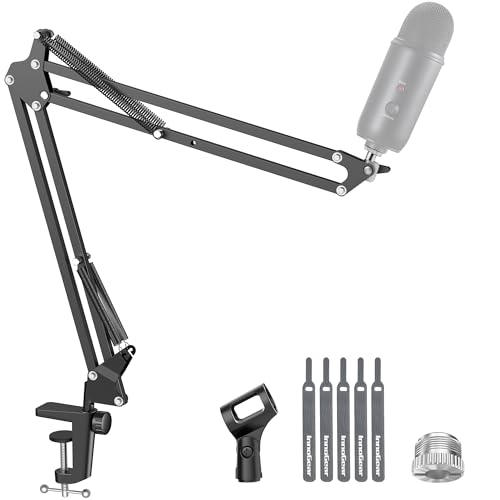
- 360-degree rotating base and multi-angle adjustment
- Steel construction supports up to 3.3 pounds
- Folds away and includes microphone adapters
Best For: Flat-edge desks and everyday gaming, streaming, or recording
Best Low-Profile Design

- Sits beneath a monitor to preserve screen visibility
- Hidden channels manage USB and XLR cables
- Aluminum arm supports up to 3.3 pounds
Best For: Clean, monitor-friendly podcasting and streaming desks
Best for Heavy Microphones

- 3.5-pound capacity handles larger microphones
- Extension riser provides up to 37.4 inches of vertical reach
- Built-in channels conceal microphone cables
Best For: Heavy microphones and extended-reach streaming setups
Best Low-Profile Value

- Low-profile design keeps the monitor view clear
- All-metal build with up to 29 inches of reach
- Includes 1/4-inch, 3/8-inch, and 5/8-inch adapters
Best For: Stable gaming and streaming setups with limited desk space
Best Value Standard Setup
Amazon Basics Adjustable Boom Arm

- Supports up to 1.5 kg with adjusted tension
- Includes pop filter and foam windscreen
- Clamp fits desks up to 2 inches thick
Best For: Standard microphones and basic recording setups
Best for QuadCast and Yeti Mics

- Designed for QuadCast, Yeti, and many other mics
- Dual springs and reinforced knobs support positioning
- Includes 3/8-to-5/8-inch adapter
Best For: Gaming and streaming microphones up to 1.4 kg
Best for Flexible Positioning
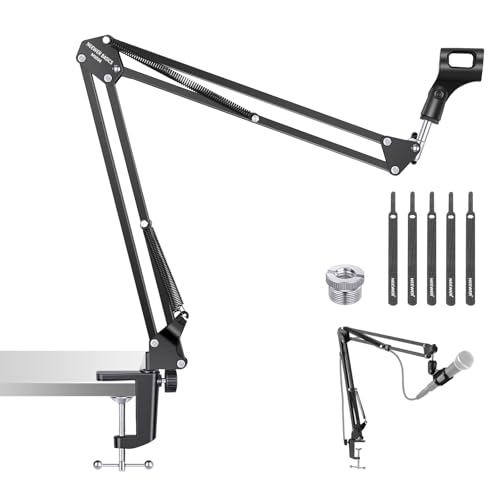
- Offers broad horizontal and vertical adjustment
- Supports microphones up to 1.5 kg
- Foldable design and protective desk clamp pads
Best For: Flexible streaming, podcasting, and recording positions
Best Overhead Extension

- 31.5-inch riser clears monitors
- Supports microphones up to 2.6 pounds
- Includes multiple thread adapters
Best For: Overhead recording and monitor-heavy desks
Best Balanced Value

- Supports up to 1 kilogram
- Protective clamp fits desks up to 2.2 inches
- Includes clip, adapter, and cable straps
Best For: Everyday podcasting, gaming, and streaming
Best Simple Pick

- Low center of gravity improves stability
- 360-degree arm rotation and 180-degree swing
- Supports loads up to 2 kilograms
Best For: Discreet gaming and streaming desks
Best Adjustable Classic – InnoGear MU01 Mic Boom Arm
If you need microphone boom arms for desk setups with straightforward adjustment and dependable support, the InnoGear MU01 is a practical clamp-on option. Its steel construction supports microphones weighing up to 3.3 pounds, while the rotating base and multiple adjustment points make positioning simple.
Best For: Gamers, streamers, and recording setups using a flat desk edge up to 2 inches thick.
Pros:
- 360-degree base rotation, 135-degree back-and-forth extension, and 180-degree vertical movement.
- Supports up to 3.3 pounds with a steel body and strong springs.
- Folds away for more compact storage when not in use.
- Includes a standard microphone clip and 3/8-inch to 5/8-inch adapter for broad microphone compatibility.
Cons:
- The clamp requires a flat, squared desk edge rather than a slanted or curved surface.
- A shock mount is not included.
The MU01 is a sensible choice when you want a traditional, adjustable microphone arm without a complicated installation. Its main limitation is desk-edge compatibility, so measure your workspace before buying.
Best Low-Profile Design – NEEWER MS007 Desk Boom Arm
The NEEWER MS007 is one of the more workspace-conscious microphone boom arms for desk use. Its low-profile dual-arm design can sit beneath a monitor, while integrated cable channels help keep USB and XLR wiring contained during recording, streaming, or calls.
Best For: Creators who want a low-profile arm that preserves monitor visibility and keeps cables organized.
Pros:
- Low-profile design helps avoid blocking the screen, camera view, or desk area.
- Aluminum construction supports up to 3.3 pounds, with a damping hinge to reduce wobble.
- Offers 360-degree horizontal rotation, 100-degree tilt, and a swiveling ball head.
- Built-in cable channels and included straps help manage USB and XLR cables.
Cons:
- The C-clamp fits desks from 0.4 to 2.4 inches, so unusually thick desks may not work.
- Its flat-base, multi-part design weighs more than some basic clamp arms.
Choose the MS007 if keeping the area beneath your monitor clear matters as much as microphone positioning. Its broad thread compatibility also makes it useful for mounts, phone holders, lights, and small cameras.
Best for Heavy Microphones – InnoGear MU-PSA28 Mic Arm
For microphone boom arms for desk setups that need extra reach and cable control, the InnoGear MU-PSA28 is built for larger microphones. Its reinforced steel arm supports up to 3.5 pounds, and the included riser helps extend the microphone over taller monitors.
Best For: Blue Yeti, Shure SM7B, and other heavier microphones used in streaming, podcasting, or studio recording.
Pros:
- Supports up to 3.5 pounds with thickened steel and internal springs.
- Reaches up to 32.3 inches horizontally and 37.4 inches vertically with the extension riser.
- Built-in cable channels and removable rubber covers create a cleaner setup.
- Provides 360-degree base rotation, 135-degree horizontal movement, and 180-degree vertical adjustment.
Cons:
- The clamp fits desks up to 2 inches thick, limiting compatibility with thicker tops.
- A shock mount is not included.
The MU-PSA28 is a strong fit when a basic arm lacks the capacity or reach you need. Its cable covers and extension riser add practical value, especially for monitor-mounted streaming stations.
Best Low-Profile Value – FIFINE BM88 Boom Arm Stand
The FIFINE BM88 combines a low-profile shape with broad positioning range, making it a useful choice among microphone boom arms for desk recording and gaming. Its all-metal construction is designed to stay steady, while hidden cable management keeps the desktop more orderly.
Best For: Gaming and streaming desks where monitor clearance, stability, and flexible microphone placement are priorities.
Pros:
- Low-profile arm extends from beneath the screen without obstructing the monitor view.
- All-metal construction and a stable C-clamp are designed to reduce wobble.
- Offers up to 29 inches of extension, 360-degree horizontal adjustment, and 220-degree vertical movement.
- Includes 1/4-inch, 3/8-inch, and 5/8-inch thread options through its adapters.
Cons:
- The clamp is intended for desks from 0.8 to 2.4 inches thick.
- The section nearest the C-clamp cannot be adjusted vertically.
- The microphone itself is not included.
The BM88 is a practical low-profile option for users who want a clear monitor view without giving up reach. Its included adapters simplify setup, though the fixed section near the clamp may limit some positioning angles.
Best Value Standard Setup – Amazon Basics Adjustable Boom Arm
If you need microphone boom arms for desk recording, the Amazon Basics adjustable model offers a straightforward clamp-mounted setup for standard microphones. Its adjustable tension, metal-alloy construction, pop filter, and windscreen make it a practical option for basic recording, streaming, and calls.
Best For: Standard microphones and users who want included accessories for reducing plosives and wind noise.
Pros:
- Supports microphones weighing up to 1.5 kg when properly adjusted.
- Includes a dual-layer pop filter and foam windscreen.
- Clamp fits desks up to 2 inches thick.
- Includes a screw adapter and mic clip with 3/8- and 5/8-inch thread compatibility.
Cons:
- Performance can vary with heavier microphones, shock mounts, or added accessories.
- Fully extended or unevenly loaded positions may require extra tension adjustment.
- Correct clamp tightening is important for a stable base.
This is a sensible choice for a conventional desk microphone setup, especially if the included pop filter and windscreen are useful to you. Users with especially heavy or extended setups should pay close attention to load distribution and tension.
Best for QuadCast and Yeti Mics – SUNMON QuadCast Boom Arm
Among microphone boom arms for desk use, the SUNMON QuadCast Boom Arm is designed around popular gaming and streaming microphones such as the HyperX QuadCast and Blue Yeti. Its dual suspension springs, reinforced knobs, and included 3/8-to-5/8-inch adapter support flexible positioning while helping limit shaking and sinking.
Best For: HyperX QuadCast, Blue Yeti, SoloCast, Shure, Fifine, Rode, and other compatible microphones up to 1.4 kg.
Pros:
- Lists compatibility with a wide range of popular microphones.
- Dual suspension springs and reinforced knobs help hold position.
- Includes a pre-installed 3/8-to-5/8-inch adapter.
- Desk clamp fits surfaces up to 1.89 inches thick and has protective sponge padding.
Cons:
- Microphone is not included.
- Proper knob adjustment is needed before and after installing the microphone.
- Its maximum recommended load is 1.4 kg, so heavier setups may not be suitable.
This arm is a focused option for streamers using the listed microphone families. Its compatibility and adapter are convenient, while the clamp thickness and 1.4 kg load limit should be checked against your desk and complete microphone setup.
Best for Flexible Positioning – NEEWER BASICS MS006 Boom Arm
The NEEWER BASICS MS006 is one of the more flexible microphone boom arms for desk setups, with broad horizontal and vertical adjustment plus a rotating microphone clip. Its foldable iron design is suited to streaming, podcasting, calls, teaching, and recording where easy repositioning and compact storage matter.
Best For: Users who want wide positioning control and a foldable arm for microphones up to 1.5 kg.
Pros:
- Base rotates 360 degrees horizontally and adjusts 135 degrees vertically.
- Mic clip rotates 270 degrees for fine positioning.
- Supports up to 1.5 kg and includes a 3/8-to-5/8-inch adapter.
- Clamp fits flat desks up to 2 inches thick and includes nonslip protective pads.
Cons:
- Clamp works best on a flat desk edge rather than a sloped or curved surface.
- Hand-tightening knobs must be secured to maintain stability.
- Included accessories are focused on essentials rather than extras such as a pop filter.
The MS006 stands out for adjustment range and compact foldability. It is a strong fit for changing camera, speaking, or recording positions, provided your desk edge is flat and the microphone remains within the 1.5 kg load limit.
Best Overhead Extension – High-Rise Mic Boom Arm
For creators searching for microphone boom arms for desk setups that can clear a monitor, this overhead model stands out with a 31.5-inch extension riser. Its heavy-duty steel construction, broad adjustment range, and included adapters make it suited to elevated podcasting, streaming, and recording positions.
Best For: Overhead microphone placement, standing or seated recording, and setups where monitor clearance matters.
Pros:
- 31.5-inch riser can extend over monitors without blocking screens.
- Heavy-duty steel construction and clamps support microphones up to 2.6 pounds.
- Tool-less adjustments allow quick height and angle changes.
- Adapters support 1/4-inch, 3/8-inch, and 5/8-inch microphone threads.
Cons:
- Its tall overhead design may be more substantial than needed for compact desks.
- The clamp fits desks up to 4.2 inches thick, so unusually thick surfaces may be unsuitable.
This is a strong choice when vertical reach and monitor clearance are higher priorities than a minimal footprint. The 2.6-pound weight rating should still be checked against your microphone and shock mount combination.
Best Balanced Value – MAONO BA20 Metal Boom Arm
The MAONO BA20 is one of the more straightforward microphone boom arms for desk users who want stable positioning without an oversized overhead structure. Its steel construction, spring design, adjustable joints, and 1-kilogram load rating fit podcasting, gaming, streaming, and recording applications.
Best For: Everyday desk recording, streaming, and gaming with microphones weighing up to 2.2 pounds.
Pros:
- Steel construction and springs support up to 1 kilogram.
- Angle and height can be adjusted by loosening the knobs.
- Upgraded clamp fits desks up to 2.2 inches thick and includes a protective rubber pad.
- Includes a 3/8-inch-to-5/8-inch adapter, microphone clip, and cable straps.
Cons:
- Not recommended for microphones over 1 kilogram.
- May not work with glass tables.
- Its clamp has a smaller maximum desk thickness than some larger arms.
Choose the BA20 if you want a conventional, adjustable arm with a clearly stated weight limit and a desk-friendly clamp. It offers broad compatibility, but verify both desk material and microphone weight before buying.
Best Simple Pick – Aokeo AK-58i Mic Arm
The Aokeo AK-58i is a practical option among microphone boom arms for desk users who want a lower visual profile. Its low center of gravity is designed to improve stability, while the arm can rotate and swing to position a microphone below the monitor area and help keep the cable concealed.
Best For: Gaming, streaming, and recording desks where a discreet arm and stable low placement are priorities.
Pros:
- Low-profile design reduces visual distraction and lowers the center of gravity.
- Arms rotate 360 degrees, with the microphone arm also swinging 180 degrees vertically.
- Supports microphones or shock mounts up to 2 kilograms.
- Includes 1/4-inch, 3/8-inch, and 5/8-inch thread adapters.
Cons:
- Maximum height is 30 centimeters, making it less suitable for elevated overhead placement.
- Fits tables less than 7 centimeters thick, which excludes some thicker desks.
- The package does not include a microphone.
The AK-58i makes the most sense when you want the arm to stay visually unobtrusive rather than rise above your monitor. Its 2-kilogram capacity and broad thread compatibility cover many microphones, while the lower profile keeps the setup tidy.
How We Picked the Best Microphone Boom Arms for Desk Setups
We focused on the factors that most affect everyday use: clamp stability, weight capacity, arm reach, adjustment range, mounting compatibility, cable management, and installation. We also considered whether an arm suits compact desks, gaming setups, podcast stations, or heavier broadcast microphones.
Compatibility claims can vary by microphone and adapter, so check your mic’s thread size and total weight before ordering. A supplied 3/8-inch-to-5/8-inch adapter is useful, but it does not replace checking the arm’s actual load rating.
Quick Comparison
| Best For | Look For | Why It Matters |
|---|---|---|
| Gaming and streaming | Easy positioning and cable routing | Faster adjustments and a cleaner setup |
| Small desks | Low-profile arm and compact clamp | Preserves monitor and keyboard space |
| Heavy microphones | Strong springs, firm joints, and high capacity | Helps prevent sagging or drifting |
| Podcasting and recording | Quiet movement and broad reach | Makes mic placement more consistent |
Key Buying Factors for Microphone Boom Arms for Desk
Desk Clamp and Stability
Measure your desk thickness and inspect the available clamping area. A wide, padded clamp generally provides better stability and protects the desktop. Avoid mounting directly over fragile edges or surfaces that flex.
Weight Capacity and Balance
Match the arm to the microphone, shock mount, pop filter, and any added accessories—not just the mic alone. Heavier broadcast microphones may need a reinforced arm or a riser extension to maintain smooth positioning.
Reach, Height, and Profile
Choose enough horizontal reach to place the mic near your mouth without blocking the screen. Low-profile arms work well beneath monitors, while taller or overhead designs offer more clearance for larger desks and standing setups.
Threads, Adapters, and Cable Management
Confirm whether your microphone uses a 3/8-inch or 5/8-inch connection and whether the required adapter is included. Integrated clips or channels keep the cable from snagging and reduce visual clutter, although they may be less flexible with unusually thick cables.
Who Should Buy Which Microphone Boom Arms for Desk?
Choose a low-profile arm if you have limited desk depth or want the microphone to sit below your monitor. Choose a cable-managed model if a tidy streaming or office setup matters most. Choose a heavy-duty arm with extra reach for broadcast microphones, large shock mounts, or frequent repositioning. Choose a simpler adjustable stand if you use a standard microphone and want an affordable, straightforward upgrade.
Before buying, verify the clamp opening, arm dimensions, microphone weight, thread compatibility, and return policy. Tighten the clamp securely, balance the arm gradually, and keep the microphone close enough for clear audio without forcing the joints beyond their intended range.