The best headphone stands with cable organizers do more than keep a headset within reach. They help protect ear cups, reduce desk clutter, and give charging or audio cables a defined place to go.
This roundup covers compact adhesive hooks, clamp-on hangers, weighted metal stands, charging models, and multi-device organizers. Use the guide below to match the design, capacity, and cable management features to your setup.
Best 10 Headphone Stands with Cable Organizers Picks for 2026
Best All-in-One Storage
KDD Headphone Stand with Drawer

- Drawer adds storage for small accessories
- Two cable organizers reduce desk clutter
- Holds a headset and two controllers
Best For: Gaming desks needing integrated storage and cable organization
Best Powered Desk Hub
cozoo Headphone Stand with Charger

- Three USB ports include USB-C charging
- Two AC outlets support connected equipment
- Combines headset storage with a power strip
Best For: Gaming and tech desks that need charging close at hand
Best Simple Cable Holder
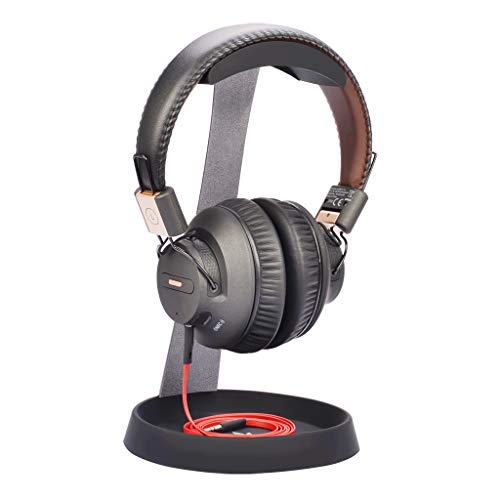
- Steel construction offers a stable base
- Silicone cable holder helps manage cords
- Supports headbands up to 4 cm wide
Best For: Users wanting a durable, no-frills stand with cable storage
Best Above-or-Under-Desk Option
NEETTO HS906 2-in-1 Headphone Holder

- Works as a stand or under-desk hanger
- Rotates 360 degrees for easier access
- Adjustable clamp fits surfaces up to 1.97 inches
Best For: Compact desks needing flexible, space-saving headphone storage
Best Wooden-Aluminum Stand

- Stable aluminum-and-wood construction
- 12-inch profile for larger headphones
- Cable holder can also hold a phone
Best For: Desks needing a sturdy, display-friendly headphone stand
Best Adhesive Hook

- Rotates 360 degrees for flexible placement
- Detachable silicone cable organizer
- Supports loads up to 500 g
Best For: Compact desks with smooth surfaces and limited space
Best Gaming Organizer

- Stores a headset and controllers together
- Vertical design helps organize the desk
- Aluminum alloy body with four tiers
Best For: Gaming setups that need consolidated controller and headset storage
Best Clamp-On Pick
Rotating Adjustable Headphone Hanger

- Clamp fits desks up to 1.57 inches thick
- 360-degree swivel arm tucks under the desk
- Built-in cable clip organizes wired headsets
Best For: Compact gaming and office desks
Best 2-in-1 Value
Acrylic Headphone and Phone Stand

- Rear organizer wraps excess headphone cords
- Also holds compatible phones and tablets
- Detachable, lightweight transparent acrylic design
Best For: Organized multimedia desktops
Best Simple Pick

- Holds headsets and popular console controllers
- Weighted anti-slip base improves stability
- Includes charger cable organization
Best For: Multi-console gaming stations
Best All-in-One Storage – KDD Headphone Stand with Drawer
If you want headphone stands with cable organizers plus storage for other desk gear, the KDD stand combines several useful features in one compact tower. Its drawer, cable organizers, controller supports, and device groove make it suited to gaming and workstations that need better organization.
Best For: Gamers and desk users who want headphone, controller, cable, and accessory storage in one stand.
Pros:
- Built-in drawer stores chargers, remotes, pens, power banks, and other small accessories.
- Two cable organizers help keep headset and controller cables orderly.
- Aluminum construction and silicone pads provide a sturdy, scratch-conscious design.
- Can hold one headset, two controllers, and a smartphone, iPad, or Switch 2.
Cons:
- Its multiple storage features may be more than needed for a simple headphone-only setup.
- The supplied notes do not specify the drawer or stand’s exact weight capacity.
The KDD is a practical choice when desktop organization matters as much as headphone storage. Choose it if you will use the drawer and controller supports; otherwise, a simpler stand may take up less space.
Best Powered Desk Hub – cozoo Headphone Stand with Charger
Among headphone stands with cable organizers, the cozoo model stands out by combining headset storage with charging and power outlets. It is designed for users who want to reduce desk clutter while keeping phones, tablets, laptops, and gaming equipment powered nearby.
Best For: Gamers and tech-focused desk users who need a headphone stand with USB charging and AC outlets.
Pros:
- Includes three USB charging ports, including USB-C, plus two AC outlets.
- USB ports support automatic device detection and charging up to 2.4 amps.
- Combines headphone storage and a power strip in one desktop accessory.
- Includes stated protection against overload, short circuits, and over-current conditions.
Cons:
- Its power-strip design may be unnecessary if your desk already has convenient charging access.
- The supplied notes do not describe a dedicated cable-organizer feature in detail.
- It has a larger footprint than a basic headphone stand.
The cozoo is best viewed as a powered workstation accessory rather than a minimal hanger. It makes sense for cluttered gaming setups with several devices to charge, but less so for users who only need cable organization.
Best Simple Cable Holder – Avantree HS102 Metal Stand
The Avantree HS102 is a straightforward option for shoppers seeking headphone stands with cable organizers without adding drawers, charging ports, or extra compartments. Its steel frame supports the headset while a silicone holder at the base helps manage a cable or hold a phone.
Best For: Work or gaming desks that need a compact, durable headphone stand with basic cable management.
Pros:
- Solid steel construction provides a stable desktop base.
- Silicone top padding helps protect the headphone band.
- Bottom silicone cable holder keeps a cable accessible and organized.
- Designed for headbands up to 4 cm wide and headphones up to 25 cm tall.
Cons:
- It has no drawer, charging ports, or controller storage.
- Compatibility depends on staying within the stated headband and height measurements.
- The stand has no fastening mechanism, so it is not secured to the desk.
The HS102 suits buyers who prefer a simple metal stand with a useful cable holder. Check your headset dimensions before buying, especially if you use a wide headband or oversized model.
Best Above-or-Under-Desk Option – NEETTO HS906 2-in-1 Headphone Holder
The NEETTO HS906 takes a different approach to headphone stands with cable organizers by working either as a desktop stand or an under-desk hanger. Its adjustable, rotating clamp helps move the headset out of the way while the cable clip keeps related cords easier to manage.
Best For: Users with limited desk space who want a height-adjustable headphone holder that can mount above or below the desk.
Pros:
- Two-in-one design works as a stand or an under-desk hanger.
- Height adjusts from 6.5 to 10.2 inches for different placements.
- 360-degree rotation brings an under-desk headset forward when needed.
- Tool-free clamp fits tabletops or shelves up to 1.97 inches thick and uses protective silicone pads.
Cons:
- Clamp mounting is not suitable for users who want a freestanding-only design.
- It is rated for headphones and other items under 5 kg, so heavier equipment should be avoided.
- The clamp requires an accessible table edge or horizontal shelf.
The HS906 is a flexible space-saving choice for compact workstations. Its rotating clamp is particularly useful when you want to hide a headset under the desk but still bring it within easy reach.
Best Wooden-Aluminum Stand – Tall Cable-Holder Design
If you want headphone stands with cable organizers that also look at home in a professional workspace, the Avantree TR902 combines a solid aluminum-and-wood construction with a generously sized wooden cable holder. Its taller profile is designed to support larger, heavier headphones while keeping the desk area clear.
Best For: Users who want a freestanding, premium-looking stand for larger headphones, with space to manage cables or hold a phone.
Pros:
- Solid aluminum alloy and wood construction provides a stable base.
- Tall 12-inch design accommodates headphones up to 30.5 cm tall.
- Large wooden cable holder helps with balance and can hold a phone.
- Suitable for desks, workspaces, and gaming setups.
Cons:
- Freestanding design takes up more desk space than an adhesive hanger.
- Designed for headbands measuring up to 5 cm.
The TR902 is a strong choice when stability, height, and desk presentation matter more than having the smallest possible footprint. Its wood-and-aluminum finish also makes it a versatile fit beyond gaming setups.
Best Adhesive Hook – Rotating Cable Organizer
For compact headphone stands with cable organizers, the Lamicall adhesive hanger keeps headphones off the desk without requiring a freestanding base. Its dual 360-degree rotating arm can be mounted under a table, on a desktop, or on the side of a smooth cabinet.
Best For: Small workstations and gaming desks where saving surface space and routing a headphone cable are priorities.
Pros:
- Dual 360-degree rotation supports flexible positioning.
- Detachable silicone organizer helps manage the headphone cable.
- Adhesive installation works on smooth, dry, oil-free surfaces.
- Silicone protection helps prevent scratches on the headband.
Cons:
- Adhesive mounting requires 24 hours before hanging headphones.
- Maximum stated load is 500 g.
- Not suitable for rough, wet, or oily mounting surfaces.
This hanger is a practical space-saving alternative to a desktop stand. Confirm the mounting surface and allow the adhesive to set fully before use, especially with heavier headsets.
Best Gaming Organizer – Four-Tier Controller Stand
The Kytok is a gaming-focused option among headphone stands with cable organizers, combining a vertical headset holder with four tiers for organizing controllers and gaming accessories. Its aluminum alloy body is designed to keep a console setup orderly without adding a separate headphone hanger.
Best For: Gamers who want one organizer for a headset and multiple controllers across Xbox, PlayStation, or Nintendo Switch setups.
Pros:
- Combines a headphone holder with a four-tier controller organizer.
- Vertical layout helps avoid taking up extra horizontal space.
- Aluminum alloy construction is designed for stability and durability.
- Detachable design and four-step installation support straightforward setup.
Cons:
- Larger footprint than a single-purpose headphone hanger.
- Its gamer-oriented design may be more than needed for a basic desk setup.
- The supplied notes describe organization for controllers and a headset but do not specify a separate cable-management channel.
Choose the Kytok when consolidating gaming gear is more important than having a minimal headphone-only stand. It is especially useful for keeping controllers accessible while storing the headset vertically.
Best Clamp-On Pick – Rotating Adjustable Headphone Hanger
If you want headphone stands with cable organizers without giving up desk space, this clamp-on EURPMASK holder is a practical option. It attaches to surfaces from 0.31 to 1.57 inches thick, rotates 360 degrees, and can tuck under the desk when not in use.
Best For: Gamers and office users who want an under-desk or edge-mounted headphone holder with flexible positioning.
Pros:
- Clamp fits desks from 0.31 to 1.57 inches thick and removes without glue or residue.
- 360-degree swivel arm provides convenient access and lets the holder move under the desk.
- Built-in cable clip helps keep wired headset cords organized.
- Soft rubber pads and curved edges help protect the headset and desk surface.
Cons:
- Clamp-on mounting is less suitable for users who prefer a freestanding tabletop stand.
- It holds headphones or other small items, but does not provide dedicated controller storage.
Choose this model when adjustable placement and a small footprint matter most. Its rotating arm and cable clip make it especially useful for compact gaming or workstations.
Best 2-in-1 Value – Acrylic Headphone and Phone Stand
This transparent acrylic stand combines headphone storage with a cellphone or tablet holder, making it a space-saving choice among headphone stands with cable organizers. Its rear organizer wraps excess cord around the stand, while the detachable design is easy to install and transport.
Best For: Users who want a visible desktop display stand that also holds a phone or small tablet.
Pros:
- Rear cable organizer helps wrap and control long headphone cords.
- 2-in-1 design holds headphones plus compatible phones or tablets.
- Detachable, lightweight construction is convenient to install and carry.
- About 10 inches tall and compatible with many listed headphone models.
Cons:
- Desktop footprint is larger than a clamp-on holder.
- Acrylic construction may be less suited to users seeking a heavy-duty metal stand.
- The cable feature wraps cords but is not described as a clip-style organizer.
This is a good fit for a neat, display-oriented workstation where a second device holder adds value. The transparent acrylic finish keeps the stand visually unobtrusive while providing practical organization.
Best Simple Pick – Controller and Headset Stand
For multi-console setups, this desktop organizer expands beyond headphone storage. It holds an over-ear headset and gaming controllers, with a weighted anti-slip base and a charger cable organizer to help keep a busy gaming desk orderly.
Best For: Gamers who need one compact stand for a headset, controllers, and charging-cable organization.
Pros:
- Designed to hold most PS5, PS4, Xbox, and Switch controllers along with over-ear headsets.
- Weighted base with anti-slip padding helps prevent wobbling and desk scratches.
- Charger cable organizer supports a tidier gaming station.
- No-tools-needed snap-together assembly takes seconds.
Cons:
- Its multi-device design occupies more desk space than a single headphone hanger.
- The supplied notes do not specify the exact number of controllers it can hold.
- It is a tabletop stand, so it cannot be tucked under a desk like a clamp-on model.
This stand makes the most sense when headset storage is only part of your organization problem. Its stable base and broad gaming compatibility provide a centralized home for commonly used controllers and headphones.
How We Picked the Best Headphone Stands with Cable Organizers
We focused on the features that matter after installation: stability, headphone support, cable routing, footprint, materials, and compatibility with common desk and gaming setups. The selection includes freestanding, under-desk, clamp-on, adhesive, and multi-purpose designs so you can compare different approaches rather than one stand style.
We also considered practical extras such as drawers, controller storage, charging ports, phone holders, rotation, and adjustable positioning. A useful stand should make daily storage easier without taking up more space than it saves.
Quick Comparison
- Best for a simple desk setup: Choose a compact metal or aluminum stand with an integrated cable channel.
- Best for gaming stations: Look for controller storage, charging support, or multiple device tiers.
- Best for limited desk space: An adhesive, under-desk, or clamp-on hanger keeps the desktop clear.
- Best for a polished workspace: Wood-and-aluminum designs can blend more naturally with office furniture.
- Best for charging: Select a model with clearly accessible ports and enough clearance for your cable ends.
Key Buying Factors for Headphone Stands with Cable Organizers
Stability and Construction
Check the base width, weight, and surface grip, especially if you regularly remove a heavy gaming headset with one hand. Metal supports are generally durable, while a weighted base helps prevent tipping. For clamp-on models, verify the desk thickness range before ordering.
Storage Location and Footprint
Measure the available area beneath or beside your monitor. Freestanding stands are easy to move but use valuable desktop space. Under-desk and adhesive options preserve room, although adhesive mounting requires a clean, suitable surface and careful positioning.
Cable Management
Look for a channel, hook, slot, or organizer that keeps the cable from falling behind the desk. Make sure it accommodates your cable thickness and leaves enough slack to connect the headset without pulling on the plug.
Headset and Device Compatibility
Confirm that the hanger is wide and tall enough for your headband and ear cups. If you want to store controllers, phones, or multiple headsets, check each tier’s spacing and stated capacity rather than relying on product photos.
Who Should Buy Which Headphone Stands with Cable Organizers?
Choose a freestanding metal stand if you want quick setup, easy relocation, and dependable everyday storage. Choose a charging stand if your headset, phone, or gaming accessories frequently need power nearby. Choose an under-desk or adhesive hanger when preserving desktop space is the priority. Choose a multi-tier controller and headset organizer for a console station with several accessories. Finally, choose a wood-and-aluminum model if appearance matters as much as cable control in a home office.