A reliable wireless video link can simplify a home studio by sending camera, computer, or playback footage to a monitor, projector, or recording station without long HDMI runs. The right system depends less on headline range than on latency, resolution support, connection stability, and the devices you need to connect.
These 10 options cover compact HDMI kits, multi-receiver systems, UVC-enabled live-production setups, and higher-end wireless transmitters. Use the guide below to narrow the choices by workflow and avoid paying for features your studio will not use.
Best 10 Video Transmitters for Home Studios Picks for 2026
Long-Range 4K Pick

- 400-foot advertised range with dual-band transmission
- 4K decoding with 10-bit 4:2:2 signal processing
- Plug-and-play mirroring or extended-screen modes
Best For: Home studios needing long-range wireless display placement
Live-Streaming Choice

- UVC output for computer streaming without a separate capture device
- 20 manually selectable channels with LCD signal information
- 1080p/60Hz transmission with HDMI loop-out monitoring
Best For: Home studios sending wireless camera video to OBS
Dual-Display Value
EVATEK DT257W-H2 Wireless HDMI Kit

- Includes one transmitter and two receivers
- Sends one source to two displays simultaneously
- Plug-and-play dual-band operation with mirror and extend modes
Best For: Home studios distributing a source across two screens
Production Monitoring Pick
SVBONY ST1 Wireless Video System

- 4K/30fps transmission with 0.06-second advertised latency
- Supports up to four receivers for multi-person monitoring
- OLED status display, loop-out, and three power options
Best For: Camera-focused studios with multiple monitoring points
Dual-Band Pro Pick

- Dual-band 2.4GHz/5GHz transmission
- HDMI and SDI, 1080p at 60fps
- Up to 1,200 feet and four-device monitoring
Best For: HDMI/SDI camera monitoring in home studios
All-in-One Monitoring Pick
Wireless HDMI System with 7-inch Monitor

- Built-in 7-inch receiver display
- Supports up to five receivers
- HDMI loop out and flexible power options
Best For: Studio monitoring and multi-viewer collaboration
Flexible 4K Value Pick
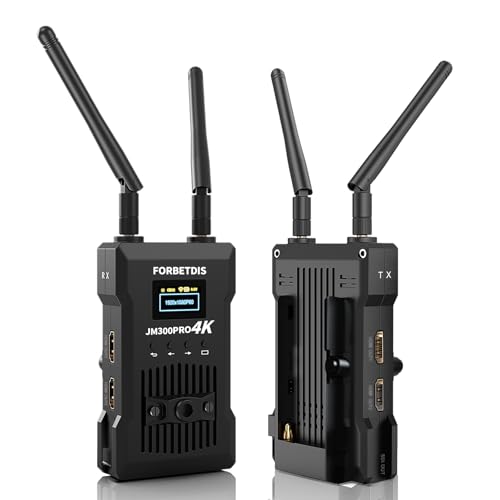
- Supports up to 4K at 30fps
- App monitoring for up to four devices
- One-to-four receiver support and three power options
Best For: 4K studio streaming and flexible display setups
Easy Setup Pick
Compact 1080p Wireless HDMI Kit

- Automatic pairing for straightforward setup
- 1080p streaming with 4K source compatibility
- Compact design with useful included adapters
Best For: Home studios needing simple wireless HDMI monitoring
Long-Range Pro Pick
1080p 60FPS Wireless Video System

- 1080p/60fps transmission with stated 0.06-second latency
- Supports up to four receivers from one transmitter
- OLED screens and HDMI loop-out aid studio workflows
Best For: Streaming and camera setups with multiple displays
Multi-Display Pick
1080p Wireless HDMI System with IR

- Loop-out and dual receiver HDMI outputs support multiple screens
- IR extension enables remote source control
- Offers USB-C, adapter, power-bank, and NP-F battery options
Best For: Multi-screen studios needing flexible monitoring and control
Long-Range 4K Pick – Ogzvhypl S4 Wireless HDMI Kit
For home studios that need flexible placement between a source and display, this wireless HDMI kit combines dual-band transmission, plug-and-play setup, and long-range coverage. It supports 4K decoding, mirroring or extended-screen modes, and compatibility with cameras, computers, projectors, and monitors.
Best For: Home studios prioritizing long range, low latency, and 4K display output.
Pros:
- Advertised 400-foot range with 5.8G and 2.4G dual-band transmission.
- Plug-and-play setup with no Wi-Fi, apps, or Bluetooth required.
- Supports 4K decoding, 10-bit 4:2:2 processing, HDR-oriented signal handling, and stereo or 5.1 audio.
- Offers both mirroring and extended-screen modes.
Cons:
- Actual range can vary with walls and interference.
- The system decodes 4K, but the supplied notes do not specify 4K wireless input or output frame-rate details.
- Its feature set may be more than needed for a basic 1080p studio setup.
Choose this model when display quality and placement flexibility matter more than streaming-specific features. Its supplied accessories, including mini and micro HDMI adapters, also make it adaptable to several source devices.
Live-Streaming Choice – Vrriis WL087 UVC Video System
This Vrriis system stands out among video transmitters for home studios because its receiver provides UVC output for computer-based live streaming. It also includes HDMI loop-out, manual channel selection, 1080p/60Hz support, and flexible power options for cameras or mobile production setups.
Best For: Home studios streaming camera footage through OBS or another computer platform.
Pros:
- UVC output can send received footage to a computer without a separate capture device.
- HDMI loop-out allows local monitoring at the transmitter.
- Offers 20 manually selectable channels with an LCD showing signal and interference information.
- Supports up to 1500 feet line-of-sight in an open, interference-free area and advertises 0.05-second latency.
Cons:
- Walls, metal, brick, and glass can substantially reduce coverage.
- Resolution is limited to Full HD 1080p at 60Hz according to the supplied notes.
- NP-F batteries are supported but not included.
For a streaming-oriented studio, UVC output is the key advantage: it simplifies getting wireless camera video into a computer. The extensive range claim is most applicable to clear line-of-sight installations, while indoor users should plan around obstacles.
Dual-Display Value – EVATEK DT257W-H2 Wireless HDMI Kit
For a home studio or workspace that needs one source shown on two displays, this EVATEK kit includes one transmitter and two receivers. It supports simultaneous viewing on TVs, projectors, or monitors, with plug-and-play operation, dual-band wireless connectivity, and mirror or extend modes.
Best For: Studios that need to distribute one HDMI source to two screens at once.
Pros:
- One transmitter supports two included receivers for simultaneous dual-display use.
- Plug-and-play operation requires no app, Bluetooth pairing, or Wi-Fi connection.
- Supports up to 328 feet of range and latency as low as under 0.2 seconds in suitable conditions.
- Compact, lightweight components are convenient for portable presentations or studio rearrangement.
Cons:
- The supplied notes identify 1080p/60Hz for the secondary display, despite 4K content support for the primary display.
- Obstacles shorten the transmission distance.
- The kit cannot be mixed with other EVATEK devices, including one-to-one units.
This is a practical choice when the main goal is sending the same source to two screens without running long HDMI cables. Confirm that your source provides HDMI output, particularly when working with tablets or phones.
Production Monitoring Pick – SVBONY ST1 Wireless Video System
The SVBONY ST1 is suited to home studios that also handle camera production, monitoring, or live shoots. It combines 4K/30fps transmission, selectable 5.8GHz channels, loop-out, dual HDMI outputs on the receiver, OLED status information, and support for multiple receivers.
Best For: Camera-based home studios needing multi-person monitoring and flexible power.
Pros:
- Advertises 1000-foot line-of-sight range and 0.06-second latency.
- Supports 4K/30fps video and nine selectable 5.8GHz channels.
- One transmitter can support up to four receivers for director, client, or crew monitoring.
- Includes loop-out, dual HDMI receiver outputs, OLED status display, and Type-C, DC, or NP-F power options.
Cons:
- NP-F batteries are not included.
- Adding receivers may reduce open-area range by approximately 50 meters per added receiver.
- The supplied notes do not specify the exact wireless range achievable indoors.
Choose the ST1 if your studio workflow includes cameras and more than one person monitoring the feed. Its display and channel controls are useful during active shoots, while app compatibility adds a phone-monitoring option for Android and iOS users.
Dual-Band Pro Pick – Accsoon CineView SE
For home studios that need dependable camera monitoring, the Accsoon CineView SE stands out among video transmitters for home studios with dual-band 2.4GHz and 5GHz transmission, HDMI and SDI support, and a compact design. It sends 1080p video at up to 60fps with claimed ultra-low latency and supports monitoring on up to four devices.
Best For: Home studios using HDMI or SDI cameras that prioritize stable, low-latency monitoring.
Pros:
- Dual-band transmission is designed to improve stability in areas with interference.
- Supports HDMI and SDI inputs with 1080p video at up to 60fps.
- Claims 0.05-second latency and up to 1,200 feet of range.
- Compact aluminum housing includes a 1.3-inch OLED display and silent cooling.
Cons:
- This listing is for the transmitter only, so a compatible receiver is needed.
- Its feature set may be more than necessary for simple single-screen setups.
The CineView SE is a strong fit when your studio workflow spans professional HDMI and SDI equipment. Its transmitter-only configuration is the main purchase consideration, but the dual-band design and multi-device monitoring make it a flexible upgrade for camera-based production.
All-in-One Monitoring Pick – Wireless HDMI System with 7-inch Monitor
This wireless HDMI system is a practical choice among video transmitters for home studios when built-in monitoring matters. Its receiver includes a 7-inch display, HDMI output, headphone monitoring, and support for up to five receivers, while the transmitter provides HDMI loop out for local viewing.
Best For: Studios that want an integrated receiver monitor and flexible multi-viewer collaboration.
Pros:
- Built-in 7-inch receiver monitor reduces the need for an extra screen.
- Supports 1080p at 60Hz, claimed latency below 0.05 seconds, and up to 1,312 feet line of sight.
- One transmitter can broadcast to as many as five receivers.
- Offers HDMI loop out, IR remote control, and NP-F battery, power-bank, or USB-C power options.
Cons:
- An HDMI cable for connecting the receiver to an external display is not included.
- Smartphone and tablet use requires a Type-C-to-HDMI cable.
The built-in screen makes this system especially convenient for compact studios and small crews. It is also well suited to collaborative shoots, although buyers should budget for any required cables and verify their preferred source-device connections.
Flexible 4K Value Pick – JM300PRO Wireless HD System
The JM300PRO is a versatile option among video transmitters for home studios, supporting up to 4K at 30fps, HDMI loop out, and wireless transmission to multiple receivers. Its app monitoring, three power options, and compatibility with TVs and projectors make it useful for studio presentations, streaming, and large-screen viewing.
Best For: Home studios that need 4K-capable transmission, app monitoring, and flexible battery or wired power.
Pros:
- Supports transmission up to 4K at 30fps with a claimed 0.06-second delay.
- Offers up to 1,000 feet of open-range transmission and monitoring on up to four phones or tablets.
- Supports one transmitter to as many as four receivers.
- Accepts USB-C, 9–16V DC, or L-series batteries for flexible placement.
Cons:
- Transmission distance can decrease as additional receivers are added.
- Batteries are not included.
- The claimed 0.06-second delay may be noticeable for real-time gaming.
The JM300PRO offers a broad feature set for studios that move between cameras, laptops, projectors, and TVs. Its 4K support and power flexibility are attractive, while the receiver-count and latency tradeoffs are worth considering for demanding real-time workflows.
Easy Setup Pick – Compact 1080p Wireless HDMI Kit
For shoppers comparing video transmitters for home studios, this compact wireless HDMI kit emphasizes simple setup and everyday 1080p streaming. It automatically pairs with supported devices, works with laptops, cameras, TVs, monitors, and projectors, and includes adapters for added flexibility.
Best For: Home studios, presentations, and basic wireless monitoring where compact size and plug-and-play operation matter.
Pros:
- Automatic pairing requires no app for basic operation.
- Streams video and audio at up to 1080p, with 4K source compatibility and 1080p output.
- Advertised range reaches 165 feet in open conditions, with shorter coverage around walls and obstacles.
- Includes a USB-C cable, HDMI-to-USB-C cable, and two mini HDMI adapters.
Cons:
- Walls and other obstacles can reduce the effective range to about 50 feet.
- Requires a 5V/2A power connection for stable operation.
- Designed for 1080p output rather than wireless 4K output.
This is a practical choice for a streamlined studio setup that prioritizes convenience over advanced production features. Its small form factor and broad HDMI compatibility make it easier to move between workstations, displays, and presentation spaces.
Long-Range Pro Pick – 1080p 60FPS Wireless Video System
Among video transmitters for home studios, this TIMBOOTECH system stands out for its long claimed range, low stated latency, and production-friendly controls. OLED screens, HDMI loop-out, camera mounting points, and support for up to four receivers make it suited to more involved multi-display or shooting setups.
Best For: Home studios, live streaming, camera work, and multi-room monitoring that benefit from loop-out and multiple receivers.
Pros:
- Supports 1080p at 60 fps with a stated 0.06-second latency.
- Advertised range reaches up to 1,000 feet in suitable conditions.
- One transmitter can connect with up to four receivers.
- OLED displays show connection status, channel, image settings, and other information.
Cons:
- 12V power adapter, NP-F batteries, and other power accessories are not included where noted.
- The built-in cooling fan adds another active component to the setup.
- Actual range and stability can vary with walls and wireless interference.
The system is a stronger fit for creators who need more visibility and expansion than a basic wireless HDMI pair provides. Its loop-out and receiver support can simplify multi-screen studio workflows, while the flexible power options accommodate camera-oriented use.
Multi-Display Pick – 1080p Wireless HDMI System with IR
This Vrriis system is one of the more flexible video transmitters for home studios when local monitoring and remote source control are priorities. It combines 1080p/60Hz transmission with transmitter loop-out, dual HDMI output on the receiver, IR support, and several power options.
Best For: Studios that need simultaneous monitoring, remote HDMI-source control, or flexible battery-powered placement.
Pros:
- Supports up to 1080p at 60Hz with a stated 0.05-second latency.
- Transmitter loop-out enables a local monitor, while the receiver can connect two screens.
- IR extension lets users control the HDMI source from the receiver location.
- Supports USB-C, adapters, portable power banks, and NP-F-series batteries.
Cons:
- Batteries are not included.
- The advertised 1,300-foot range applies to open, interference-free conditions; walls and materials can reduce coverage.
- Adding more receivers can reduce the transmission distance.
For a home studio with multiple viewing points, this kit offers useful routing and control features without requiring a direct HDMI run to every display. It is especially compelling when battery operation, local preview, and remote source control are part of the workflow.
How We Picked the Best Video Transmitters for Home Studios
We focused on the specifications that matter during real studio use: supported resolution and frame rate, stated transmission range, latency, wireless-band design, input and output ports, receiver count, loop-through capability, and setup simplicity. We also considered whether each system suits a fixed desk, a camera-based studio, live streaming, or multi-screen monitoring.
Range figures are typically measured in open conditions, so walls, crowded Wi-Fi environments, and nearby electronics can reduce performance. A transmitter that offers a shorter but stable connection may be more useful than one with an optimistic maximum range.
Quick Comparison
| Studio need | Look for | Best fit among these types |
|---|---|---|
| Basic monitor or projector link | Plug-and-play HDMI, 1080p support, low latency | Compact single-transmitter kits |
| Multiple displays | Two or more receivers, synchronized output | Dual-display or multi-receiver systems |
| Live production | UVC output, channel selection, dependable monitoring | UVC or professional wireless video systems |
| Camera-to-monitor work | 4K handling, 60fps support, strong line-of-sight range | Camera-focused 4K or low-latency transmitters |
Key Buying Factors for Video Transmitters for Home Studios
Resolution, Frame Rate, and Compatibility
Check both the source and display requirements. A product may advertise 4K decoding while accepting or transmitting only 1080p. For smooth camera monitoring, confirm 1080p at 60fps if your camera supports it. Also verify HDMI version, HDCP behavior, and whether the transmitter works with your computer, camera, capture device, or projector.
Latency and Signal Reliability
Low latency matters for livestreaming, gaming, presenter monitoring, and camera operation. Published figures are useful for comparison, but interference and distance can increase delay or cause dropouts. Dual-band operation, manual channel selection, clear status displays, and external antennas can help in busy wireless environments.
Ports and Workflow Features
HDMI loop-out lets you keep a wired monitor connected while transmitting to another display. UVC output can allow a computer to recognize the receiver as a video source, reducing the need for a separate capture device. IR pass-through, audio support, and multiple receivers are valuable only if they match your equipment and workflow.
Power and Placement
Confirm whether the units use USB power, wall adapters, batteries, or a combination. Keep antennas unobstructed and place the transmitter and receiver where they have the clearest practical path. For a permanent studio, include cable reach and mounting space in your setup plan.
Who Should Buy Which Video Transmitters for Home Studios?
Choose a compact 1080p kit if you need an affordable way to send a computer or camera feed to one nearby monitor or projector. Choose a dual-receiver system when the same source must appear on two screens. Choose a UVC-enabled model for streaming workflows that need direct computer video input. Choose a 4K-capable system when your source and display chain genuinely require higher resolution; otherwise, a dependable 1080p transmitter may provide better value. For demanding camera or live-production work, prioritize tested latency, channel control, loop-out, and connection stability over maximum advertised range.