A good desktop subwoofer can add weight and depth to music, games, movies, and creative work without requiring a full-size home theater system. The right model depends on your desk space, speaker connections, listening distance, and preferred bass level.
We’ve gathered 10 options ranging from compact multimedia systems to powered studio and home-audio subwoofers, making it easier to match low-end performance with your setup and budget.
Best 10 Subwoofers for Desktop Setups Picks for 2026
Compact Desktop Bass

- 5.24-inch long-throw woofer
- 60-watt active Class D design
- Vibration pads for shelf placement
Best For: Desktop gaming and compact computer audio
High-Power Desktop Bass
Audioengine S8 Powered Subwoofer
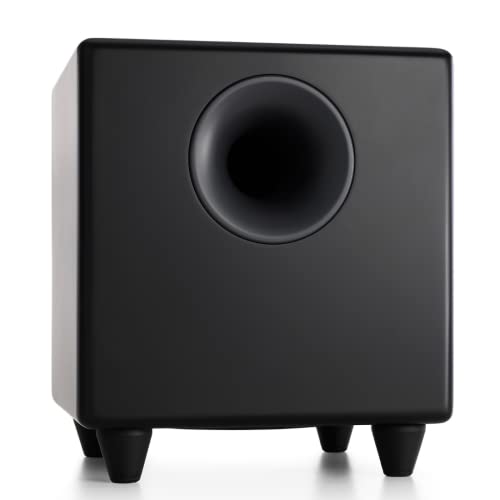
- 250 watts of maximum output
- 8-inch woofer with 27Hz response
- Down-firing design and W3 adapter compatibility
Best For: High-output desktop, gaming, and home theater audio
Studio Monitor Expansion
Mackie CR8SBT Studio Subwoofer

- TRS, RCA, and Bluetooth inputs
- Adjustable crossover for monitor blending
- Desktop remote with sub bypass
Best For: CR Series monitors and desktop studio systems
Adjustable Deep Bass
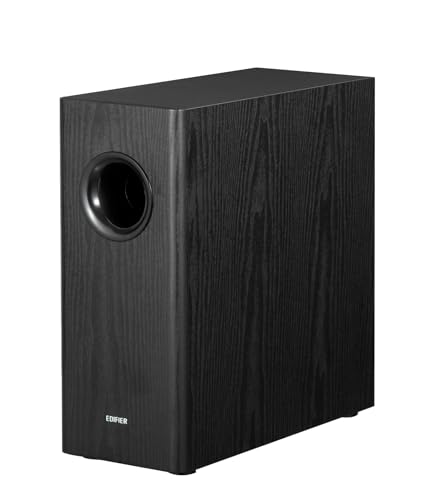
- 8-inch woofer with 70W RMS
- 35Hz response and adjustable low-pass filter
- RCA cables and auto-standby included
Best For: RCA-equipped desktop and bookshelf speaker systems
Powerful Desktop 2.1 Pick

- 62W peak, 30W RMS 2.1 output
- 5.25-inch down-firing subwoofer
- Convenient wired control pod
Best For: Bass-forward desktop audio for music, movies, and gaming
Simple USB-Powered Choice
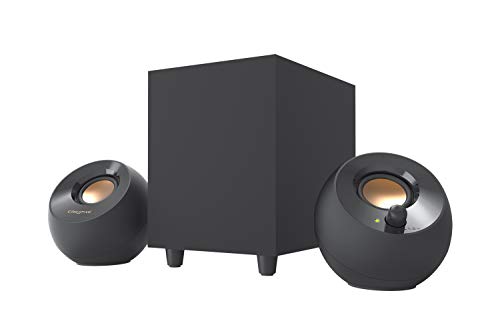
- USB-powered with 3.5mm AUX input
- 4-inch down-firing ported subwoofer
- 45-degree elevated desktop drivers
Best For: Small desks and laptops needing convenient bass
Studio-Grade Bass Upgrade

- 8-inch driver with 100W power
- Bass response reaches down to 30 Hz
- Bluetooth 5.0 and flexible wired inputs
Best For: Music production and refined multimedia listening
Compact Power Pick

- 6-inch front-firing driver
- 210W maximum output
- Compact wired RCA/AUX design
Best For: Desktop users seeking powerful bass in a compact enclosure
Budget Desktop 2.1 Pick
OROW S211 USB-Powered Speakers

- Complete 2.1 speaker system
- USB-powered for simple placement
- 16W output with wooden cabinets
Best For: Everyday computer audio in small spaces
Connectivity Upgrade Pick
BESTISAN SW65D Powered Subwoofer
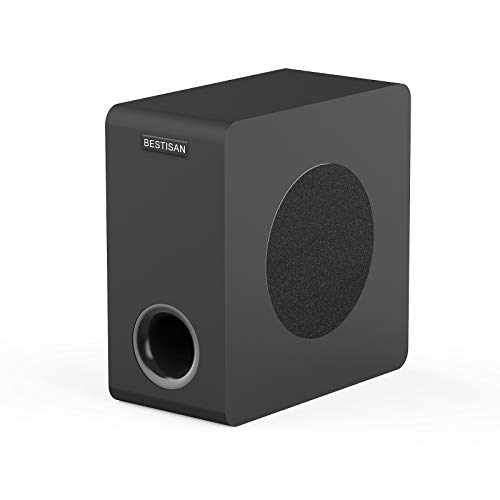
- 6.5-inch side-firing woofer
- RCA, AUX, LFE, and high-level inputs
- 100W maximum output with remote
Best For: Flexible desktop and small-room audio systems
Compact Desktop Bass – Ortizan V8 Active Subwoofer
For shoppers seeking subwoofers for desktop setups, the Ortizan V8 is a compact active option with a 5.24-inch long-throw woofer, 60 watts of maximum output, and a built-in Class D amplifier. Its vibration pads are designed for shelf-mounted desktop use.
Best For: Desktop gaming, computer audio, and smaller studio listening spaces where a compact subwoofer is useful.
Pros:
- Compact active design with a built-in amplifier
- 5.24-inch long-throw woofer for added bass extension
- Vibration pads support shelf placement
- Bluetooth connectivity is listed in the specifications
Cons:
- Its 60-watt maximum output is lower than the larger models in this roundup
- The approximately 11-by-8.5-by-8.5-inch footprint still requires dedicated desk or shelf space
The Ortizan V8 is a practical fit when you want a straightforward, compact bass upgrade for a desktop or gaming system without moving to a larger 8-inch subwoofer.
High-Power Desktop Bass – Audioengine S8 Powered Subwoofer
The Audioengine S8 is one of the more powerful subwoofers for desktop setups, pairing an 8-inch woofer with 250 watts of output. Its down-firing design is intended to produce deep bass, while the compact subwoofer format allows flexible positioning near a desk or home audio system.
Best For: Desktop and laptop systems, home theaters, gaming, and listeners who want substantial bass output.
Pros:
- 250 watts of maximum output for robust bass
- 8-inch woofer with a listed 27Hz frequency response
- Down-firing design supports deep, resonant bass
- Compatible with the Audioengine W3 wireless subwoofer adapter kit
Cons:
- At 30 pounds, it is considerably heavier than the compact options
- Wired RCA connectivity is standard; wireless operation requires the separate W3 adapter kit
- Its roughly 11.3-inch cube footprint may be substantial for a crowded desk area
The S8 makes the most sense when bass impact matters more than minimal size. Its high output and 8-inch driver suit a desktop system that also serves as a home theater or music setup.
Studio Monitor Expansion – Mackie CR8SBT Studio Subwoofer
The Mackie CR8SBT is designed specifically to add low-end extension to CR Series monitors. For subwoofers for desktop setups, it offers TRS and RCA connections, built-in Bluetooth, an adjustable crossover, and a desktop remote for convenient volume and bypass control.
Best For: CR Series monitor owners, desktop music production, and users who want remote control over a 2.1 speaker system.
Pros:
- Designed to integrate with Mackie CR Series monitors
- TRS, RCA, and Bluetooth connectivity provide flexible input options
- Adjustable crossover helps blend bass with the main monitors
- Includes a desktop volume control with subwoofer bypass
Cons:
- Its approximately 16.2-inch width makes it less suitable for very small desks
- At 32.4 pounds, it is the heaviest model in this selection
- Its listed frequency response starts at 40Hz, higher than some alternatives here
The CR8SBT is a strong choice for a desktop monitoring setup when integration and hands-on control are priorities. It is less compelling for users who need the smallest possible enclosure.
Adjustable Deep Bass – Edifier T5s Powered Subwoofer
The Edifier T5s combines an 8-inch long-throw woofer with 70 watts RMS, a 35Hz frequency response, and controls for low-pass filtering and phase. It is a flexible pick among subwoofers for desktop setups, especially when the speakers or amplifier provide RCA connections.
Best For: Desktop and bookshelf speaker systems needing adjustable bass integration through RCA or a subwoofer output.
Pros:
- 8-inch woofer with 70 watts RMS from a Class D amplifier
- 35Hz deep-bass response for fuller low-end sound
- Adjustable 30Hz–160Hz low-pass filter and 0°/180° phase selector
- Auto-standby and included 3.5mm-to-RCA and RCA cables simplify setup
Cons:
- Connectivity is wired RCA with no wireless communication
- The enclosure is approximately 15.7 inches deep and 16.1 inches high
- Series connection without a subwoofer output requires main speakers with LINE IN
The T5s offers useful tuning controls and broad speaker compatibility, but its taller enclosure and wired-only design should be considered before placing it beside a compact desktop system.
Powerful Desktop 2.1 Pick – Cyber Acoustics CA-3610
If you want subwoofers for desktop setups that add substantial bass without taking over your workspace, the Cyber Acoustics CA-3610 is a practical 2.1 speaker system. It combines 62 watts peak power with a compact down-firing subwoofer and a wired control pod for convenient adjustments.
Best For: Desktop users who want strong bass for music, movies, gaming, and other 3.5mm-compatible devices.
Pros:
- 5.25-inch down-firing subwoofer delivers deep bass.
- 62 watts peak power and 30 watts RMS provide robust output.
- Control pod includes volume, bass, auxiliary input, and headphone controls.
- Compact subwoofer fits under most desks.
Cons:
- Uses wired connectivity rather than Bluetooth.
- Requires AC power.
The CA-3610 is a well-rounded choice when you want an all-in-one desktop speaker system with more low-end impact than typical compact computer speakers.
Simple USB-Powered Choice – Creative Pebble Plus
For compact subwoofers for desktop setups, the Creative Pebble Plus keeps the arrangement simple with USB power, 3.5mm audio, and a standalone 4-inch down-firing subwoofer. Its angled satellite speakers and front volume controls suit small computer desks.
Best For: Laptop and desktop users who want easy USB-powered audio with a separate bass module.
Pros:
- USB-powered design avoids the need for a wall socket.
- 4-inch ported down-firing subwoofer adds depth.
- 45-degree elevated drivers aim sound toward the listener.
- High Gain Mode raises output to 8W RMS with a 5V 2A USB adapter.
Cons:
- The 5V 2A adapter for High Gain Mode is not included.
- Lower total output than larger desktop speaker systems.
- Audio connection is through a wired 3.5mm AUX cable.
The Pebble Plus is a space-conscious option for everyday computer listening, especially when USB convenience matters more than maximum volume.
Studio-Grade Bass Upgrade – PreSonus Eris Sub 8BT
The PreSonus Eris Sub 8BT is a more advanced option among subwoofers for desktop setups, pairing an 8-inch front-firing driver with 100 watts of power and response down to 30 Hz. It is designed for accurate low frequencies, with Bluetooth, balanced, RCA, and auxiliary connections.
Best For: Music producers, hi-fi listeners, and gamers who need adjustable, extended bass alongside compatible monitors or audio equipment.
Pros:
- 8-inch driver and 100 watts of power deliver substantial low-end output.
- Reaches down to 30 Hz for extended bass response.
- Bluetooth 5.0 complements balanced TRS, RCA, and front-panel auxiliary inputs.
- Highpass, lowpass, and room-tuning controls help integrate the subwoofer.
Cons:
- Larger and more specialized than typical computer speaker systems.
- Best suited to setups with compatible monitors or audio connections.
- Its floor-standing design may require more desk or room space.
The Eris Sub 8BT makes the most sense when bass accuracy, connectivity, and crossover control are priorities rather than simple plug-and-play desktop convenience.
Compact Power Pick – Audioengine S6 Mini Subwoofer
The Audioengine S6 is a strong choice for desktop setups that need fuller, deeper bass without a large enclosure. Its 6-inch front-firing driver, 210-watt maximum output, and wired auxiliary/RCA connectivity make it suitable for music, gaming, and movie audio.
Best For: Desktop users who want powerful bass in a compact, premium-feeling subwoofer.
Pros:
- Compact 9.92-by-8.74-by-9.96-inch footprint for easier placement.
- Front-firing 6-inch driver with a listed 33 Hz frequency response.
- Supports auxiliary and RCA connections, with optional Audioengine W3 wireless-adapter compatibility.
- Includes a three-year warranty.
Cons:
- Uses a corded power source and wired subwoofer connection.
- At 15.4 pounds, it is heavier than many small desktop speakers.
- The supplied specifications include inconsistent driver-size entries, so verify fit before ordering.
The S6 stands out when bass impact matters more than ultra-minimal size. It is especially appealing for a desktop or compact home-theater system with RCA or auxiliary output.
Budget Desktop 2.1 Pick – OROW S211 USB-Powered Speakers
The OROW S211 is a practical all-in-one option for subwoofers for desktop setups, combining two satellite speakers with a compact subwoofer. USB power, 3.5mm audio input, and a 16-watt system make it convenient for computers, laptops, gaming consoles, and other small-room listening applications.
Best For: Budget-conscious desktop users who want a complete 2.1 speaker system with USB power.
Pros:
- Complete 2.1 setup includes a subwoofer and two small speakers.
- USB-powered design avoids requiring a dedicated AC outlet.
- 9 mm wooden enclosures are designed to reduce unwanted noise and resonance.
- Compact subwoofer can fit under a desk or bed.
Cons:
- 16 watts of maximum system power is intended for smaller spaces rather than room-filling sound.
- Connectivity is more limited than larger home-audio subwoofers.
- The supplied specifications list a 100 Hz frequency response, so it may not deliver the deepest bass.
The S211 prioritizes convenience and value over high output. It is a sensible pick for everyday computer audio when you want more bass than typical built-in monitor or laptop speakers provide.
Connectivity Upgrade Pick – BESTISAN SW65D Powered Subwoofer
The BESTISAN SW65D suits desktop setups that connect to a broader audio system and need flexible input options. Its 6.5-inch side-firing woofer, bass-reflex cabinet, and RCA, AUX, LFE, and high-level speaker connections support computers, TVs, soundbars, receivers, and bookshelf speakers.
Best For: Desktop or small-room systems that need versatile connections and stronger low-frequency extension.
Pros:
- 6.5-inch side-firing woofer with a stated 35–200 Hz response range.
- Offers RCA, 3.5mm AUX, LFE, and high-level speaker inputs and outputs.
- Wooden bass-reflex enclosure includes internal bracing to help reduce resonance.
- Remote control and 100-watt maximum output add setup flexibility.
Cons:
- Its 12.5-by-6.3-by-12.6-inch enclosure takes more space than a mini desktop subwoofer.
- It requires a corded connection and compatible audio cabling.
- The manufacturer recommends source devices outputting no more than 850 mV for stable operation.
The SW65D is the most adaptable choice here for a mixed desktop and home-audio setup. Choose it when connection flexibility and deeper bass matter more than having the smallest possible cabinet.
How We Picked the Best Subwoofers for Desktop Setups
We focused on models that suit nearfield listening and small-room use, prioritizing practical connectivity, enclosure size, amplifier power, woofer design, and setup flexibility. The lineup includes standalone powered subwoofers as well as complete 2.1 speaker systems for desktops without separate powered monitors.
We also considered useful features such as Bluetooth, wireless readiness, USB power, remote controls, adjustable crossover controls, and vibration-reducing feet. Because desktop audio needs vary widely, the selection covers budget-friendly multimedia speakers, compact bass modules, and larger studio-oriented subwoofers.
Quick Comparison
| Best For | What to Look For |
|---|---|
| Small desks | Compact enclosure, down-firing or front-firing driver, and low-volume clarity |
| Music and movies | Powered 6- or 8-inch woofer with useful crossover control |
| Gaming | Strong impact, simple connections, and a convenient volume control |
| Studio monitors | Balanced response, monitor-friendly inputs, and adjustable integration |
| Basic computer audio | Complete 2.1 system with USB or 3.5mm connectivity |
Key Buying Factors for Subwoofers for Desktop Setups
Size and Placement
Measure the space beneath or beside your desk before buying. An 8-inch subwoofer can deliver deeper, more authoritative bass, but a compact 5- or 6.5-inch model may integrate more easily in a confined workspace. Keep the subwoofer stable and avoid blocking vents or placing it directly against a rattling wall or cabinet.
Power and Bass Extension
Higher amplifier ratings do not automatically guarantee better sound, but they can provide more headroom at louder levels. Look for a subwoofer with a published low-frequency range and enough output for your room. Desktop listeners generally benefit more from controlled, clean bass than maximum volume.
Connectivity and Controls
Check whether your computer, DAC, monitor controller, or speakers use 3.5mm, RCA, USB, Bluetooth, or studio-style connections. Adjustable crossover and phase controls make it easier to blend the subwoofer with small satellite speakers. A remote or separate level control is useful when switching between music, games, and late-night listening.
Standalone Subwoofer or Complete System
A standalone powered subwoofer is best when you already own powered speakers or studio monitors. A 2.1 package is simpler for a new desktop setup and usually includes satellites, cables, and basic volume controls in one box.
Who Should Buy Which Subwoofers for Desktop Setups?
- Choose a compact model if desk space is limited or you mainly want fuller background music and improved dialogue.
- Choose an 8-inch powered subwoofer if you watch movies, play games, or listen to bass-heavy music at moderate to high levels.
- Choose a studio-oriented subwoofer if you use nearfield monitors and want more controlled low-frequency monitoring.
- Choose a 2.1 multimedia system if you need an affordable, straightforward computer audio upgrade with minimal setup.
- Choose wireless-ready connectivity if you want a cleaner desktop or plan to use the subwoofer with multiple audio sources.
Before purchasing, confirm compatibility with your existing speakers and leave room for sensible placement. Proper crossover adjustment and moderate volume often improve desktop bass more than simply choosing the largest available driver.