Samplers can turn a simple idea into a full track fast, but the best choice depends on how you record, perform, and edit.
This roundup highlights 10 strong options for different setups, from pocket-sized beat tools to multitrack studio systems and software-based workflows.
Best 10 Samplers for Recording Picks for 2026
Portable Micro Sampler
teenage engineering PO-33 K.O.! micro sampler and drum machine

- Built-in mic and 3.5 mm line in for sampling
- 40-second sample memory with melodic and drum slots
- 16 onboard effects plus speaker/headphone playback
Best For: Mobile beatmakers who want a pocket-sized sampler for fast recording
Pad Sampler Controller
Akai Professional MPX8 USB MIDI Sample Pad Controller

- Loads 16-bit mono WAV samples from SD or SDHC cards
- Eight velocity-sensitive pads with MIDI control
- Kit editor adds tuning and reverb adjustments
Best For: Producers who want a compact pad controller for existing recorded samples
Reggae Rhythm Sampler
teenage engineering EP-40 riddim reggae sampler and sequencer

- Synced loops and eight remixable tracks
- 400+ handcrafted sounds with reggae library
- Bass/lead synths and dub siren included
Best For: Reggae and dub producers who want a style-focused sampler and sequencer
Standalone Production Center
Akai Professional MPC Live III Portable Music Production Center
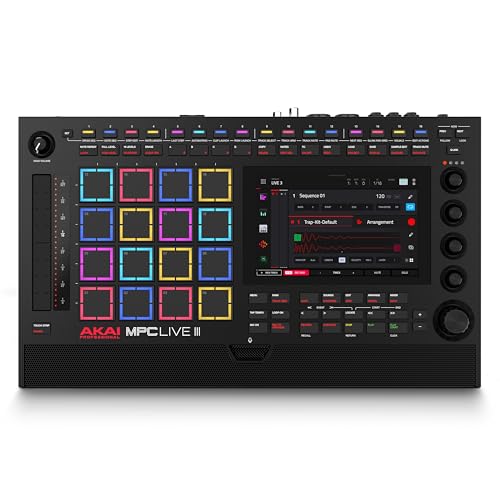
- Standalone recording, mixing, and performance without a computer
- Integrated mic, stereo monitors, and rechargeable battery
- 128GB internal storage with SD or SSD expansion
Best For: Producers needing a full standalone system for recording and beat-making
Portable Multitrack Recording Hub
Zoom R24 Multi-Track Tabletop Recorder

- Built-in stereo condenser mics
- 8 XLR combo inputs, 24-track recording
- USB interface for major DAWs
Best For: Recordists who need sampling plus multitrack production
Software-Based Music Mixer
MixPad Free Multitrack Recording Studio

- Free multitrack recording software
- Effects tools with Effect Chain
- Beat Maker and Midi Creator included
Best For: Users who want free software for mixing recorded audio
Performance Sampling Console

- Four stereo tracks with capture and overdub
- Granular, filter, color, and space processing
- Scenes, macros, and modulators for performance
Best For: Performers and sound designers
Portable Starter Studio
PreSonus AudioBox Go Creator Complete Studio Bundle

- 24-bit/96 kHz USB-C interface
- Includes mic, headphones, and DAW software
- Compact 2-channel recording bundle
Best For: Beginners and mobile creators who want an all-in-one recording kit
Pad-Based Loop Triggering
PreSonus ATOM Production & Performance Midi Pad Controller

- 16 RGB velocity- and pressure-sensitive pads
- Tight integration with Studio One and Ableton Live Lite
- Built for triggering samples, loops, and virtual instruments
Best For: Beat makers and performers who want tactile sample and loop control
Complete Home Recording Pack
PreSonus AudioBox USB 96 25th Anniversary Studio Recording Package

- Includes interface, mic, headphones, cables, and stand
- Studio One Artist and Studio Magic software included
- 2-channel USB interface for vocals and instruments
Best For: Home recordists who want an all-in-one starter studio
Portable Micro Sampler – teenage engineering PO-33 K.O.! micro sampler and drum machine
If you want samplers for recording that fit in a pocket, the PO-33 K.O.! is built for quick capture and sketching ideas anywhere. It can sample from the built-in microphone or a 3.5 mm line in, then lets you sequence those sounds, add effects, and monitor through the built-in speaker or headphones.
Best For: Mobile beatmakers and creators who want a tiny, battery-powered sampler for grabbing sounds fast.
Pros:
- Built-in microphone plus 3.5 mm line in for sampling different sound sources
- 40-second sample memory with 8 melodic slots and 8 drum slots
- 16 onboard effects for shaping and tweaking recordings
- Built-in speaker and headphone output for easy playback
Cons:
- Very limited sample memory compared with larger production units
- Compact format may feel restrictive for longer recording sessions
- Best suited to quick ideas rather than full-scale studio work
Overall, this is a practical pick if portability matters more than deep editing. It keeps the recording workflow simple, immediate, and fun for capturing sounds on the go.
Pad Sampler Controller – Akai Professional MPX8 USB MIDI Sample Pad Controller
For samplers for recording that are more about triggering and organizing sounds than capturing audio directly, the MPX8 is a straightforward pad controller. It loads 16-bit mono WAV samples from an SD or SDHC card, then gives you eight velocity-sensitive pads, MIDI control, and sample editing tools for live use or studio prep.
Best For: Players who already have recorded samples and want a simple pad-based controller for triggering them.
Pros:
- Loads 16-bit mono WAV samples from SD or SDHC cards up to 32 GB
- Eight backlit velocity- and pressure-sensitive pads for performance triggering
- USB MIDI plus standard MIDI in/out for broad connectivity
- Sample kit editor with tuning and reverb controls for quick customization
Cons:
- Does not record audio directly into the unit
- Internal playback is limited to loaded WAV samples
- Pad pressure affects MIDI output, not internal sample playback
The MPX8 makes sense if your workflow starts with samples you’ve already recorded elsewhere. It’s compact, easy to connect, and designed to put those samples under your fingers fast.
Reggae Rhythm Sampler – teenage engineering EP-40 riddim reggae sampler and sequencer
If you’re looking at samplers for recording with a style-specific workflow, the EP-40 RIDDIM is centered on reggae and dub production. It combines synced loops, bass and lead synths, a reggae sound library, a dub siren, and eight remixable tracks into a rhythm system built for fast idea building.
Best For: Producers who want a reggae-focused sampler and sequencer with built-in sounds and looping tools.
Pros:
- Includes synced loops and eight remixable tracks
- Comes with 400+ handcrafted sounds and a reggae sound library
- Built-in bass and lead synths plus dub siren expand arrangement options
Cons:
- Genre-specific focus may be less flexible for non-reggae workflows
- No detailed recording specs are provided in the supplied notes
- Best fit is more creative sequencing than general-purpose sampling
This is a strong choice if you want a sampler that immediately pushes you toward a specific sound. It’s less of a blank canvas and more of a ready-made reggae rhythm environment.
Standalone Production Center – Akai Professional MPC Live III Portable Music Production Center
For serious samplers for recording, the MPC Live III is the most complete standalone option in this group. It lets you produce, record, mix, and perform without a computer, and it adds an integrated mic, stereo monitors, a rechargeable battery, and large internal storage for building and managing sample-heavy projects.
Best For: Producers who want a fully standalone sampler and production system for recording anywhere.
Pros:
- Standalone workflow with no computer required
- Integrated mic, stereo monitors, and rechargeable battery for portable recording
- 8-core processor, 8GB RAM, and MPC3 OS for fast production
- 128GB internal storage with SD or SSD expansion for large sample libraries
Cons:
- Much larger and more complex than pocket-sized samplers
- Likely overkill if you only need basic sample capture
- Premium feature set is aimed at full production workflows
If you need one machine to handle recording, sequencing, and performance, this is the most capable pick here. It’s designed to cover the whole workflow rather than just one part of it.
Portable Multitrack Recording Hub – Zoom R24 Multi-Track Tabletop Recorder
If you want samplers for recording that can also handle full sessions, the Zoom R24 blends sampling, multitrack capture, and USB interface duties in one tabletop unit. It is built for recording sound effects, speeches, dialog, voiceovers, and music, with built-in stereo condenser microphones and XLR combo inputs for more flexible source capture.
Best For: Creators who need a compact recorder for sketching ideas, capturing dialogue or effects, and overdubbing into a multitrack workflow.
Pros:
- Built-in high-sensitivity stereo condenser mics for quick sound capture
- 8 XLR combo inputs and 24-track recording for larger sessions
- USB audio interface support for DAW use on Windows, macOS, and Linux
- Can record scratch tracks and overdub voiceovers in post-production
Cons:
- Designed around tabletop use rather than a handheld sampling workflow
- SD/SDHC card support is limited to cards up to 32 GB
The R24 is a practical choice if your recording needs go beyond simple sampling and into full project capture. Its built-in mics, phantom power, and multitrack structure make it especially useful when you need one device to handle both sampling and production tasks.
Software-Based Music Mixer – MixPad Free Multitrack Recording Studio
MixPad is a free multitrack recording studio and mixer for users who want samplers for recording inside a software-first workflow. It lets you build mixes with audio, music, and voice tracks, then shape them with editing tools, effects, and integrated NCH multimedia applications.
Best For: Budget-minded users who want free multitrack recording and editing software for mixing samples, voice, and music.
Pros:
- Create mixes with audio, music, and voice tracks
- Includes effects tools plus Effect Chain for stacking multiple effects
- Beat Maker and Midi Creator expand production options
- Bookmarks help you work more efficiently during editing
Cons:
- Software only, so it does not include recording hardware
- Best suited to users comfortable working inside a DAW-style environment
MixPad is a straightforward pick if you already have an audio interface or recorder and just need software to arrange and mix recorded material. Its free price point and built-in editing tools make it a low-risk way to start working with sampled audio.
Performance Sampling Console – S4 Sculpting Sampler
The S4 is a dedicated option for samplers for recording when you want real-time capture and deep sound-shaping in one instrument. It offers four parallel stereo tracks and a Material section that supports internal samples, real-time recording, overdub, sound-on-sound loops, varispeed recording, and external audio processing.
Best For: Performers and sound designers who want a hands-on sampler for recording, granular processing, and evolving textures.
Pros:
- Four stereo tracks with independent signal chains
- Real-time recording, overdub, and sound-on-sound loop options
- Granular, filter, color, and space processing for detailed shaping
- Scenes, macros, and modulators support performance-focused control
Cons:
- Highly specialized design may be more than casual users need
- Best used by people comfortable with layered sound design tools
The S4 stands out when recording is only the starting point and you want to transform audio into textures and performance material. Its combination of sampling, modulation, and onboard effects makes it better suited to experimental workflows than simple capture.
Portable Starter Studio – PreSonus AudioBox Go Creator Complete Studio Bundle
If you want samplers for recording setup support in a compact package, this PreSonus bundle gives you the core pieces to track vocals, instruments, and ideas on the go. The AudioBox GO interface is USB-C powered, works with popular DAWs, and the included mic and headphones make it easy to start recording right away.
Best For: Beginners, mobile creators, and anyone who wants a small recording bundle with software included.
Pros:
- Includes a 24-bit/96 kHz AudioBox GO interface for portable recording.
- Comes with an M7 condenser microphone and HD7 monitoring headphones.
- Studio One 6 Artist is included, along with broad DAW compatibility.
- Very compact and lightweight for mobile setups.
Cons:
- Only 2 channels, so it is not built for larger multi-input sessions.
- More of a starter studio bundle than a specialized sampler workflow tool.
Overall, this is a practical all-in-one recording bundle for people who want to plug in and start making tracks quickly. It covers the basics well without taking up much space, which makes it a strong entry point for home and portable production.
Pad-Based Loop Triggering – PreSonus ATOM Production & Performance Midi Pad Controller
For samplers for recording workflows, the PreSonus ATOM is a focused pad controller for triggering samples, loops, and virtual instruments. Its 16 RGB velocity-sensitive pads, pad banks, and deep software integration make it a strong fit for beat-making and hands-on performance.
Best For: Beat makers, live performers, and producers who want tactile sample triggering and DAW control.
Pros:
- 16 full-size velocity- and pressure-sensitive RGB pads.
- Works tightly with Studio One Artist and Ableton Live Lite.
- Includes 20 assignable buttons and 4 endless rotary encoders.
- Supports loops, effects, virtual instruments, and MIDI editing workflows.
Cons:
- It is a controller, so it does not record audio by itself.
- Best results depend on compatible music production software.
This is a strong choice if your recording setup centers on pad performance and sample triggering rather than traditional audio capture. It gives you a lot of expressive control in a compact footprint, especially for users working in supported DAWs.
Complete Home Recording Pack – PreSonus AudioBox USB 96 25th Anniversary Studio Recording Package
If you’re shopping for samplers for recording and want a full home-studio bundle, this package covers the essentials in one purchase. You get the AudioBox USB 96 interface, an M7 condenser mic, HD7 headphones, cables, a desktop mic stand, and Studio One Artist software.
Best For: Home recordists who want a complete beginner-friendly package for vocals and instruments.
Pros:
- Includes a rugged 2-channel AudioBox USB 96 interface.
- Comes with an M7 condenser microphone and HD7 monitoring headphones.
- Studio One Artist and Studio Magic are included.
- All required cables and a desktop mic stand are bundled in.
Cons:
- Only 2 channels, so it is limited for larger recording sessions.
- Better suited to basic home recording than advanced multi-source setups.
This bundle is a straightforward way to build a recording setup without piecing together separate gear. It is especially appealing if you want the interface, mic, monitoring, and software to arrive together and work as a simple starting point.
How We Picked These Samplers for Recording
We focused on practical features that matter in real recording sessions: sound capture quality, workflow speed, portability, connectivity, software support, and whether the unit is better for sketching ideas or building complete productions. We also favored gear that fits different budgets and skill levels, since Samplers for Recording can range from simple pad controllers to all-in-one production stations.
Quick Comparison
Some picks are built for fast live sampling and hands-on performance, while others are better as recording hubs or entry points into a DAW-based studio. If you want mobility, compact samplers and pad controllers make sense. If you need to track multiple sources, look for interfaces or tabletop recorders with more inputs and deeper routing. For computer-first workflows, software bundles can be the most cost-effective way to start.
Key Buying Factors for Samplers for Recording
Input Options and Recording Flexibility
Check whether the sampler has a built-in mic, line input, XLR combo inputs, or USB audio capability. More input options usually mean more ways to capture vocals, instruments, and external gear without extra adapters.
Workflow and Editing Depth
Some units are designed for quick triggering and looping, while others offer multitrack recording, sequencing, slicing, granular processing, or detailed sample editing. Choose the level of control that matches your process. If you mainly want to capture ideas quickly, a simpler sampler may be enough; if you plan to arrange full songs, deeper editing tools matter more.
Portability and Power
Portable samplers are ideal for traveling, live sets, and field recording. Desktop and tabletop models usually provide more connectivity and track count, but they trade off mobility. Think about where you will actually record most often.
Software Compatibility
Many modern Samplers for Recording work best when paired with a DAW or included software. Bundled programs can shorten the learning curve and expand your editing and mixing options, especially if you are starting from scratch.
Controller Versus Standalone System
Pad controllers are great if you already use software and want tactile triggering. Standalone grooveboxes and production centers suit creators who want to work without a computer. Neither is universally better; the right choice depends on whether you prioritize hardware independence or software integration.
Who Should Buy Which Samplers for Recording?
Choose a compact sampler if you want portability and fast sketching. Go with a multitrack recorder or interface bundle if your goal is clean capture for vocals, instruments, and demos. Pick a production center or advanced performance sampler if you want more sequencing, arrangement, and live-control features. If you are just getting started, software-based options can be the easiest and most affordable entry into sampling and recording.
In short, the best Samplers for Recording are the ones that match your workflow, input needs, and space constraints. Start with how you create, then choose the tool that makes recording feel quicker, simpler, and more inspiring.